Appearance
Function Calling
本文介绍在AI应用开发中,什么是Function Calling(主要以Gemini API 为例)。
1. 概述
Function Calling(或者称为 Tool Calling),是让LLM有了执行能力。也就是说,有了工具,LLM就可以通过调用工具,有了获取最新消息、执行操作等能力。工具主要有以下使用场景:
- 知识增强:LLM可以通过工具,查询数据库、向量数据库或调用API,获取最新信息或私有数据;
- 能力扩展:LLM擅长逻辑推理,但不擅长精确数学计算和渲染多媒体内容,通过工具,LLM可以使用计算器工具进行精确计算、调用绘图库进行多媒体内容渲染等;
- 行动执行:通过API和外部系统交互,例如发送邮件、预定会议、生成发票等等;
2. 执行流程
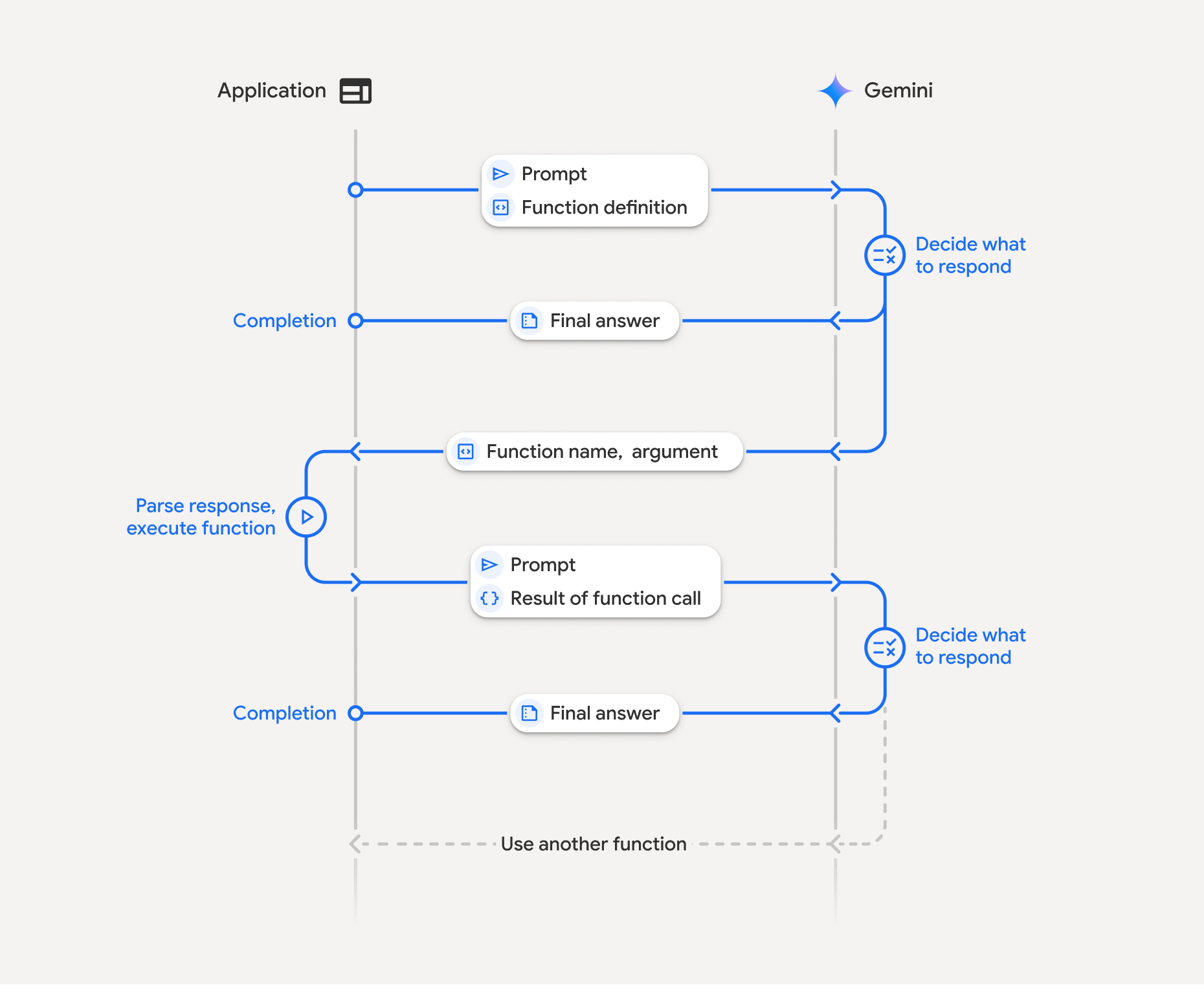
以Gemini AI 为例,Function Calling执行流程主要分为四步(以下的函数Function和工具Tool含义相同):
- 定义函数声明:在应用层代码中定义函数声明,包括函数名称、描述、参数等信息;
- 使用函数声明调用AI API:在通过API使用AI时,将函数声明与提示词一起发送给LLM;LLM分析请求,判断是否需要使用工具(函数)。如果LLM判断需要使用工具,将会返回一个结构化的JSON对象,包括函数名称、调用参数、调用ID(如果是Gemini 3模型,该ID总是会返回);
- 执行函数:当应用层接收到LLM的返回后,解析发现需要执行函数,那么需要在应用层中执行函数;
- 返回执行结果:当在应用层执行函数后,将函数结果以及调用ID返回给LLM。LLM据此决定是组织最终的返回结果,还是调用其他函数。
以上流程示意图如下:
3. 函数声明
函数/工具声明就是定义函数的名称、描述、参数等信息,在Gemini 中,函数声明主要有以下字段:
name:字符串,定义函数的名称,需要唯一;description:字符串,定义函数的作用,这一项非常重要,因为LLM会根据描述,来判断是否需要调用该函数,因此,描述需要简洁、准确地阐述函数作用;parameters:对象,用于定义函数的参数信息,实际就是JSON Schema对象:type:参数类型,例如object;properties:当参数类型为object时,用于定义具体的字段,每个字段又是一个JSON Schema对象;
完整的函数声明,参考:https://ai.google.dev/api/caching#FunctionDeclaration
不同LLM提供商所要求的函数声明语法不同,具体参考各厂商文档:
- OpenAI :https://developers.openai.com/api/docs/guides/function-calling#defining-functions
- DeepSeek:https://api-docs.deepseek.com/guides/tool_calls
4. 示例
下面以python语言为例,介绍如何封装获取用户信息工具,并提供给Gemini AI调用。
首先,创建一个本地后台服务,用于获取用户信息:
Details
python
#!/usr/bin/env python3
import json
from http.server import BaseHTTPRequestHandler, HTTPServer
from urllib.parse import parse_qs, urlparse


class UserInfoHandler(BaseHTTPRequestHandler):
    def do_GET(self):
        parsed = urlparse(self.path)
        if parsed.path == "/getUserInfo":
            query = parse_qs(parsed.query)
            user_id = query.get("userId", ["u_10001"])[0]
            fake_user_info = {
                "userId": user_id,
                "nickname": f"用户_{user_id}",
                "address": "上海市浦东新区世纪大道100号",
                "birthDate": "1995-08-12",
                "email": f"{user_id}@example.com",
            }

            body = json.dumps(fake_user_info, ensure_ascii=False).encode("utf-8")
            self.send_response(200)
            self.send_header("Content-Type", "application/json; charset=utf-8")
            self.send_header("Content-Length", str(len(body)))
            self.end_headers()
            self.wfile.write(body)
            return

        self.send_response(404)
        self.send_header("Content-Type", "application/json; charset=utf-8")
        self.end_headers()
        self.wfile.write(b'{"error":"Not Found"}')

    def log_message(self, format, *args):
        return


def main():
    server_address = ("127.0.0.1", 8080)
    httpd = HTTPServer(server_address, UserInfoHandler)
    print("Server started at http://127.0.0.1:8080")
    print("API endpoint: http://127.0.0.1:8080/getUserInfo")
    httpd.serve_forever()


if __name__ == "__main__":
main()然后,编写通过API与Gemini 交互的代码:
Details
python
#!/usr/bin/env python3
"""
Gemini Function Calling Demo

参考:
https://ai.google.dev/gemini-api/docs/function-calling

运行前准备:
1) 先启动本地 API 服务: python3 api_server.py
2) 安装依赖: pip install google-genai
3) 在代码里填入 GEMINI_API_KEY
4) 运行本脚本: python3 gemini_function_call_demo.py
"""

import json
import urllib.error
import urllib.parse
import urllib.request
from typing import Optional

from google import genai
from google.genai import types


LOCAL_USER_API = "http://127.0.0.1:8080/getUserInfo"
MODEL_NAME = "gemini-3.1-flash-lite-preview"
GEMINI_API_KEY = "替换成你的真实GEMINI_API_KEY"

def get_user_info(user_id: str) -> dict:
    """调用本地 /getUserInfo?userId=xxx API,返回用户信息。"""
    try:
        query = urllib.parse.urlencode({"userId": user_id})
        request_url = f"{LOCAL_USER_API}?{query}"
        with urllib.request.urlopen(request_url, timeout=5) as response:
            payload = response.read().decode("utf-8")
            return json.loads(payload)
    except urllib.error.URLError as exc:
        return {
            "error": "local_api_unavailable",
            "message": f"无法访问本地接口 {LOCAL_USER_API}: {exc}",
        }
    except json.JSONDecodeError as exc:
        return {
            "error": "invalid_json",
            "message": f"本地接口返回的不是合法 JSON: {exc}",
        }


def find_first_function_call(response) -> Optional[types.FunctionCall]:
    """从模型响应中提取第一个 function_call。"""
    if not response.candidates:
        return None
    content = response.candidates[0].content
    if not content or not content.parts:
        return None
    for part in content.parts:
        if part.function_call:
            return part.function_call
    return None


def build_function_response_part(
    tool_name: str, tool_result: dict, tool_call_id: Optional[str]
):
    """兼容不同 SDK 版本构造 function response。"""
    # 新版 SDK 支持 id;旧版不支持,抛 TypeError 后降级。
    if tool_call_id:
        try:
            return types.Part.from_function_response(
                name=tool_name,
                response={"result": tool_result},
                id=tool_call_id,
            )
        except TypeError:
            pass

    return types.Part.from_function_response(
        name=tool_name,
        response={"result": tool_result},
    )


def extract_text_from_response(response) -> str:
    """优先返回 response.text,不可用时从 parts 中拼接文本。"""
    text = getattr(response, "text", None)
    if text:
        return text

    texts = []
    if response.candidates and response.candidates[0].content:
        for part in response.candidates[0].content.parts or []:
            if getattr(part, "text", None):
                texts.append(part.text)
    return "\n".join(texts).strip()


def main() -> None:
    if GEMINI_API_KEY == "替换成你的真实GEMINI_API_KEY":
        raise RuntimeError("请先在代码里把 GEMINI_API_KEY 替换成你的真实 Key。")

    client = genai.Client(api_key=GEMINI_API_KEY)

    get_user_info_declaration = {
        "name": "get_user_info",
        "description": "根据 userId 获取用户基本资料信息(ID、昵称、地址、出生日期、邮箱)。",
        "parameters": {
            "type": "object",
            "properties": {
                "userId": {
                    "type": "string",
                    "description": "用户ID,例如 u_10001",
                }
            },
            "required": ["userId"],
        },
    }

    # 第一轮尝试触发工具调用
    config = types.GenerateContentConfig(
        tools=[types.Tool(function_declarations=[get_user_info_declaration])],
        tool_config=types.ToolConfig(
            function_calling_config=types.FunctionCallingConfig(
                mode="AUTO"
            )
        ),
    )

    contents = [
        types.Content(
            role="user",
            parts=[
                types.Part(
                    text="请查询 userId 为 u_10086 的用户信息,并用一句中文总结给我。"
                )
            ],
        )
    ]

    # 第一次调用:让模型产生 function_call
    first_response = client.models.generate_content(
        model=MODEL_NAME,
        contents=contents,
        config=config,
    )
    tool_call = find_first_function_call(first_response)
    if not tool_call:
        print("模型没有发起工具调用,原始文本输出如下:")
        print(first_response.text)
        return

    print("=== Step 1: 模型请求调用工具 ===")
    print(f"function name: {tool_call.name}")
    print(f"function id: {tool_call.id}")
    print(f"function args: {dict(tool_call.args)}")
    if not tool_call.id:
        print("提示: 当前返回未包含 function call id,将使用兼容模式回传。")

    # 第二步:执行本地工具
    if tool_call.name != "get_user_info":
        raise RuntimeError(f"收到未知工具调用: {tool_call.name}")
    tool_args = dict(tool_call.args or {})
    user_id = str(tool_args.get("userId", "u_10001"))
    tool_result = get_user_info(user_id=user_id)
    print("\n=== Step 2: 本地工具执行结果 ===")
    print(json.dumps(tool_result, ensure_ascii=False, indent=2))

    # 第三步:把 functionResponse(带同一个 id)回传给模型
    function_response_part = build_function_response_part(
        tool_name=tool_call.name,
        tool_result=tool_result,
        tool_call_id=tool_call.id,
    )
    contents.append(first_response.candidates[0].content)
    contents.append(types.Content(role="user", parts=[function_response_part]))

    final_response = client.models.generate_content(
        model=MODEL_NAME,
        contents=contents,
        config=config,
    )

    print("\n=== Step 3: 模型最终回复 ===")
    final_text = extract_text_from_response(final_response)
    if final_text:
        print(final_text)
    else:
        print("未返回文本内容,请检查 final_response.candidates[0].content.parts。")


if __name__ == "__main__":
main()根据指示运行代码:
- 先启动本地 API 服务: python3 api_server.py
- 安装依赖: pip install google-genai
- 在代码里填入 GEMINI_API_KEY
- 运行本脚本: python3 gemini_function_call_demo.py
结果如下:
txt
=== Step 1: 模型请求调用工具 ===
function name: get_user_info
function id: af844qeb
function args: {'userId': 'u_10086'}

=== Step 2: 本地工具执行结果 ===
{
  "userId": "u_10086",
  "nickname": "用户_u_10086",
  "address": "上海市浦东新区世纪大道100号",
  "birthDate": "1995-08-12",
  "email": "u_10086@example.com"
}

=== Step 3: 模型最终回复 ===
Warning: there are non-text parts in the response: ['thought_signature'], returning concatenated text result from text parts. Check the full candidates.content.parts accessor to get the full model response.
用户 u_10086 的昵称为“用户_u_10086”,出生于1995年8月12日,居住在上海市浦东新区,邮箱为 u_10086@example.com。从结果可见,自定义工具已被成功调用。
5. 内置工具
除了可向LLM提供自定义工具外,厂商也提供了内置工具。以Gemini为例,内置工具包括:
- Google Search:允许模型访问互联网,获取实时信息,以提供更精准的答案,减少幻觉;
- Google Maps:能够查找地点、获取路线并提供丰富的本地背景信息;
- Code Execution:允许模型编写并运行 Python 代码,以精确地解决数学问题或处理数据;
- URL Context:在提示中通过URL提供额外的信息,模型可以利用该工具获取该URL的内容,从而更好地回答;
- File Search: 索引并搜索文档,以实现检索增强生成(RAG);
- Computer Use:预览功能,能够操作浏览器,也就是说可以自动执行网页表单填写、网页自动化测试、在不同网站收集信息等;
不同LLM厂商提供的内置工具不同,具体可以参考厂商开发者文档。
6. 不同工具流程
LLM会在会话期间请求使用工具,根据要请求的工具是内置的或自定义的,流程会有所不同。
6.1 内置工具流程
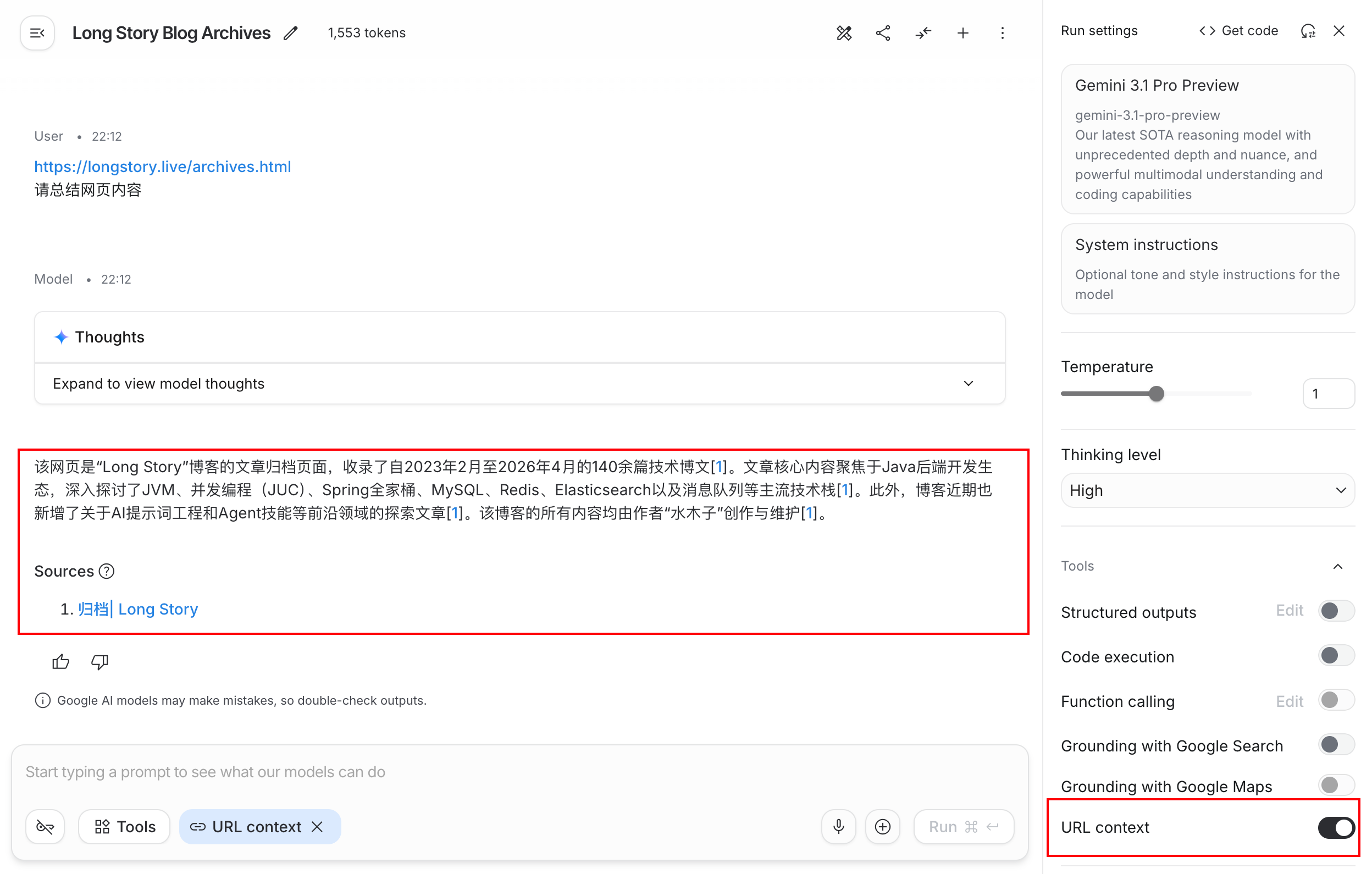
如果LLM判断只调用内置工具,那么整个过程在一次API调用完成:
- 发送请求:例如提示词:"请总结https://longstory.live/archives.html网页内容";
- LLM判断:LLM决定要使用某个内置工具,在Gemini服务器端使用工具(例如,使用URL Context工具获取网页内容);
- 返回结果:Gemini整合工具结果,返回最终响应;
例如,在Google AI Studio中测试如下:
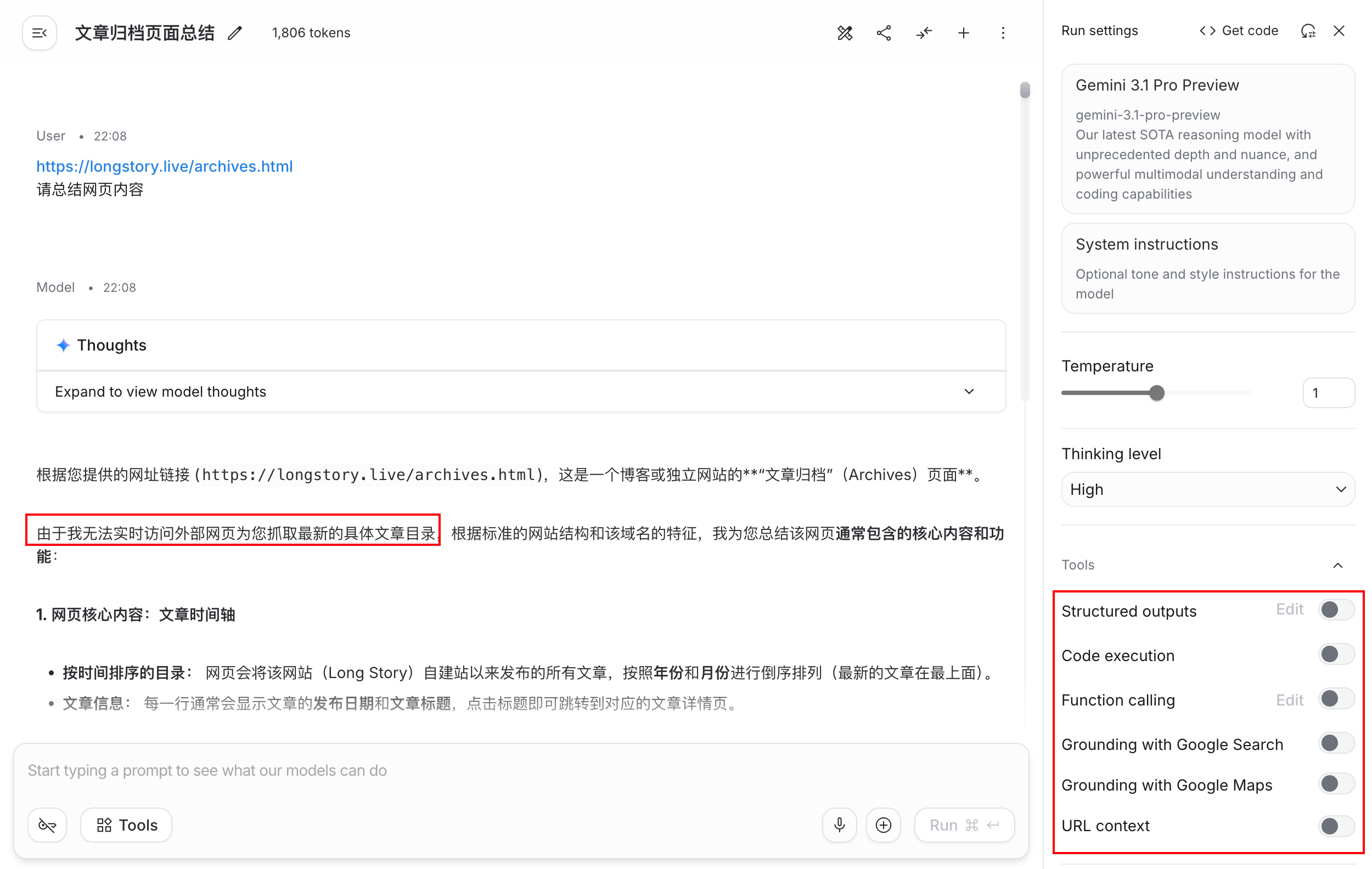
如下是关掉了内置工具调用权限的结果:
6.2 自定义工具流程
如果涉及自定义工具,那么流程如下(也就是第2节的流程,这里再重复一下):
- 定义函数声明:在应用层代码中定义函数声明,包括函数名称、描述、参数等信息;
- 使用函数声明调用AI API:在通过API使用AI时,将函数声明与提示词一起发送给LLM;LLM分析请求,判断是否需要使用工具(函数)。如果LLM判断需要使用工具,将会返回一个结构化的JSON对象,包括函数名称、调用参数、调用ID(如果是Gemini 3模型,该ID总是会返回);
- 执行函数:当应用层接收到LLM的返回后,解析发现需要执行函数,那么需要在应用层中执行函数;
- 返回执行结果:当在应用层执行函数后,将函数结果以及调用ID返回给LLM。LLM据此决定是组织最终的返回结果,还是调用其他函数。
示例参考第4节。
6.3 混合工具流程
混合工具流程,是指在单次请求中既有内置工具,又有自定义工具。流程如下:
- 启用工具混合:在请求中同时包含内置工具和自定义工具:
python
response = client.models.generate_content(
    model="gemini-3-flash-preview",
    contents="What is the northernmost city in the United States? What's the weather like there today?",
    config=types.GenerateContentConfig(
      tools=[
        types.Tool(
          google_search=types.GoogleSearch(),      # Built-in tool
          function_declarations=[getWeather]       # Custom tool
        ),
      ],
    ),
)Google AI文档说要把include_server_side_tool_invocations设置为true,但是我用的版本,根本没有这个参数
返回调用上下文:
- 如果执行了内置工具,那么返回的响应中会包括
toolCall和toolResponse,表示执行了的工具及其结果; - 特别地,如果执行了Code Execution内置工具,返回的响应中会包括
executableCode和codeExecutionResult,表示执行了的代码及其结果; - 如果LLM需要执行自定义工具,会返回
functionCall,表示需要应用层执行工具;
- 如果执行了内置工具,那么返回的响应中会包括
应用层执行工具:应用层执行自定义工具,并且将执行结果封装在
functionResponse中,然后和第2步返回的其他部分,组装全部返回给LLM。注意,这一步一定是要返回所有第2步的所有结果,这样LLM才有充足的上下文知道之前执行了什么工具,之后的每一轮,都需要带上完整的信息。python# Turn 2: Manually build history to circulate both tool and function context history = [ types.Content( role="user", parts=[types.Part(text="What is the northernmost city in the United States? What's the weather like there today?")] ), # Response from Turn 1 includes tool_call, tool_response, and thought_signatures response.candidates[0].content, # Return the function_response types.Content( role="user", parts=[types.Part( function_response=types.FunctionResponse( name="getWeather", response={"response": "Very cold. 22 degrees Fahrenheit."}, # 假装执行了自定义工具 id=get_first_function_call_id(response) ) )] ) ] response_2 = client.models.generate_content( model="gemini-3-flash-preview", contents=history, config=types.GenerateContentConfig( tools=[ types.Tool( google_search=types.GoogleSearch(), function_declarations=[getWeather] ), ] ), )
7. 工具调用模式
Gemini AI 提供了四种工具调用模式:
AUTO:当只使用自定义工具时的默认模式,LLM会根据提示词,决定是输出自然语言回答还是调用工具;
VALIDATED:在混合工具调用场景下,默认模式为 VALIDATED,它是
AUTO的加强版,相比AUTO,它更不容易产生格式错误的调用;LLM也会根据提示词,决定是输出自然语言回答还是调用工具。如果allowed_function_names属性没有被设置,那么所有提供的工具都可以使用,反之,只能使用allowed_function_names中指定的工具;
ANY:LLM被限制为只能使用工具,不允许输出自然语言回答,allowed_function_names同样有效;
NONE:LLM不允许使用工具,即只能输出自然语言回答;
指定工具调用模式例子:
python
from google.genai import types

# Configure function calling mode
tool_config = types.ToolConfig(
    function_calling_config=types.FunctionCallingConfig(
        mode="ANY", allowed_function_names=["get_current_temperature"]
    )
)

# Create the generation config
config = types.GenerateContentConfig(
    tools=[tools],  # not defined here.
    tool_config=tool_config,
)8. 最佳实践
- 定义准确:对于自定义工具,名称要有意义(不要有空格、破折号等奇怪符号),描述要清楚具体,参数要类型准确;
- 工具宜少不宜多:虽然LLM可以使用任意数量的工具,但是提供过多工具,可能增加模型选择错误工具的风险,因此,只提供与问题最相关的工具。必要时,可以考虑使用Tool Search工具,即搜索工具的工具;
- 执行前校验:如果工具执行后会造成重要后果(例如删除数据),在执行前需要进行校验;
- 在自定义工具中,优雅处理错误,返回有效的信息,以帮助LLM定位问题;
参考资料
[1] https://ai.google.dev/gemini-api/docs/function-calling
[2] https://ai.google.dev/gemini-api/docs/tools
[3] https://developers.openai.com/api/docs/guides/function-calling