Appearance
Index Template
本文介绍索引模板的使用。
1. 概述
索引模板定义了如何创建一个索引,即索引的settings、mappings和其他配置。
假设应用程序的日志,需要每天保存进一个新的索引中,例如log-2025_12_01、log-2025_12_02,并且每个索引的设置需要相同。如果我们需要每天都手动创建新索引,则稍显麻烦;如果使用ES的机制,当新文档添加到一个不存在的索引时,ES会自动创建索引,但是,自动创建的索引字段和类型可能不是我们想要的。
此时,索引模板就起作用了。我们预先在ES中设置索引模板,当新文档添加到一个不存在索引时,例如log-2025_12_03,ES会先查看是否有匹配的索引模板,如果有,则使用索引模板来创建新索引,这种方式就可以保证每个索引的设置都是相同的了。
在ES中,有两种类型的索引模板:
- 索引模板:索引模板是创建索引(index)或数据流(data stream)时应用的主要配置对象。它使用索引模式匹配索引名称,并通过优先级值解决冲突。索引模板可以选择性地直接定义
settings、mappings和aliases,并引用一系列组件模板列表。它还可以指示是否应创建数据流或常规索引; - 组件模板:组件模板是可重用的模块,定义了
settings、mappings和aliases;组件模板不能直接直接使用,必须被索引模板引用使用;
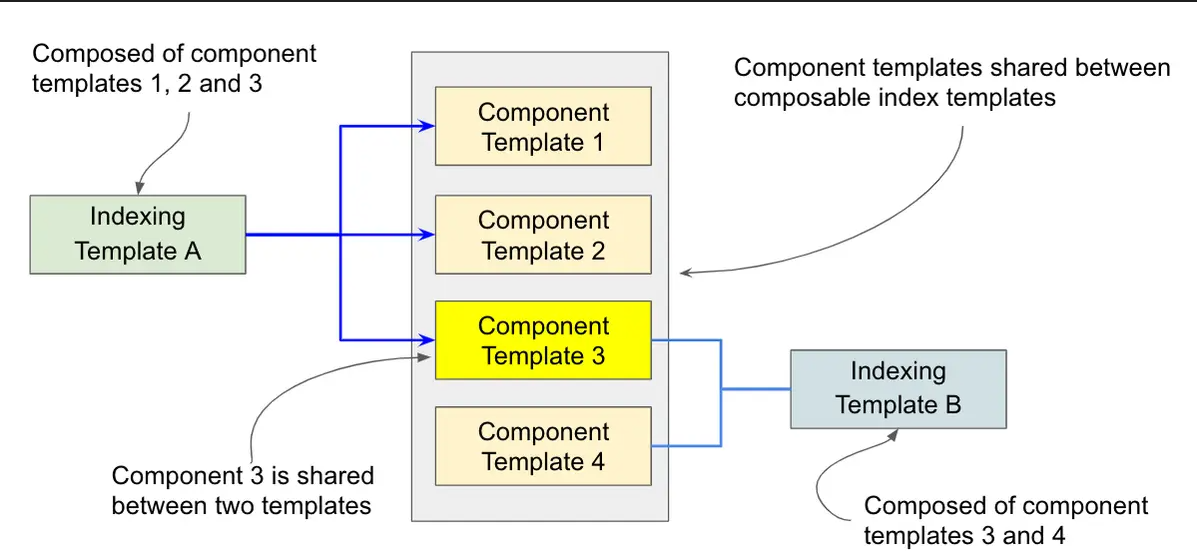
图源:https://www.elastic.co/search-labs/blog/index-composable-templates
2. 创建模板
2.1 创建索引模板
我们可以使用PUT _index_template/{template_name}的方式来创建索引模板,例如:
json
PUT _index_template/template_1
{
  "index_patterns": ["te*", "bar*"],
  "template": {
    "settings": {
      "number_of_shards": 1
    },
    "mappings": {
      "_source": {
        "enabled": true
      },
      "properties": {
        "host_name": {
          "type": "keyword"
        },
        "created_at": {
          "type": "date",
          "format": "EEE MMM dd HH:mm:ss Z yyyy"
        }
      }
    },
    "aliases": {
      "mydata": { }
    }
  },
  "priority": 501,
  "composed_of": ["component_template1", "runtime_component_template"]
}PUT _index_template/template_1:tempalte_1定义了模板的名称;index_patterns:是一个数组,定义了该模板可以匹配的索引名称,例如该模板可以匹配名称以te或bar开头的索引或数据流;template:定义了具体的模板内容settings:即索引的设置;mappings:索引字段映射;aliases:索引别名;
priority:模板优先级,数值越大,优先级越高;composed_of:定义了该索引模板引用的组件模板;- 注意,如果引用的组件模板不存在,那么创建索引模板时会报错;
2.2 创建组件模板
我们可以使用PUT _component_template/{component_template_name} API来创建组件模板。
创建settings组件模板:
json
PUT _component_template/settings_component_template
{
  "template":{
    "settings":{
      "number_of_shards":5,
      "number_of_replicas":2
    }
  }
}创建mappings组件模板:
json
PUT _component_template/mappings_component_template
{
  "template": {
    "mappings": {
      "properties": {
        "order_date": {
          "type": "date",
          "format":"dd-MM-yyyy"
        }
      }
    }
  }
}创建aliases组件模板:
json
PUT _component_template/aliases_component_template
{
  "template": {
    "aliases": {
      "all_orders": {},
      "sales_orders":{}
    }
  }
}关于别名的理解与使用:
索引模板中,我们可以指定别名,这些别名可以指向多个索引;
如果一个别名指向了一个索引,那么可以通过该别名执行写操作;如果该别名指向了多个索引,那么不可以通过该别名执行写操作,因为ES不知道将该写操作路由到哪个索引;
如果一个别名指向了多个索引,那么要指定其中一个索引成为可写的,那么可以如下
is_write_index:jsonPOST _aliases { "actions": [ { "add": { "index": "index-name", "alias": "alias-name", "is_write_index": true } } ] }
3. 查看模板
我们可以使用如下API查看所有索引模板:
txt
GET _index_template如果要查看具体的索引模板,可以指定模板名称:
txt
GET _index_template/{template_name}同理,要查看所有的组件模板,使用如下API:
txt
GET _component_template要查看具体的组件模板,使用模板名称:
txt
GET _component_template/synthetics*支持使用*通配符。
4. 模板使用注意事项
在手动创建索引时,我们可以自己指定索引的
settings、mappings等配置,如果要创建的索引也匹配上了索引模板,那么冲突的配置项以创建索引时的配置为准,而不是索引模板中的;索引模板可以引用多个组件模板,如果索引模板和组件模板中有冲突的配置,那么以索引模板中的为准;
关于优先级的理解:如果多个索引模板都匹配上了同一个索引,那么是把这些索引模板的内容合并,如果有冲突,以高优先级的为准;
5. 测试模拟
ES提供了API,可以测试某个索引模板。在ES中,有两种测试:
测试某个索引引用模板后的效果:因为一个索引可以应用多个索引模板,所以通过该API,可以测试该索引最终的设置
txtPOST /_index_template/_simulate_index/{index_name}测试某个索引模板的效果:由于索引模板可以引用多个组件模板,所以通过该API,可以测试该索引模板最终的设置
txtPOST /_index_template/_simulate/{template_name}
参考资料
[1] https://www.elastic.co/search-labs/blog/index-composable-templates
[2] https://www.elastic.co/docs/manage-data/data-store/templates