Appearance
Java IO - 04 字符流
本文介绍通过字符流进行文件的读写操作,字符流是以字符为单位的流,接口为Reader和Writer。
Java IO流体系如下:
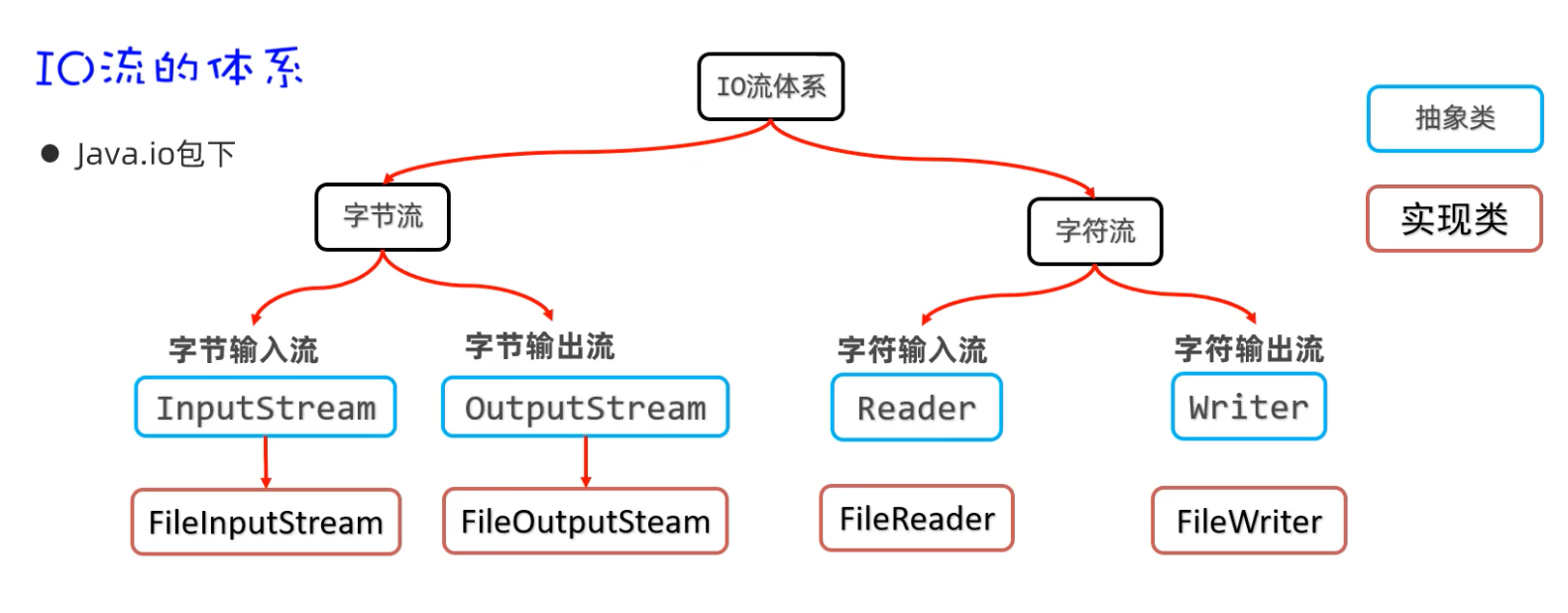
字符流是在字节流的基础上增加了字符编码,进一步封装了数据的读写。
1. 字符输入流
字符输入流是以字符为单位,将磁盘或网络中的数据读取到内存中。我们以FileReader为例:
java
public static void main(String[] args) {
    // 1. 打开字符流,指定编码
    try (FileReader fileReader = new FileReader("src/main/resources/data.txt", StandardCharsets.UTF_8);){
        // 2. 指定缓冲区
        char[] chars = new char[1024];
        int len = 0;
        // 3. 以字符为单位读取数据,若没有读取到数据,则返回-1
        while ((len = fileReader.read(chars)) != -1){
            System.out.println(new String(chars, 0, len));
        }
    }catch (Exception e){
        e.printStackTrace();
    }
}2. 字符输出流
字符输出流是以字符为单位,将内存中的数据写入到磁盘或网络中。我们以FileWriter为例:
java
public static void main(String[] args) {
    // 1. 打开字符输出流,指定字符编码,也可以指定是覆盖写入还是追加写入
    try(FileWriter fileWriter = new FileWriter("src/main/resources/output_fileWriter.txt", StandardCharsets.UTF_8)) {
        // 2. 写出数据
        fileWriter.write("hello world, 你好 世界");
        // 3. 刷新缓冲区
        fileWriter.flush();
    }catch (Exception e){
        e.printStackTrace();
    }
}如果字符输出流不关闭不刷新,那么缓冲区中的数据可能不会写入到磁盘文件中,出现丢失现象。