Appearance
Java NIO - 01 概述
NIO和Netty系列文章参考下列视频教程:
本文主要介绍NIO是什么以及NIO的关键组件,并附带介绍一些工具类。
1. NIO是什么
Java NIO(New I/O)是 Java 1.4 引入的一组 API,用于高效处理 I/O 操作。与传统的 Java I/O(基于流)不同,NIO 基于通道(Channel)和缓冲区(Buffer),支持非阻塞 I/O 和选择器(Selector),适合高并发、高性能的应用场景。
核心组件
Buffer(缓冲区)
用于临时存储数据,支持多种类型(如 ByteBuffer, CharBuffer 等)。
提供读写操作,通过 flip() 等方法切换读写模式。
Channel(通道)
类似于流,但支持双向读写。
常见实现:FileChannel, SocketChannel, ServerSocketChannel, DatagramChannel。
Selector(选择器)
允许单线程监控多个通道的 I/O 事件(如连接、读、写)。
适合高并发场景,减少线程开销。
2. 工具类
在Java 1.7中引入了两个工具类,Path和Files,可以帮助我们操作路径和文件。
2.1 Path
Path表示文件路径。
我们可以通过以下方法获取Path对象:
public static Path of(String first, String... more):通过拼接字符串获取文件路径;public static Path of(URI uri):通过URI获取文件路径;
在拼接字符串获取文件路径时,有绝对路径与相对路径一说。
java
// 绝对路径(macOS操作系统下)
Path path1 = Path.of("/home/user", "/documents", "file.txt");
System.out.println(path1.toAbsolutePath());

// 相对路径(macOS操作系统下)
Path path2 = Path.of("home/user", "/documents", "file.txt");
System.out.println(path2.toAbsolutePath());一些常用方法:
Path toAbsolutePath():获取绝对路径;Path normalize():获取标准化的绝对路径,即去除.和..的路径;
注意,相对路径是相对于当前工作目录(working directory) 的,工作目录通常是启动 Java 程序的目录。例如,如果在命令行中通过 java MyProgram 运行程序,那么工作目录就是执行这个命令的目录。
在IDEA中,可以在运行配置中设置工作目录:
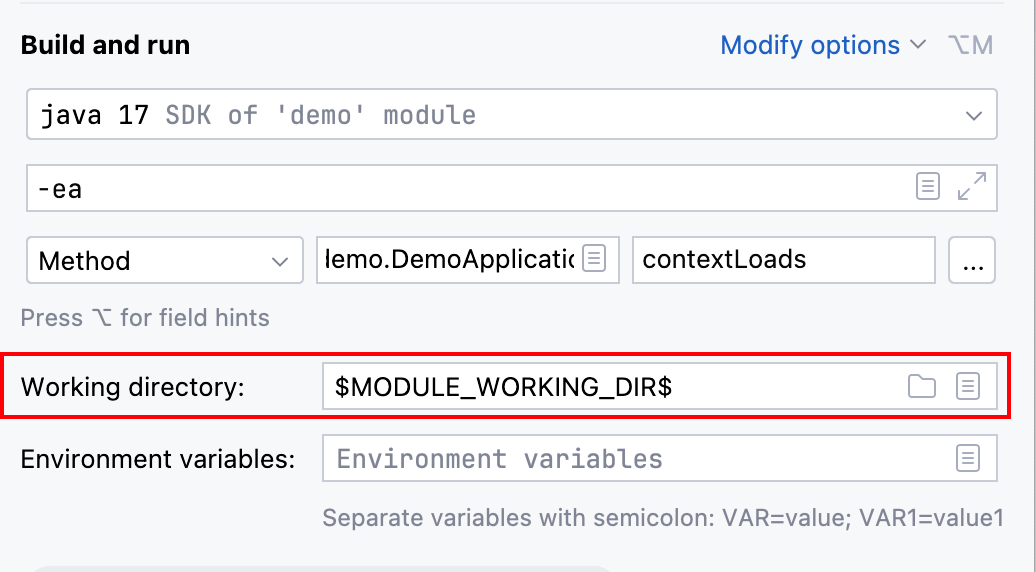
在代码中,可以通过如下方式获取工作目录:
java
System.out.println(System.getProperty("user.dir"));
System.out.println(Path.of("").toAbsolutePath());2.2 Files
Files提供了一些静态方法方便我们操作文件与目录。
此处只介绍如何使用Files遍历文件与目录,使用walkFileTree()方法,例如下面的例子查找指定目录下的XML文件:
java
Files.walkFileTree(Path.of("src/main/resources"), new SimpleFileVisitor<Path>(){
    @Override
    public FileVisitResult visitFile(Path file, BasicFileAttributes attrs) throws IOException {
        if(file.toString().endsWith(".xml")){
            System.out.println(file.normalize());
        }
        return super.visitFile(file, attrs);
    }
});如果我们直接使用Files.delete()删除目录,而目录不为空,则会报错,我们可以通过遍历文件夹进行删除目录的操作:
java
Files.walkFileTree(Path.of("src/main/resources/dir"), new SimpleFileVisitor<Path>(){

    @Override
    public FileVisitResult visitFile(Path file, BasicFileAttributes attrs) throws IOException {
      // 先删除文件
        Files.delete(file);
        return super.visitFile(file, attrs);
    }

    @Override
    public FileVisitResult postVisitDirectory(Path dir, IOException exc) throws IOException {
      // 再删除目录
        Files.delete(dir);
        return super.postVisitDirectory(dir, exc);
    }
});如果源目录不为空,则使用Files.copy()复制目录时会抛异常,我们可以使用walk()方法复制文件夹:
java
String sourcePath = "src/main/resources/dir";
String targetPath = "src/main/resources/copy";

Files.walk(Path.of(sourcePath)).forEach(path -> {
    try {
        String target = path.toString().replace(sourcePath, targetPath);

        if (Files.isDirectory(path)) {
            Files.createDirectories(Path.of(target));
        } else if (Files.isRegularFile(path)) {
            Files.copy(path, Path.of(target));
        }
    }catch (Exception e){
        e.printStackTrace();
    }
});