Appearance
Java NIO - 03 TCP通信
本文介绍NIO中的几种TCP网络编程模型,并引出Selector组件的使用。
1. 阻塞式
首先编写服务端代码:
java
@Slf4j
public class Server {
    public static void main(String[] args) throws IOException {
        // 1. 创建服务器
        ServerSocketChannel serverSocketChannel = ServerSocketChannel.open();
        // 2. 监听8080端口
        serverSocketChannel.bind(new InetSocketAddress(8080));

        List<SocketChannel> socketChannelList = new ArrayList<>();
        while (true){
            // 3. 在循环中阻塞式监听连接,线程会在此阻塞,当有连接请求时唤醒线程,并返回SocketChannel(与客户端的连接)
            SocketChannel socketChannel = serverSocketChannel.accept();
            log.info("socket connected , {}", socketChannel);
            socketChannelList.add(socketChannel);

            // 4. 循环所有的客户端连接
            for (SocketChannel sc : socketChannelList){
                ByteBuffer byteBuffer = ByteBuffer.allocate(1024);
                // 5. 获取客户端发送的消息,阻塞式获取,即没有消息发送过来时,线程会在此阻塞
                sc.read(byteBuffer);

                // 6. 输出消息内容
                byteBuffer.flip();
                StringBuilder stringBuilder = new StringBuilder();
                while (byteBuffer.hasRemaining()){
                    stringBuilder.append((char)byteBuffer.get());
                }
                log.info("{} send message: {}", sc, stringBuilder.toString());
                byteBuffer.clear();
            }

        }
    }
}阻塞式体现在两个地方:
ServerSocketChannel.accept()会阻塞,直到有新的连接到达;SocketChannel.read()会阻塞,直到有新的消息到达;
然后编写客户端代码:
java
public class Client {
    public static void main(String[] args) throws IOException {
        // 1. 创建客户端程序
        SocketChannel socketChannel = SocketChannel.open();
        // 2. 连接服务端程序
        socketChannel.connect(new InetSocketAddress("127.0.0.1", 8080));

        System.out.println("waiting...");

        // 3. 发送消息
        //socketChannel.write(StandardCharsets.UTF_8.encode("hello!"));
    }
}我们先启动服务端程序,然后以debug模式启动客户端程序,然后在调试模式下发送消息:
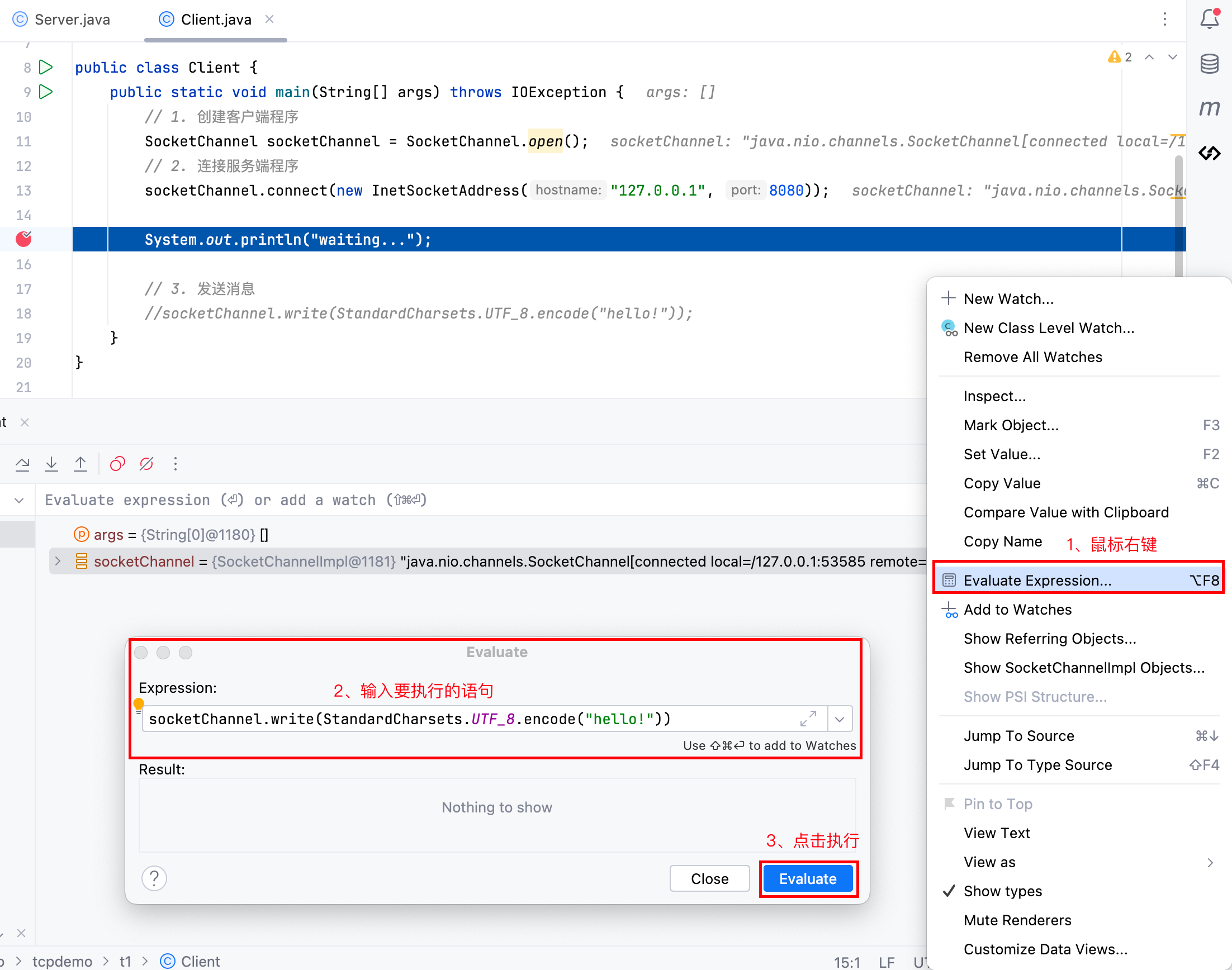
我们可以启动多个客户端查看情况,经过测试,阻塞式TCP通信存在以下不足:
- 当服务端程序监听客户端消息发送时,即服务端程序会阻塞在
SocketChannel.read(),此时服务端程序无法监听到其他客户端的建立连接请求; - 当服务端程序监听客户端连接请求时,即服务端程序会阻塞在
ServerSocketChannel.accept(),此时服务端程序无法监听到其他客户端发来的消息;
2. 非阻塞式
鉴于阻塞式编程模式存在的弊端,NIO提供了非阻塞式编程模式,服务端代码如下:
java
@Slf4j
public class Server {
    public static void main(String[] args) throws IOException {
        // 1. 创建服务器
        ServerSocketChannel serverSocketChannel = ServerSocketChannel.open();
        // 2. 监听8080端口
        serverSocketChannel.bind(new InetSocketAddress(8080));
        // 3. 非阻塞式
        serverSocketChannel.configureBlocking(false);

        List<SocketChannel> socketChannelList = new ArrayList<>();
        while (true){
            // 4. 非阻塞式监听客户端连接,如果没有连接请求,则socketChannel为null
            SocketChannel socketChannel = serverSocketChannel.accept();
            if(socketChannel != null) {
                log.info("socket connected , {}", socketChannel);
                // 5. 非阻塞式
                socketChannel.configureBlocking(false);
                socketChannelList.add(socketChannel);
            }

            // 6. 循环所有的客户端连接
            for (SocketChannel sc : socketChannelList){
                ByteBuffer byteBuffer = ByteBuffer.allocate(1024);
                // 7. 非阻塞式获取客户端发送的消息,如果没有消息发送,则返回值len为0
                int len = sc.read(byteBuffer);

                // 8. 输出消息内容
                if(len > 0) {
                    byteBuffer.flip();
                    StringBuilder stringBuilder = new StringBuilder();
                    while (byteBuffer.hasRemaining()) {
                        stringBuilder.append((char) byteBuffer.get());
                    }
                    log.info("{} send message: {}", sc, stringBuilder.toString());
                    byteBuffer.clear();
                }
            }
        }
    }
}客户端代码不做改动。
但是非阻塞式编程模式存在一个问题:如果服务端没有客户端连接或消息读写,那么程序就会不停的空转,造成CPU资源浪费。
3. Selector模式
以Selector模式编写的服务端代码:
java
@Slf4j
public class SelectorServer {
    public static void main(String[] args) throws IOException {
        // 1. 打开Selector
        Selector selector = Selector.open();

        // 2. 打开ServerSocketChannel,设置非阻塞模式并绑定到8080端口
        ServerSocketChannel serverSocketChannel = ServerSocketChannel.open();
        serverSocketChannel.bind(new InetSocketAddress(8080));
        serverSocketChannel.configureBlocking(false);

        // 3. 将ServerSocketChannel注册到Selector上,监听连接事件
        SelectionKey sscKey = serverSocketChannel.register(selector, SelectionKey.OP_ACCEPT);

        while (true){
            // 4. 在循环中使用select() 方法阻塞监听事件,
            // 当Selector中的SelectionKey关注的事件发生时,停止阻塞,线程恢复执行
            int select = selector.select();

            // 5. 获取发生事件的SelectionKey集合
            Iterator<SelectionKey> iterator = selector.selectedKeys().iterator();
            while (iterator.hasNext()){
                // 6. 遍历SelectionKey处理事件
                SelectionKey key = iterator.next();

                if(key.isAcceptable()) {
                    // 7. 如果是连接事件,接受连接并注册到Selector上监听读事件
                    ServerSocketChannel channel = (ServerSocketChannel) key.channel();
                    SocketChannel socketChannel = channel.accept();
                    log.info("connected: {}", socketChannel);
                    // 注意设置为非阻塞模式
                    socketChannel.configureBlocking(false);
                    // 将SocketChannel注册到Selector上,监听可读事件
                    SelectionKey scKey = socketChannel.register(selector, SelectionKey.OP_READ);
                }
                if (key.isReadable()){
                    // 8. 如果是读事件,读取数据并打印
                    SocketChannel socketChannel = (SocketChannel) key.channel();
                    ByteBuffer byteBuffer = ByteBuffer.allocate(1024);
                    int read = socketChannel.read(byteBuffer);
                    if (read > 0) {
                        // 读取的数据量大于0,表示有实际数据,打印显示
                        byteBuffer.flip();
                        StringBuilder stringBuilder = new StringBuilder();
                        while (byteBuffer.hasRemaining()) {
                            stringBuilder.append((char) byteBuffer.get());
                        }
                        log.info("{} send message: {}", socketChannel, stringBuilder);
                        byteBuffer.clear();
                    }else if (read == -1){
                        // 如果读取到-1,表示客户端已关闭连接,关闭SocketChannel并取消SelectionKey
                        log.info("client closed: {}", socketChannel);
                        socketChannel.close();
                        key.cancel();
                    }
                }

                // 移除当前处理的SelectionKey,防止下次select()重复处理
                iterator.remove();
            }
        }
    }
}客户端代码不做改动,接下来就详细解释服务端代码以及关键点。
3.1 将Channel注册到Selector上
我们可以使用Channel.register()将Channel注册到Selector上,使得Selector可以管理Channel。在register()方法中,有两个参数:
第一个参数表示Selector对象;
第二个参数表示要在Channel上关注什么事件,总共有四个事件:
SelectionKey.OP_ACCEPT:表示服务器通道已经准备好接受新的客户端连接,对于ServerSocketChannel,当有新的客户端连接请求时触发。SelectionKey.OP_CONNECT:表示通道已经完成连接(或连接失败),对于SocketChannel,当调用connect()方法后,连接成功或失败时触发。SelectionKey.OP_READ:表示通道已经准备好读取数据,通道的接收缓冲区中有数据可读或对端关闭连接时,都会触发OP_READ事件。SelectionKey.OP_WRITE:表示通道已经准备好写入数据,通道的发送缓冲区有空间可写时会出发事件,或当通道首次注册时,如果发送缓冲区未满,也会触发OP_WRITE事件。
3.2 Selector.select()
Selector的select()方法提供了三种形式:
select():阻塞等待,直到至少有一个通道的事件准备就绪。返回当前就绪的通道数量(如果没有就绪的通道,则返回 0)。javaint readyChannels = selector.select();select(long timeout):阻塞等待,直到至少有一个通道的事件准备就绪,或者超时(单位为毫秒)。返回当前就绪的通道数量(如果没有就绪的通道,则返回 0)。javaint readyChannels = selector.select(1000); // 最多等待 1 秒selectNow():非阻塞方法,立即返回当前就绪的通道数量(如果没有就绪的通道,则返回 0)。javaint readyChannels = selector.selectNow();
如果 select() 处于阻塞状态,可以在另一个线程中通过 selector.wakeup() 唤醒它:
java
selector.wakeup(); // 唤醒阻塞的 select()3.3 Selector.selectedKeys()
Selector.selectedKeys() 的作用是返回一个包含所有已经就绪事件的 SelectionKey 集合。这些 SelectionKey 表示注册到 Selector 上的通道(Channel)中,哪些通道的事件已经准备就绪(如可读、可写、连接完成等)。
selectedKeys()返回一个Set<SelectionKey>,其中包含所有已经就绪的SelectionKey。- 每个
SelectionKey对应一个通道,并且可以通过SelectionKey的方法(如isReadable()、isWritable()等)判断具体是哪种事件就绪。 - 事件处理:通过遍历
selectedKeys()返回的集合,可以处理所有已经就绪的事件。
注意事项
selectedKeys集合是动态的:- 每次调用
select()后,selectedKeys集合会被更新,包含新就绪的事件。 - 如果未处理的事件仍然存在于
selectedKeys集合中,它们会在下一次select()调用时再次被触发。
- 每次调用
必须手动移除
SelectionKey:- 处理完事件后,必须调用
Iterator.remove()方法将SelectionKey从selectedKeys集合中移除。 - 如果不移除,会导致事件被重复处理。
- 处理完事件后,必须调用
线程安全性:
selectedKeys()返回的集合不是线程安全的。如果在多线程环境中使用,需要额外的同步机制。
性能优化:
- 在高并发场景下,
selectedKeys集合的遍历和处理可能成为性能瓶颈。可以通过优化事件处理逻辑来提高性能。
- 在高并发场景下,
4. 黏包半包-处理消息边界
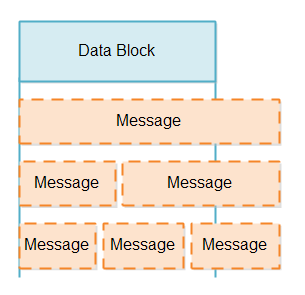
由于黏包半包,所以消息到达服务端时,会有以下情况,我们需要正确拆分出消息以便后续处理:
4.1 固定长度消息
限制客户端发送消息的长度为固定长度,如果消息过长,需要客户端自己拆分,如果消息过短,需要填充达到指定长度。
java
public static void main(String[] args) throws IOException {
    SocketChannel socketChannel = SocketChannel.open();
    socketChannel.connect(new InetSocketAddress("127.0.0.1",8080));

    Scanner scanner = new Scanner(System.in);
    while (true){
        String input = scanner.next();
        if("quit".equals(input)){
            break;
        }
        byte[] bytes = input.getBytes(StandardCharsets.UTF_8);

        if(bytes.length <= 4){
            // 消息过短
            ByteBuffer sendBuffer = ByteBuffer.allocate(4);

            sendBuffer.put(bytes);
            // 填充短消息
            while (sendBuffer.position() < sendBuffer.limit()){
                sendBuffer.put((byte) ' ');
            }
            sendBuffer.flip();
            socketChannel.write(sendBuffer);
        }else{
            // 消息过长
            int leftBytes = bytes.length;
            // 拆分长消息
            while (leftBytes > 0){
                ByteBuffer sendBuffer = ByteBuffer.allocate(4);

                sendBuffer.put(bytes, bytes.length - leftBytes, Math.min(4, leftBytes));
                // 最后的消息可能过短
                while (sendBuffer.position() < sendBuffer.limit()){
                    sendBuffer.put((byte) ' ');
                }

                sendBuffer.flip();
                socketChannel.write(sendBuffer);

                leftBytes -= 4;
            }
        }

    }

    socketChannel.close();
}4.2 按分隔符拆分消息
客户端和服务端可以约定,消息之间按照某个特殊字符分隔,然后服务端按照特殊字符进行拆分消息。
但是,存在一种情况,如果服务端的缓冲区(ByteBuffer)满了还没有找到分隔符,此时应该怎么办?应该缓冲区扩容,继续接收新的消息以便找到缓冲区。
在SelectionKey中存在着一个附件attachment的概念,可以是任何对象。
SelectionKey.attach(Object obj);:设置附件SelectionKey.attachment();:获取附件
我们可以将SelectionKey的附件设置为缓冲区(ByteBuffer),使得消息可以保存。
此处以a作为分隔符为例。
java
@Slf4j
public class SelectorServer {
public static void main(String[] args) throws IOException {
// 代码省略...
while (true){
int select = selector.select(11);
Iterator<SelectionKey> iterator = selector.selectedKeys().iterator();
while (iterator.hasNext()){
SelectionKey key = iterator.next();
if(key.isAcceptable()) {
// 如果是连接事件,接受连接并注册到Selector上监听读事件
ServerSocketChannel channel = (ServerSocketChannel) key.channel();
SocketChannel socketChannel = channel.accept();
// 代码省略...
// 设置附件
scKey.attach(ByteBuffer.allocate(4));
}
if (key.isReadable()){
// 8. 如果是读事件,读取数据并打印
SocketChannel socketChannel = (SocketChannel) key.channel();
// 获取附件
ByteBuffer byteBuffer = (ByteBuffer) key.attachment();
int read = socketChannel.read(byteBuffer);
if (read > 0) {
// 读取的数据量大于0,表示有实际数据,打印显示
// 读取、拆分消息
split(byteBuffer);
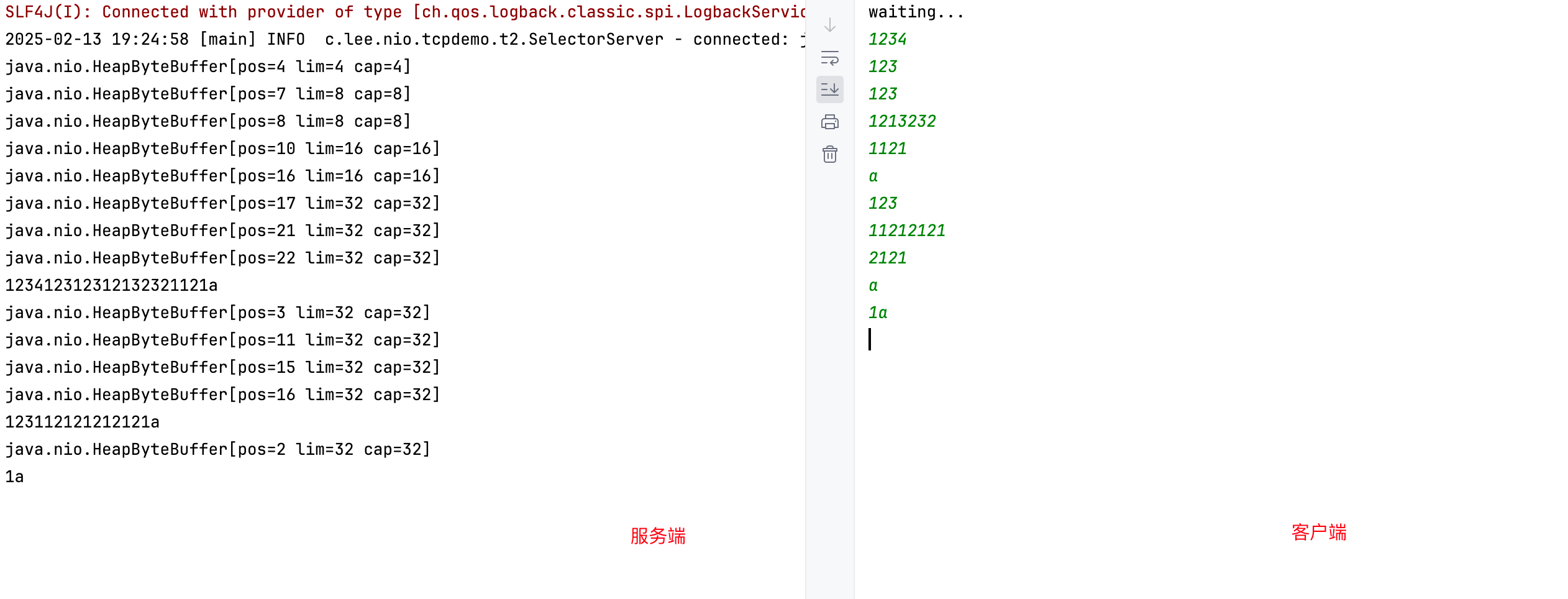
测试效果如下:
4.3 基于长度拆分消息
我们可以把消息以及消息的长度一起传输,分为两种格式:
4.3.1 TLV:Type-Length-Value,
- Type(类型):标识数据的类型,通常是一个固定长度的字段(如1字节或2字节)。
- Length(长度):表示
Value字段的长度,通常是一个固定长度的字段(如1字节或2字节)。 - Value(值):实际的数据内容,长度由
Length字段指定。
假设 Type 为1字节,Length 为2字节,Value 为可变长度:
+------+--------+----------------+
| Type | Length |      Value     |
+------+--------+----------------+
| 0x01 | 0x0005 | Hello          |
+------+--------+----------------+Type = 0x01:表示数据类型为字符串。Length = 0x0005:表示Value的长度为5字节。Value = "Hello":实际数据。
4.3.2 LTV:Length-Type-Value
LTV 是 TLV 的一种变体,区别在于字段的顺序和命名:
- Length(长度):表示整个消息的长度,通常是一个固定长度的字段(如2字节或4字节)。
- Type(类型):标识数据的类型或含义,通常是一个固定长度的字段(如1字节或2字节)。
- Value(值):实际的数据内容,长度由
Length字段减去Type字段的长度决定。
假设 Length 为2字节,Type 为1字节,Value 为可变长度:
+--------+------+----------------+
| Length | Type |      Value     |
+--------+------+----------------+
| 0x0006 | 0x01 | Hello          |
+--------+------+----------------+Length = 0x0006:表示整个消息的长度为6字节(包括Type和Value)。Type = 0x01:表示数据类型为字符串。Value = "Hello":实际数据。
4.3.3 代码示例
这里以LTV为例子,演示服务端如何解析消息:
java
@Slf4j
public class SelectorServer {
    public static void main(String[] args) throws IOException {
        // 1. 打开Selector
        Selector selector = Selector.open();

        // 2. 打开ServerSocketChannel,设置非阻塞模式并绑定到8080端口
        ServerSocketChannel serverSocketChannel = ServerSocketChannel.open();
        serverSocketChannel.bind(new InetSocketAddress(8080));
        serverSocketChannel.configureBlocking(false);

        // 3. 将ServerSocketChannel注册到Selector上,监听连接事件
        SelectionKey sscKey = serverSocketChannel.register(selector, SelectionKey.OP_ACCEPT);

        while (true){
            // 4. 在循环中使用select() 方法阻塞监听事件,
            // 当Selector中的SelectionKey关注的事件发生时,停止阻塞,线程恢复执行
            int select = selector.select(11);

            // 5. 获取发生事件的SelectionKey集合
            Iterator<SelectionKey> iterator = selector.selectedKeys().iterator();
            while (iterator.hasNext()){
                // 6. 遍历SelectionKey处理事件
                SelectionKey key = iterator.next();

                if(key.isAcceptable()) {
                    // 7. 如果是连接事件,接受连接并注册到Selector上监听读事件
                    ServerSocketChannel channel = (ServerSocketChannel) key.channel();
                    SocketChannel socketChannel = channel.accept();
                    log.info("connected: {}", socketChannel);
                    // 注意设置为非阻塞模式
                    socketChannel.configureBlocking(false);
                    // 将SocketChannel注册到Selector上,监听可读事件
                    SelectionKey scKey = socketChannel.register(selector, SelectionKey.OP_READ);
                    // 设置附件,用于存储length
                    scKey.attach(new LTV());
                }
                if (key.isReadable()){
                    // 8. 如果是读事件,读取数据并打印
                    SocketChannel socketChannel = (SocketChannel) key.channel();
                    // 获取附件
                    LTV ltv = (LTV) key.attachment();
                    ByteBuffer byteBuffer ;
                    if(ltv.getLength() == 0){
                        // 如果length为0,表示第一次读取,读取length
                        byteBuffer = ByteBuffer.allocate(4);
                    }else{
                        // 如果length不为0,表示已经读取了length,准备读取消息内容
                        if(ltv.getBuffer() == null)
                            ltv.setBuffer(ByteBuffer.allocate(ltv.getLength()));

                        byteBuffer = ltv.getBuffer();
                    }

                    int read = socketChannel.read(byteBuffer);
                    if (read > 0) {
                        if(ltv.getLength() == 0){
                            // 如果length为0,表示第一次读取,读取length
                            byteBuffer.flip();
                            ltv.setLength(byteBuffer.getInt());
                        }else{
                            // 增加已读取的消息长度
                            ltv.setReadLength(ltv.getReadLength() + read);
                        }

                        if(ltv.getReadLength() == ltv.getLength()){
                            // 如果已经读取了完整的消息,输出消息
                            ltv.getBuffer().flip();
                            byte type = ltv.getBuffer().get();

                            if(type == 1){
                                // 如果type为1,表示文本消息
                                System.out.println("文本:" + new String(ltv.getBuffer().array(), 1, ltv.getBuffer().limit() - 1));
                            }else if (type == 2){
                                // 如果type为2,表示数字消息
                                byte[] data = new byte[ltv.getLength() - 1];
                                ltv.getBuffer().get(data);
                                System.out.println("数字:" + Integer.parseInt(new String(data), 2));
                            }else{
                                // ...其他消息类型
                                System.out.println("其他:" + new String(ltv.getBuffer().array(), 0, ltv.getLength()));
                            }

                            // 清空缓冲区,准备接收下一条消息
                            ltv = new LTV();
                            key.attach(ltv);
                        }

                    }else if (read == -1){
                        // 如果读取到-1,表示客户端已关闭连接,关闭SocketChannel并取消SelectionKey
                        log.info("client closed: {}", socketChannel);
                        socketChannel.close();
                        key.cancel();
                    }
                }

                // 移除当前处理的SelectionKey,防止下次select()重复处理
                iterator.remove();
            }
        }
    }

    /**
     * 拆分消息
     * @param byteBuffer 缓冲区
     */
    private static void split(ByteBuffer byteBuffer) {
        System.out.println(byteBuffer);
        byteBuffer.flip();

        for (int i = 0; i < byteBuffer.limit(); i++) {
            if(byteBuffer.get(i) == 'a'){
                // 找到分隔符,输出消息
                byte[] bytes = new byte[i + 1];
                byteBuffer.get(bytes);
                System.out.println(new String(bytes).trim());
                break;
            }
        }

        byteBuffer.compact();
    }
}

@Data
class LTV{
    private int length;

    private ByteBuffer buffer;
    private int readLength;
}客户端示例:
java
public static void main(String[] args) throws IOException {
    // 1. 创建客户端程序
    SocketChannel socketChannel = SocketChannel.open();
    // 2. 连接服务端程序
    socketChannel.connect(new InetSocketAddress("127.0.0.1", 8080));

    System.out.println("waiting...");

    // 3. 发送消息
    Scanner scanner = new Scanner(System.in);
    while (true) {
        String input = scanner.next();
        if("quit".equals(input)){
            break;
        }

        socketChannel.write(toMessage(input));
    }

    socketChannel.close();
}

/**
 * 将输入内容转为正确消息格式
 * @param input 输入内容
 * @return
 */
private static ByteBuffer toMessage(String input){

    // 类型1个字节
    byte type = 0x01;
    // 输入的是文本
    byte[] bytes = input.getBytes(StandardCharsets.UTF_8);

    // 如果输入的是数字
    if(input.matches("\\d+")){
        type = 0x02;

        String string = Integer.toString(Integer.parseInt(input),2);
        bytes = string.getBytes(StandardCharsets.UTF_8);
    }

    // 类型+内容长度
    int length = bytes.length + 1;

    ByteBuffer byteBuffer = ByteBuffer.allocate(length + 4);

    byteBuffer.putInt(length);  // 写入长度
    byteBuffer.put(type);      // 写入类型
    byteBuffer.put(bytes);     // 写入内容

    byteBuffer.flip();

    return byteBuffer;
}演示结果如下:

5. 多线程优化
在服务端,我们可以让主线程负责建立连接,让其他线程负责读写事件。
主线程:
java
@Slf4j
public class MultiThreadServer {
    public static void main(String[] args) throws IOException {
        Selector selector = Selector.open();

        ServerSocketChannel serverSocketChannel = ServerSocketChannel.open();
        serverSocketChannel.bind(new InetSocketAddress(8080));
        serverSocketChannel.configureBlocking(false);

        serverSocketChannel.register(selector, SelectionKey.OP_ACCEPT);

        // 获取处理器数量
        int processors = Runtime.getRuntime().availableProcessors();
        // 根据处理器数量,创建工作线程
        Worker[] workers = new Worker[processors];
        for (int i = 0; i < processors; i++) {
            workers[i] = new Worker("worker-" + i);
            workers[i].start();
        }

        // 轮循索引
        AtomicInteger index = new AtomicInteger(0);

        while (true){
            selector.select();

            Iterator<SelectionKey> iterator = selector.selectedKeys().iterator();
            while (iterator.hasNext()){
                SelectionKey selectionKey = iterator.next();

                if (selectionKey.isAcceptable()) {
                    ServerSocketChannel channel = (ServerSocketChannel) selectionKey.channel();

                    SocketChannel socketChannel = channel.accept();
                    log.info("connect from {}", socketChannel.getRemoteAddress());

                    // 当有新的连接时,选取下一个工作线程,并将socketChannel注册到工作线程的selector上
                    workers[index.getAndIncrement() % workers.length].register(socketChannel);
                }

                iterator.remove();
            }
        }
    }
}工作线程:
java
@Slf4j
public class Worker implements Runnable{
    private Thread thread;
    private Selector selector;
    private String name;

    private ConcurrentLinkedQueue<Runnable> taskQueue;

    public Worker(String name) {
        this.name = name;
        taskQueue = new ConcurrentLinkedQueue<>();
    }

    public void start() throws IOException {
        this.selector = Selector.open();
        this.thread = new Thread(this);
        thread.start();
    }

    public void register(SocketChannel socketChannel) throws IOException {
        socketChannel.configureBlocking(false);
        this.selector.wakeup();
        socketChannel.register(this.selector, SelectionKey.OP_READ);
    }

    public void register2(SocketChannel socketChannel){
        taskQueue.add(()->{
            try {
                socketChannel.configureBlocking(false);
                socketChannel.register(this.selector, SelectionKey.OP_READ);
            } catch (IOException e) {
                e.printStackTrace();
            }
        });

        this.selector.wakeup();
    }

    @Override
    public void run() {
        while (true){
            try {
                selector.select();
                // 与register2配合使用
                Runnable runnable = taskQueue.poll();
                if(runnable != null){
                    runnable.run();
                }

                Iterator<SelectionKey> iterator = selector.selectedKeys().iterator();
                while (iterator.hasNext()) {
                    SelectionKey selectionKey = iterator.next();

                    SocketChannel socketChannel = (SocketChannel) selectionKey.channel();

                    try {
                        if (selectionKey.isReadable()) {

                            ByteBuffer buffer = ByteBuffer.allocate(1024);
                            int len = socketChannel.read(buffer);
                            if (len > 0) {
                                log.info(this.name + " read...");

                                buffer.flip();
                                while (buffer.hasRemaining()) {
                                    log.info(String.valueOf((char) buffer.get()));
                                }
                                buffer.clear();
                            } else if (len == -1) {
                                socketChannel.close();
                                selectionKey.cancel();
                            }
                        }

                        iterator.remove();
                    }catch (Exception e){
                        log.info("断开连接了:{}",socketChannel);
                        socketChannel.close();
                        selectionKey.cancel();
                    }

                }

            } catch (IOException e) {
                e.printStackTrace();
            }

        }
    }
}在多线程优化中,有一个地方需要注意:如果工作线程处于阻塞状态selector.select()时,在主线程中直接使用socketChannel.register()是不会成功的,反而会造成主线程阻塞,所以上面的例子提供的两种方法注册:
- 第一种是首先将工作线程唤醒
selector.wakeup(),然后再进行注册;注意,selector.wakeup()方法会在selector上保留唤醒标志,如果调用selector.select时,其身上有唤醒标志,那么也会立即返回不会阻塞; - 第二种是使用队列,在工作线程中维护队列用于在selector上注册socketChannel,然后selector,之后检查队列中有没有任务,如果有就取出来执行注册;