Appearance
Netty - 02 组件介绍
本文介绍Netty中关键的几个组件。
1. EventLoop与EventLoopGroup
EventLoop本质是一个单线程执行器(同时维护了一个Selector),里面有run()方法处理Channel上源源不断的IO事件。
EventLoop继承自java.util.concurrent.ScheduledExecutorService,因此包含了线程池的所有方法,也就是说可以向EventLoop提交普通任务和定时任务;EventLoop也继承自io.netty.util.concurrent,其中包含两个方法:boolean inEventLoop(Thread thread);判断一个线程是否属于该EventLoop;EventExecutorGroup parent();返回属于的EventLoopGroup;
EventLoopGroup就是一组EventLoop,Channel一般会调用EventLoopGroup中的register()方法来绑定一个EventLoop,后续这个Channel上的IO事件都是有绑定的EventLoop处理。
EventLoopGroup包括以下方法:
EventLoop next();:获取下一个EventLoop;Iterator<EventExecutor> iterator();:遍历该组中的EventLoop;Future<?> shutdownGracefully();:优雅关闭EventLoopGroup;
1.1 EventLoopGroup中有多少个线程?
我们以NioEventLoopGroup为例,直接创建实例:
java
EventLoopGroup eventLoopGroup = new NioEventLoopGroup();我们跟踪构造函数,会在MultithreadEventLoopGroup发现以下代码:
java
private static final int DEFAULT_EVENT_LOOP_THREADS;

static {
    DEFAULT_EVENT_LOOP_THREADS = Math.max(1, SystemPropertyUtil.getInt(
            "io.netty.eventLoopThreads", NettyRuntime.availableProcessors() * 2));

    if (logger.isDebugEnabled()) {
        logger.debug("-Dio.netty.eventLoopThreads: {}", DEFAULT_EVENT_LOOP_THREADS);
    }
}

protected MultithreadEventLoopGroup(int nThreads, Executor executor, Object... args) {
    super(nThreads == 0 ? DEFAULT_EVENT_LOOP_THREADS : nThreads, executor, args);
}可以看到,如果没有指定group中EventLoop数量(即线程数),那么取值逻辑如下:
- 首先查看虚拟机参数
io.netty.eventLoopThreads是否有值,如果有值则取该值,否则取系统处理器数量x2; - 然后用第一步取到的值与1比大小,取较大值;
1.2 遍历与获取EventLoop
java
EventLoopGroup eventLoopGroup = new NioEventLoopGroup();

// 遍历EventLoop
int count = 0;
Iterator<EventExecutor> iterator = eventLoopGroup.iterator();
while (iterator.hasNext()) {
    EventExecutor eventLoop = iterator.next();
    System.out.println(eventLoop);
    count++;
}
System.out.println(count);

// 通过next()获取eventLoop
EventLoop eventLoop1 = eventLoopGroup.next();
System.out.println(eventLoop1);
EventLoop eventLoop2 = eventLoopGroup.next();
System.out.println(eventLoop2);结果如下:
txt
io.netty.channel.nio.NioEventLoop@4facf68f
io.netty.channel.nio.NioEventLoop@76508ed1
io.netty.channel.nio.NioEventLoop@41e36e46
io.netty.channel.nio.NioEventLoop@15c43bd9
io.netty.channel.nio.NioEventLoop@3d74bf60
io.netty.channel.nio.NioEventLoop@4f209819
io.netty.channel.nio.NioEventLoop@15eb5ee5
io.netty.channel.nio.NioEventLoop@2145b572
io.netty.channel.nio.NioEventLoop@39529185
io.netty.channel.nio.NioEventLoop@72f926e6
io.netty.channel.nio.NioEventLoop@3daa422a
io.netty.channel.nio.NioEventLoop@31c88ec8
io.netty.channel.nio.NioEventLoop@1cbbffcd
io.netty.channel.nio.NioEventLoop@27ce24aa
io.netty.channel.nio.NioEventLoop@481a996b
io.netty.channel.nio.NioEventLoop@3d51f06e
16
io.netty.channel.nio.NioEventLoop@4facf68f
io.netty.channel.nio.NioEventLoop@76508ed11.3 执行普通任务、定时任务
EventLoopGroup有两个实现:
DefaultEventLoopGroup:可以执行普通任务、定时任务;NioEventLoopGroup:不仅可以执行普通任务、定时任务,也可以监听多通道Channel上的IO事件;
下面的例子演示了EventLoopGroup上执行普通任务和定时任务:
java
EventLoopGroup eventLoopGroup = new DefaultEventLoopGroup();

// 执行普通任务
eventLoopGroup.submit(()->{
    try {
        log.info("开始执行普通任务...");
        Thread.sleep(1000);
        log.info("结束执行普通任务...");
    } catch (InterruptedException e) {
        throw new RuntimeException(e);
    }
});

// 执行定时任务:每秒输出当前事件
eventLoopGroup.scheduleAtFixedRate(()->{
    log.info("报时:{}", LocalDateTime.now());
},0,1, TimeUnit.SECONDS);1.4 监听IO事件
我们在Netty入门案例中已经使用过NioEventLoopGroup来监听Channel上的事件了:
java
@Slf4j
public class HelloServer {
    public static void main(String[] args) {
        new ServerBootstrap()
                .group(new NioEventLoopGroup())
                .channel(NioServerSocketChannel.class)
                .childHandler(new ChannelInitializer<NioSocketChannel>() {
                    @Override
                    protected void initChannel(NioSocketChannel nioSocketChannel) throws Exception {
                        nioSocketChannel.pipeline().addLast(new StringDecoder());
                        nioSocketChannel.pipeline().addLast(new ChannelInboundHandlerAdapter(){
                            @Override
                            public void channelRead(ChannelHandlerContext ctx, Object msg) throws Exception {
                                log.info(msg.toString());
                            }
                        });
                    }
                })
                .bind(8080);
    }
}1.5 分工细化
我们在NIO的学习中,知道可以让主线程(Boss)监听连接事件,让Worker线程监听读写事件,在Netty也可以:
java
@Slf4j
public class HelloServer {
    public static void main(String[] args) {
        new ServerBootstrap()
                // 第一个参数:new NioEventLoopGroup(1)为主线程,监听连接事件
                // 第二个参数:new NioEventLoopGroup()为Worker线程,监听读写事件
                .group(new NioEventLoopGroup(1), new NioEventLoopGroup())
                .channel(NioServerSocketChannel.class)
                .childHandler(new ChannelInitializer<NioSocketChannel>() {
                    @Override
                    protected void initChannel(NioSocketChannel nioSocketChannel) throws Exception {
                        nioSocketChannel.pipeline().addLast(new StringDecoder());
                        nioSocketChannel.pipeline().addLast(new ChannelInboundHandlerAdapter(){
                            @Override
                            public void channelRead(ChannelHandlerContext ctx, Object msg) throws Exception {
                                log.info(msg.toString());
                            }
                        });
                    }
                })
                .bind(8080);
    }
}1.6 进一步细化
在Netty中,收到消息后需要经过一系列处理器Handler处理,如果某个处理器耗时较长,那么也可以将这个处理器交由业务线程处理:
java
@Slf4j
public class HelloServer {
    public static void main(String[] args) {
        // 创建业务处理线程池
        EventLoopGroup businessGroup = new DefaultEventLoopGroup();

        new ServerBootstrap()
                // 第一个参数:new NioEventLoopGroup(1)为主线程,监听连接事件
                // 第二个参数:new NioEventLoopGroup()为Worker线程,监听读写事件
                .group(new NioEventLoopGroup(1), new NioEventLoopGroup())
                .channel(NioServerSocketChannel.class)
                .childHandler(new ChannelInitializer<NioSocketChannel>() {
                    @Override
                    protected void initChannel(NioSocketChannel nioSocketChannel) throws Exception {
                        nioSocketChannel.pipeline().addLast(new StringDecoder());
                        nioSocketChannel.pipeline().addLast(new ChannelInboundHandlerAdapter(){
                            @Override
                            public void channelRead(ChannelHandlerContext ctx, Object msg) throws Exception {
                                log.info(msg.toString());
                                ctx.fireChannelRead(msg);
                            }
                        });
                        // 这个处理器耗时较长,可以交由业务线程处理
                        nioSocketChannel.pipeline().addLast(businessGroup, "handler-3", new ChannelInboundHandlerAdapter(){
                            @Override
                            public void channelRead(ChannelHandlerContext ctx, Object msg) throws Exception {
                                Thread.sleep(5000);  // 睡眠5秒,模拟耗时较长操作
                                log.info(ctx.name() + ": " + msg.toString());
                            }
                        });
                    }
                })
                .bind(8080);
    }
}结果如下:
java
2025-02-16 21:44:43 [nioEventLoopGroup-4-1] INFO  com.lee.netty.demo1.HelloServer - hello world
2025-02-16 21:44:48 [defaultEventLoopGroup-2-1] INFO com.lee.netty.demo1.HelloServer - handler-3: hello world可以看到handler-3处理器是由defaultEventLoopGroup-2-1调用的。
1.7 切换线程源码
消息到达服务端时会经过很多处理器,并且不同的处理器可以由不同线程执行,那么是如何切换线程的呢?答案在AbstractChannelHandlerContext中的方法:
java
static void invokeChannelRead(final AbstractChannelHandlerContext next, Object msg) {
    final Object m = next.pipeline.touch(ObjectUtil.checkNotNull(msg, "msg"), next);
  	// 获取下一个处理器的线程
    EventExecutor executor = next.executor();
  	// 与当前线程是同一个,则直接执行
    if (executor.inEventLoop()) {
        next.invokeChannelRead(m);
    } else {
      	// 不是同一个线程,则将要执行的代码作为任务提交给下一个处理器的线程
        executor.execute(new Runnable() {
            @Override
            public void run() {
                next.invokeChannelRead(m);
            }
        });
    }
}2. Channel、Future与Promise
2.1 Channel
在客户端代码中,我们通过启动器连接到服务器:
java
Bootstrap bootstrap = new Bootstrap();
// 省略代码...
ChannelFuture channelFuture = bootstrap.connect(new InetSocketAddress("127.0.0.1", 8080));可以看到connect()方法返回的是一个Future对象,说明connect()是一步方法。
所以我们需要同步等待连接建立好,才能获取连接:
java
// 同步阻塞,等待连接建立
channelFuture.sync();
// 获取建立好的连接
Channel channel = channelFuture.channel();之后就可以使用连接进行发送数据了。
java
channel.writeAndFlush("hello world");当然,我们也可以使用异步对象,当连接建立好后,会调用传入的回调函数:
java
channelFuture.addListener(new ChannelFutureListener() {
    @Override
    public void operationComplete(ChannelFuture future) throws Exception {
        log.info("连接建立成功...");
        Channel channel = future.channel();

        channel.writeAndFlush("Hello Server");
    }
});同理,channel的关闭也是一步方法,也可参照连接方法进行管理:
java
ChannelFuture closeFuture = channel.close();
closeFuture.sync();
// 连接关闭后,做一些清理工作...2.2 Future和Promise
在异步处理时,经常用到Future和Promise接口,首先要说明的是netty中的Future和JDK中的Future同名,但是是不同的接口。netty中的Future继承自JDK中的Future,而Promise又继承自netty中的Future。
- JDK Future只能同步等待任务结束(成功或失败)才能得到结果;
- netty Future可以同步等待任务结束得到结果,也可以异步方式得到结果,但都是要等到任务结束;
- netty Promise不仅有netty Future的功能,而且脱离了任务独立存在,只作为两个线程间传递结果的容器;
| 功能 | JDK Future | netty Future | netty Promise |
|---|---|---|---|
| cancel | 取消任务 | ✅ | ✅ |
| isCanceled | 任务是否取消 | ✅ | ✅ |
| isDone | 任务是否完成,不能区分成功失败 | ✅ | ✅ |
| get | 获取任务结果,阻塞等待 | ✅ | ✅ |
| getNow | / | 非阻塞式获取任务结果,还未产生结果时返回null | ✅ |
| await | / | 等待任务结束,如果任务失败,不会抛出异常,而是通过isSuccess判断 | ✅ |
| sync | / | 阻塞等待任务结束,如果任务失败,抛出异常 | ✅ |
| isSuccess | / | 判断任务是否成功 | ✅ |
| cause | / | 获取失败信息,非阻塞,如果没有失败,返回null | ✅ |
| addListener | / | 添加回调,异步接收结果 | ✅ |
| setSuccess | / | / | 设置成功结果 |
| setFailure | / | / | 设置失败结果 |
JDK Future示例
java
public static void main(String[] args) throws ExecutionException, InterruptedException {
    // 创建线程池
    ExecutorService threadPool = Executors.newFixedThreadPool(2);

    // 提交任务,返回Future对象
    Future<Integer> future = threadPool.submit(new Callable<Integer>() {
        @Override
        public Integer call() throws Exception {
            log.info("task running...");
            Thread.sleep(1000);
            return 50;
        }
    });

    log.info("等待结果");
    log.info("结果:{}", future.get());  // get() 阻塞等待结果

    // 关闭线程池
    threadPool.shutdown();
}netty Future示例
java
public static void main(String[] args) throws ExecutionException, InterruptedException {
    EventLoopGroup group = new NioEventLoopGroup();
    EventLoop eventLoop = group.next();

    Future<String> future = eventLoop.submit(new Callable<String>() {
        @Override
        public String call() throws Exception {
            log.info("task running...");
            Thread.sleep(1000);
            return "success";
        }
    });

    // 同步阻塞等待结果
//        future.sync();
//        log.info("等待结果");
//        log.info("结果:{}", future.getNow());

    // 异步获取结果
    future.addListener(new GenericFutureListener<Future<? super String>>() {
        @Override
        public void operationComplete(Future<? super String> future) throws Exception {
            log.info("异步任务执行完毕");
            Object now = future.getNow();
            log.info("结果 {}" , now);
        }
    });

    log.info("主线程执行完毕");
  // 优雅关闭EventLoopGroup
    group.shutdownGracefully();
}netty Promise示例
java
public static void main(String[] args) throws ExecutionException, InterruptedException {
    EventLoop eventLoop = new NioEventLoopGroup().next();

    // 手动创建Promise
    DefaultPromise<Integer> promise = new DefaultPromise<>(eventLoop);

    new Thread(()->{
        try {
            log.info("开始计算...");
            Thread.sleep(1000);
            // 手动指定成功结果
            promise.setSuccess(888);
        }catch (Exception e){
            e.printStackTrace();
        }
    }).start();

    log.info("等待结果");
    log.info("结果:{}",promise.get());  // 同步阻塞获取结果
}3. Pipeline与Handler
当一条消息到达服务端后,会经过一系列处理器Handler,这些处理器组成了流水线Pipeline。处理器分为入站处理器和出站处理器:
- InboundHandler:入站处理器,是指服务端接收到的消息需要经过的处理器;
- OutboundHandler:出站处理器,是指服务端发送出去的消息需要经过的处理器;
在Netty中提供了一些已定义好的处理器,例如StringEncoder、StringDecoder、LoggingHandler等,我们也可以定义自己的处理器:
- 如果要自定义入站处理器,需要继承
ChannelInboundHandlerAdapter类,并重写channelRead()方法; - 如果要自定义出站处理器,需要继承
ChannelOutboundHandlerAdapter类,并重写write()方法;
3.1 入站处理器
我们可以通过Channel的pipeline()方法获取流水线,然后向其中增加处理器,netty提供了测试用的EmbeddedChannel,所以我们可以用它来方便地测试:
java
public static void main(String[] args) {
    EmbeddedChannel embeddedChannel = new EmbeddedChannel();

    // 增加日志处理器
    embeddedChannel.pipeline().addLast(new LoggingHandler(LogLevel.DEBUG));
    // 增加解码器:将ByteBuf转换为字符串
    embeddedChannel.pipeline().addLast(new StringDecoder());
    // 增加自定义处理器:直接输出
    embeddedChannel.pipeline().addLast(new ChannelInboundHandlerAdapter(){
        @Override
        public void channelRead(ChannelHandlerContext ctx, Object msg) throws Exception {
            System.out.println(msg);
            super.channelRead(ctx, msg);
        }
    });

    // 模拟客户端发送消息
    ByteBuf buffer = ByteBufAllocator.DEFAULT.buffer();
    buffer.writeBytes("hello world".getBytes());
    embeddedChannel.writeInbound(buffer);
}结果如下:
java
2025-02-17 19:55:49 [main] DEBUG i.n.handler.logging.LoggingHandler - [id: 0xembedded, L:embedded - R:embedded] READ: 11B
         +-------------------------------------------------+
         |  0  1  2  3  4  5  6  7  8  9  a  b  c  d  e  f |
+--------+-------------------------------------------------+----------------+
|00000000| 68 65 6c 6c 6f 20 77 6f 72 6c 64                |hello world     |
+--------+-------------------------------------------------+----------------+
2025-02-17 19:55:49 [main] DEBUG i.n.handler.logging.LoggingHandler - [id: 0xembedded, L:embedded - R:embedded] READ: 11B
         +-------------------------------------------------+
         |  0  1  2  3  4  5  6  7  8  9  a  b  c  d  e  f |
+--------+-------------------------------------------------+----------------+
|00000000| 68 65 6c 6c 6f 20 77 6f 72 6c 64                |hello world     |
+--------+-------------------------------------------------+----------------+
hello world
2025-02-17 19:55:49 [main] DEBUG i.n.handler.logging.LoggingHandler - [id: 0xembedded, L:embedded - R:embedded] READ COMPLETE
2025-02-17 19:55:49 [main] DEBUG i.n.handler.logging.LoggingHandler - [id: 0xembedded, L:embedded - R:embedded] READ COMPLETE可以看到前面的日志处理器将我们写入的ByteBuf打印了出来,然后SrtingDecoder处理器将ByteBuf转换为字符串,并传给下一个处理器,下一个处理器是我们自定义的处理器,所以在channelRead()方法中拿到的msg就是上一个处理器的结果字符串,然后我们将其打印出来,如第13行,之后如果要把结果传给下一个处理器,需要调用super.channelRead(ctx, msg);或ctx.fireChannelRead(msg);,当然,我们可以将消息转换为其他类型传给下一个处理器:
java
public static void main(String[] args) {
    EmbeddedChannel embeddedChannel = new EmbeddedChannel();

    // 下面增加处理器,并给处理器取名

    // 增加日志处理器
    embeddedChannel.pipeline().addLast("h1", new LoggingHandler(LogLevel.DEBUG));
    // 增加解码器:将ByteBuf转换为字符串
    embeddedChannel.pipeline().addLast("h2", new StringDecoder());
    // 增加自定义处理器:将消息转换为Greeting对象,并传给下一个处理器
    embeddedChannel.pipeline().addLast("h3", new ChannelInboundHandlerAdapter(){
        @Override
        public void channelRead(ChannelHandlerContext ctx, Object msg) throws Exception {
            System.out.println(ctx.name() + ":" + msg); // ctx.name()获取处理器名称
            Greeting greeting = new Greeting(msg.toString(), LocalDateTime.now());
            ctx.fireChannelRead(greeting);
        }
    });
    // 自定义处理器,接收到的数据是Greeting对象
    embeddedChannel.pipeline().addLast("h4", new ChannelInboundHandlerAdapter(){
        @Override
        public void channelRead(ChannelHandlerContext ctx, Object msg) throws Exception {
            System.out.println(ctx.name() + ":" + msg);
            super.channelRead(ctx, msg);
        }
    });

    // 模拟客户端发送消息
    ByteBuf buffer = ByteBufAllocator.DEFAULT.buffer();
    buffer.writeBytes("hello world".getBytes());
    embeddedChannel.writeInbound(buffer);
}java
@Slf4j
@AllArgsConstructor
@ToString
class Greeting{
    private String content;
    private LocalDateTime localDateTime;
}部分结果:
java
h3:hello world
h4:Greeting(content=hello world, localDateTime=2025-02-17T20:05:50.343752)可以看到h4处理器拿到的数据是h3处理器转换后的结果。
3.2 出站处理器
除了入站处理器,我们也可以添加出站处理器:
java
public static void main(String[] args) {
  EmbeddedChannel embeddedChannel = new EmbeddedChannel();

  // 添加三个出站处理器
  embeddedChannel.pipeline().addLast("h1", new ChannelOutboundHandlerAdapter(){
      @Override
      public void write(ChannelHandlerContext ctx, Object msg, ChannelPromise promise) throws Exception {
          log.info("{}:{}", ctx.name(), (String) msg);

          super.write(ctx, msg, promise);
      }
  });
  embeddedChannel.pipeline().addLast("h2", new ChannelOutboundHandlerAdapter(){
      @Override
      public void write(ChannelHandlerContext ctx, Object msg, ChannelPromise promise) throws Exception {
          log.info("{}:{}", ctx.name(), (String) msg);

          // 增加前缀
          String data = "[prefix]" + msg.toString();
          ctx.write(data, promise);
      }
  });
  embeddedChannel.pipeline().addLast("h3", new ChannelOutboundHandlerAdapter(){
      @Override
      public void write(ChannelHandlerContext ctx, Object msg, ChannelPromise promise) throws Exception {
          log.info("{}:{}", ctx.name(), (String) msg);

          // 转换为大写字母
          String upperCase = msg.toString().toUpperCase();
          ctx.write(upperCase, promise);
      }
  });

  // 向出站处理器写内容
  embeddedChannel.writeOutbound("abc");

  // 获取出站处理器的结果
  Object o = embeddedChannel.readOutbound();
  log.info("{}:{}","main", o.toString());
}结果如下:
java
2025-02-17 20:44:48 [main] INFO  com.lee.netty.handler.Demo02 - h3:abc
2025-02-17 20:44:48 [main] INFO  com.lee.netty.handler.Demo02 - h2:ABC
2025-02-17 20:44:48 [main] INFO  com.lee.netty.handler.Demo02 - h1:[prefix]ABC
2025-02-17 20:44:48 [main] INFO com.lee.netty.handler.Demo02 - main:[prefix]ABC可以看到,出站处理器的处理顺序是从后往前,即最先添加的出站处理器最后执行,最后添加的出站处理器最先执行。并且,调用ctx.write(msg, promise);或super.write(ctx, msg, promise);,将前一个处理器的结果会传给下一个处理器,如果其中某个处理器没有传递数据,则会导致下一个处理器获取到的结果为null。
3.3 入站和出站处理器
我们可以在入站处理器中触发出站处理器:
ctx.writeAndFlush(msg):从当前处理器触发出站处理器,只有在当前处理器之前的出站处理器才会被调用;ctx.channel().writeAndFlush(msg);:从尾处理器触发出站处理器,整个流水线上的出站处理器都可以被调用;
TIP
补充:在netty中,流水线上已经为我们提供了头尾处理器,我们自己添加的处理器在头尾处理器之间。
java
public static void main(String[] args) {
EmbeddedChannel embeddedChannel = new EmbeddedChannel();
embeddedChannel.pipeline().addLast("h1", new InboundChannelHandler());
embeddedChannel.pipeline().addLast("h2", new OutboudnChannelHandler());
embeddedChannel.pipeline().addLast("h3", new ChannelInboundHandlerAdapter(){
@Override
public void channelRead(ChannelHandlerContext ctx, Object msg) throws Exception {
// 1. 从当前处理器往前触发出站处理器
//ctx.writeAndFlush(msg);
java
class InboundChannelHandler extends ChannelInboundHandlerAdapter{
    @Override
    public void channelRead(ChannelHandlerContext ctx, Object msg) throws Exception {
        System.out.println("入站处理器--" + ctx.name() + ":" + msg);
        super.channelRead(ctx, msg);
    }
}java
class OutboudnChannelHandler extends ChannelOutboundHandlerAdapter{
    @Override
    public void write(ChannelHandlerContext ctx, Object msg, ChannelPromise promise) throws Exception {
        System.out.println("出站处理器--" + ctx.name() + ":" + msg);
        super.write(ctx, msg, promise);
    }
}如果是1. 从当前处理器往前触发出站处理器,结果如下:
txt
入站处理器--h1:hello
出站处理器--h2:hello如果是2. 从尾处理器往前触发出站处理器,结果如下:
txt
入站处理器--h1:hello
出站处理器--h5:hello
出站处理器--h4:hello
出站处理器--h2:hello4. ByteBuf
ByteBuf是netty对NIO中ByteBuffer的包装与增强。
4.1 结构
ByteBuf结构如下,包含一个读指针和写指针:
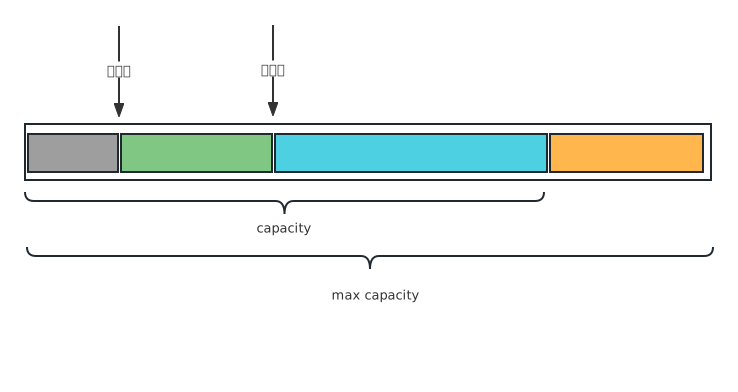
- 灰色:已读部分
- 绿色:可读部分
- 蓝色:可写部分
- 橙色:可扩容部分
我们可以使用ByteBufAllocator来创建ByteBuf实例:
java
// 指定初始容量
ByteBuf buffer1 = ByteBufAllocator.DEFAULT.buffer(16);
// 指定初始容量和最大容量
ByteBuf buffer2 = ByteBufAllocator.DEFAULT.buffer(16, 1024);如果没有指定最大容量,则默认值为Integer.MAX_VALUE;
4.2 写入数据
ByteBuf提供了一系列写入方法:
java
public static void main(String[] args) {
    ByteBuf buffer = ByteBufAllocator.DEFAULT.buffer(16);

    buffer.writeByte(97);  // 写入一个字节
    buffer.writeBytes(new byte[]{1, 2, 3, 4, 5, 6, 7, 8, 9, 10});  // 写入一个字节数组
    buffer.writeInt(Integer.MAX_VALUE);  // 写入一个整数
    buffer.writeBoolean(false);  // 写入布尔值
    buffer.writeCharSequence("hello world", StandardCharsets.UTF_8); // 写入字符串

    System.out.println(buffer);
    String data = ByteBufUtil.prettyHexDump(buffer);
    System.out.println(data);
}txt
PooledUnsafeDirectByteBuf(ridx: 0, widx: 27, cap: 64)
         +-------------------------------------------------+
         |  0  1  2  3  4  5  6  7  8  9  a  b  c  d  e  f |
+--------+-------------------------------------------------+----------------+
|00000000| 61 01 02 03 04 05 06 07 08 09 0a 7f ff ff ff 00 |a...............|
|00000010| 68 65 6c 6c 6f 20 77 6f 72 6c 64                |hello world     |
+--------+-------------------------------------------------+----------------+从结果我们发现,ByteBuf有自动扩容机制,因为我们声明的大小是16字节,最终buffer的容量是64字节。
扩容机制如下:
- 首先计算新容量,如果新容量小于64字节,则直接扩容到64字节;
- 如果新容量大于64字节,则直接扩容到大于或等于新容量的最小的 2 的幂次方值;
其中计算大于或等于某值的最小的 2 的幂次方值源码如下:
java
public static int findNextPositivePowerOfTwo(final int value) {
    return 1 << (32 - Integer.numberOfLeadingZeros(value - 1));
}- 首先,
value - 1将输入值减去 1。这一步是为了处理边界情况,例如当value本身已经是 2 的幂时。 - 然后是
Integer.numberOfLeadingZeros(value - 1),用于计算一个整数的二进制表示中最高位 1 前面的 0 的个数。例如: - 对于
value - 1 = 7(二进制为00000000 00000000 00000000 00000111),numberOfLeadingZeros返回29,因为最高位 1 前有 29 个 0。 - 对于
value - 1 = 15(二进制为00000000 00000000 00000000 00001111),numberOfLeadingZeros返回28。 - 然后计算
32 - Integer.numberOfLeadingZeros(value - 1),实际上返回的就是最高位1的所在位置,例如:- 如果
value - 1 = 7,numberOfLeadingZeros返回29,那么32 - 29 = 3,表示最高位 1 在第 3 位。 - 如果
value - 1 = 15,numberOfLeadingZeros返回28,那么32 - 28 = 4,表示最高位 1 在第 4 位。
- 如果
- 最后计算
1 << (32 - Integer.numberOfLeadingZeros(value - 1)),使用位移运算符将1左移(32 - numberOfLeadingZeros(value - 1))位。这样就得到了大于或等于value的最小的 2 的幂次方值。
4.3 读取数据
ByteBuf也提供了一系列读取数据的方法:
java
public static void main(String[] args) {
    // 创建一个ByteBuf并写入数据
    ByteBuf buffer = ByteBufAllocator.DEFAULT.buffer();
    buffer.writeByte(97);
    buffer.writeBoolean(false);
    buffer.writeInt(123456);
    buffer.writeBytes("你好".getBytes(StandardCharsets.UTF_8));

    System.out.println(buffer.readByte());  // 读取一个字节
    System.out.println(buffer.readBoolean());  // 读取布尔值
    System.out.println(buffer.readInt());  // 读取整数
    // 读取字符串,由于在UTF-8编码中,一个汉字占3个字节,所以长度为6
    System.out.println(buffer.readCharSequence(6, StandardCharsets.UTF_8));
}4.4 slice()
slice()方法是将一个ByteBuf切成一个全新缓存,但是与原始缓存共用同一块内存空间,所以改变新缓存的值,会影响原始缓存的内容。
java
public static void main(String[] args) {
    ByteBuf buffer = ByteBufAllocator.DEFAULT.buffer();
    buffer.writeBytes(new byte[]{1, 2, 3, 4, 5});

    // 切片
    ByteBuf slice01 = buffer.slice(0, 3);
    ByteBuf slice02 = buffer.slice(3, 2);

    System.out.println(ByteBufUtil.prettyHexDump(slice01));
    System.out.println(ByteBufUtil.prettyHexDump(slice02));

    // 改变slice 第一个字节的值
    slice01.setByte(0,99);

    // buffer也改变了
    System.out.println(ByteBufUtil.prettyHexDump(buffer));
    System.out.println(ByteBufUtil.prettyHexDump(slice01));
}ByteBufUtil.prettyHexDump() 可以方便地打印缓存中的内容。
4.5 ByteBuf内存管理
在Netty中,ByteBuf根据堆内和堆外、是否池化分为几种类型,不同类型的内存管理要求不同:
UnpooledHeapByteBuf:使用JVM内存,等待GC回收即可UnpooledDirectByteBuf:使用直接内存,需要特殊方法回收PooledByteBuf和子类:使用了池化机制,需要更复杂的规则回收 「重用」
所以Netty定义了ReferenceCounted接口,根据引用计数法则判断一个对象是否还有用。如果某个对象的引用计数为0,那么ByteBuf的内存将会被回收,即使ByteBuf对象还存在,它的方法也无法正常使用。
ByteBuf对象的默认引用计数为1,调用release()方法会使引用计数-1,调用retain()方法会使引用计数+1。
java
public static void main(String[] args) {
    ByteBuf buffer = ByteBufAllocator.DEFAULT.buffer();
    buffer.writeBytes(new byte[]{1, 2, 3, 4, 5});

    ByteBuf slice01 = buffer.slice(0, 3);
    ByteBuf slice02 = buffer.slice(3, 2);
    // 在slice01上释放内存,此时slice01所占据的内存会被释放
    slice01.release();

    // 由于slice01所占据的内存和slice02所占据的内存是同一块内存,所以下面的方法会报错
    System.out.println(slice02.readByte());
}上面的代码会抛出异常如下:
txt
Exception in thread "main" io.netty.util.IllegalReferenceCountException: refCnt: 0补充:
- 在流水线上,netty提供了头尾处理器,其中职责就有释放缓冲区内存;