Appearance
Netty - 04 协议设计
本文介绍如何设计协议,以及演示HTTP和Redis协议。
1. HTTP协议演示
Netty提供了HttpServerCodec用于解析HTTP协议。HttpServerCodec既是入站处理器,也是出站处理器,可以将请求封装成消息对象,也可以将响应对象封装成字节流发送给客户端。
HttpServerCodec会将请求封装成两个对象:HttpRequest和HttpContent。
SimpleChannelInboundHandler泛型指定了感兴趣的类型,只有消息为该类型,该处理器才会执行。
java
public static void main(String[] args) {
    new ServerBootstrap()
            .group(new NioEventLoopGroup(1), new NioEventLoopGroup())
            .channel(NioServerSocketChannel.class)
            .childHandler(new ChannelInitializer<NioSocketChannel>() {
                @Override
                protected void initChannel(NioSocketChannel nioSocketChannel) throws Exception {
                    nioSocketChannel.pipeline().addLast(new LoggingHandler(LogLevel.DEBUG));
                    // 处理HTTP请求
                    nioSocketChannel.pipeline().addLast(new HttpServerCodec());
                    // 只对HttpRequest感兴趣
                    nioSocketChannel.pipeline().addLast(new SimpleChannelInboundHandler<HttpRequest>() {
                        @Override
                        protected void channelRead0(ChannelHandlerContext channelHandlerContext, HttpRequest httpRequest) throws Exception {
                            // 发送响应
                            DefaultFullHttpResponse response = new DefaultFullHttpResponse(
                                    httpRequest.protocolVersion(), HttpResponseStatus.OK
                            );

                            byte[] bytes = "<h1>Hello, world!</h1>".getBytes(StandardCharsets.UTF_8);
                            response.content().writeBytes(bytes);
                            // 指定内容长度,否则浏览器会一直转圈等待
                            response.headers().add("Content-Length", bytes.length);

                            channelHandlerContext.writeAndFlush(response);
                        }
                    });

                }
            })
            .bind(8080);
}结果演示:
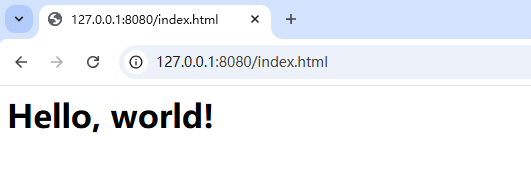
2. Redis协议演示
Redis使用称为RESP(Redis serialization protocol)作为客户端和服务端通信协议,详细内容如下:
https://redis.io/docs/latest/develop/reference/protocol-spec/
批量字符串 (Bulk Strings): 以 "$" 开头,后跟字符串长度,再后跟字符串内容,以 "\r\n" 结尾。用于表示二进制安全的字符串,可以包含任意字符。
- 示例:
$6\r\nfoobar\r\n
- 示例:
数组 (Arrays): 以 "*" 开头,后跟数组元素个数,再后跟每个元素的 RESP 表示。用于表示多个值的集合,例如命令返回的多个结果。
- 示例:
*2\r\n$3\r\nfoo\r\n$3\r\nbar\r\n
- 示例:
下面的例子演示了使用Netty向Redis服务发送set age 12命令:
java
private static byte[] LINE = "\r\n".getBytes(StandardCharsets.UTF_8);

public static void main(String[] args) throws InterruptedException {
    NioEventLoopGroup group = new NioEventLoopGroup();

    Channel channel = new Bootstrap()
            .group(group)
            .channel(NioSocketChannel.class)
            .handler(new ChannelInitializer<NioSocketChannel>() {
                @Override
                protected void initChannel(NioSocketChannel nioSocketChannel) throws Exception {
                    nioSocketChannel.pipeline().addLast(new LoggingHandler(LogLevel.DEBUG));
                }
            })
            .connect(new InetSocketAddress("127.0.0.1", 6379))
            .sync()
            .channel();

    ByteBuf buffer = ByteBufAllocator.DEFAULT.buffer();
    buffer.writeBytes("*3".getBytes(StandardCharsets.UTF_8));
    buffer.writeBytes(LINE);
    buffer.writeBytes("$3".getBytes(StandardCharsets.UTF_8));
    buffer.writeBytes(LINE);
    buffer.writeBytes("set".getBytes(StandardCharsets.UTF_8));
    buffer.writeBytes(LINE);
    buffer.writeBytes("$3".getBytes(StandardCharsets.UTF_8));
    buffer.writeBytes(LINE);
    buffer.writeBytes("age".getBytes(StandardCharsets.UTF_8));
    buffer.writeBytes(LINE);
    buffer.writeBytes("$2".getBytes(StandardCharsets.UTF_8));
    buffer.writeBytes(LINE);
    buffer.writeBytes("12".getBytes(StandardCharsets.UTF_8));
    buffer.writeBytes(LINE);
    channel.writeAndFlush(buffer);

    System.out.println("");

    //channel.close().sync();

    //group.shutdownGracefully();
}结果:
txt
09:53:19.344 [nioEventLoopGroup-2-1] DEBUG io.netty.handler.logging.LoggingHandler - [id: 0x31f5d97b, L:/127.0.0.1:4070 - R:/127.0.0.1:6379] WRITE: 30B
         +-------------------------------------------------+
         |  0  1  2  3  4  5  6  7  8  9  a  b  c  d  e  f |
+--------+-------------------------------------------------+----------------+
|00000000| 2a 33 0d 0a 24 33 0d 0a 73 65 74 0d 0a 24 33 0d |*3..$3..set..$3.|
|00000010| 0a 61 67 65 0d 0a 24 32 0d 0a 31 32 0d 0a       |.age..$2..12..  |
+--------+-------------------------------------------------+----------------+
09:53:19.344 [nioEventLoopGroup-2-1] DEBUG io.netty.handler.logging.LoggingHandler - [id: 0x31f5d97b, L:/127.0.0.1:4070 - R:/127.0.0.1:6379] FLUSH
09:53:19.350 [nioEventLoopGroup-2-1] DEBUG io.netty.handler.logging.LoggingHandler - [id: 0x31f5d97b, L:/127.0.0.1:4070 - R:/127.0.0.1:6379] READ: 5B
         +-------------------------------------------------+
         |  0  1  2  3  4  5  6  7  8  9  a  b  c  d  e  f |
+--------+-------------------------------------------------+----------------+
|00000000| 2b 4f 4b 0d 0a                                  |+OK..           |
+--------+-------------------------------------------------+----------------+可以看到Netty成功给Redis发送了命令,并且也接收到了Redis的响应。
3. 自定义协议与解析
3.1 协议要素
自定义协议一般包括以下内容:
- 魔数:用来在第一时间判断是否是无效数据包;
- 版本号:支持协议升级;
- 序列化算法:消息正文采用的序列化反序列化方式,例如:json、protobuf、hessian、jdk等;
- 消息类型:和业务相关,例如登录、注册等;
- 请求序号:为了双工通信,提供异步能力;
- 正文长度
- 消息正文
3.2 消息结构体
首先准备抽象父类Message和子类LoginRequestMessage:
java
@Data
public abstract class Message implements Serializable {
    // 魔数
    private byte[] magicNumber;
    // 版本号
    private byte version;
    // 请求序号
    private long sequenceId;
    // 消息类型
    private int messageType;
    // 序列化反序列化方式 1-jdk 2-json ...
    private byte serializationType;

    public Message(){
        magicNumber = new byte[]{1,2,3,4};
        version = 1;
        sequenceId = new Random().nextLong();
        serializationType = 1;
    }

    public abstract int getMessageType();

    public static final int LOGIN_REQUEST_MESSAGE = 1;
    public static final int LOGIN_RESPONSE_MESSAGE = 2;
}java
@Data
@ToString(callSuper = true)
public class LoginRequestMessage extends Message {

    private String username;
    private String password;

    public LoginRequestMessage(String username, String password){
        super();
        this.username = username;
        this.password = password;
    }

    @Override
    public int getMessageType() {
        return Message.LOGIN_REQUEST_MESSAGE;
    }
}3.3 消息编解码器
我们可以继承ByteToMessageCodec,使得我们定义的消息结构体与字节数组可以进行相互转换。
- 编码(encode):将消息编码为字节数组,对于服务器端来说,就是将响应对象编码成字节数组发送给客户端,即出站;
- 解码(decode):将字节数组解码为消息对象,对于服务器端来说就是入站;
java
@Slf4j
public class MessageCodec extends ByteToMessageCodec<Message> {

    // 将消息编码为字节流
    @Override
    public void encode(ChannelHandlerContext ctx, Message msg, ByteBuf out) throws Exception {
        out.writeBytes(msg.getMagicNumber());  // 4字节的魔数
        out.writeByte(msg.getVersion());       // 1字节的版本号
        out.writeByte(msg.getSerializationType()); // 1字节的序列化算法
        out.writeInt(msg.getMessageType());   // 4字节的消息类型
        out.writeLong(msg.getSequenceId());    // 8字节的请求序号

        // 计算消息长度
        ByteArrayOutputStream byteArrayOutputStream = new ByteArrayOutputStream();
        ObjectOutputStream objectOutputStream = new ObjectOutputStream(byteArrayOutputStream);
        objectOutputStream.writeObject(msg);
        byte[] data = byteArrayOutputStream.toByteArray();

        out.writeInt(data.length);           // 4字节的消息长度
        out.writeBytes(data);                // 消息正文
    }

    // 将字节数组解码为消息
    @Override
    public void decode(ChannelHandlerContext ctx, ByteBuf in, List<Object> out) throws Exception {
        byte[] magicNumber = new byte[4];
        in.readBytes(magicNumber);      // 读4字节的魔数
        byte version = in.readByte();   // 读1字节的版本号
        byte serializationType = in.readByte();   // 读1字节的序列化算法
        int messageType = in.readInt();  // 读4字节的消息类型
        long sequenceId = in.readLong();  // 读8字节的请求序号
        int length = in.readInt();        // 读4字节的消息长度

        byte[] data = new byte[length];
        in.readBytes(data);  // 读消息正文

        ByteArrayInputStream byteArrayInputStream = new ByteArrayInputStream(data);
        ObjectInputStream objectInputStream = new ObjectInputStream(byteArrayInputStream);
        Message message = (Message) objectInputStream.readObject();

        log.info("{},{},{},{},{}", Arrays.toString(magicNumber), version, serializationType, messageType, sequenceId);
        log.info("{},{}", length, message);

        out.add(message);
    }
}测试入站:
java
public static void main(String[] args) throws Exception {
    EmbeddedChannel embeddedChannel = new EmbeddedChannel();

    embeddedChannel.pipeline().addLast(new LoggingHandler());
    embeddedChannel.pipeline().addLast(new LengthFieldBasedFrameDecoder(Integer.MAX_VALUE, 18, 4, 0, 0))
    embeddedChannel.pipeline().addLast(new MessageCodec());

    LoginRequestMessage message = new LoginRequestMessage("admin", "123");
    ByteBuf buffer = ByteBufAllocator.DEFAULT.buffer();
    new MessageCodec().encode(null, message, buffer);

    embeddedChannel.writeInbound(buffer);
}结果如下:
txt
10:38:57.152 [main] INFO  com.protocol.MessageCodec - [1, 2, 3, 4],1,1,1,-1053288131635030401
10:38:57.153 [main] INFO com.protocol.MessageCodec - 267,LoginRequestMessage(super=Message(magicNumber=[1, 2, 3, 4], version=1, sequenceId=-1053288131635030401, messageType=1, serializationType=1), username=admin, password=123)测试出站:
java
public static void main(String[] args) throws Exception {
    EmbeddedChannel embeddedChannel = new EmbeddedChannel();

    embeddedChannel.pipeline().addLast(new LoggingHandler());
    embeddedChannel.pipeline().addLast(new LengthFieldBasedFrameDecoder(Integer.MAX_VALUE, 18, 4, 0, 0))
    embeddedChannel.pipeline().addLast(new MessageCodec());

    LoginRequestMessage message = new LoginRequestMessage("admin", "123");
    embeddedChannel.writeOutbound(message);
}结果如下:
txt
10:55:57.802 [main] DEBUG io.netty.handler.logging.LoggingHandler - [id: 0xembedded, L:embedded - R:embedded] WRITE: 305B
         +-------------------------------------------------+
         |  0  1  2  3  4  5  6  7  8  9  a  b  c  d  e  f |
+--------+-------------------------------------------------+----------------+
|00000000| 01 02 03 04 01 01 00 00 00 01 b6 84 2f f0 b5 a1 |............/...|
|00000010| c8 c7 00 00 01 1b ac ed 00 05 73 72 00 28 63 6f |..........sr.(co|
|00000020| 6d 2e 70 72 6f 74 6f 63 6f 6c 2e 6d 65 73 73 61 |m.protocol.messa|
|00000030| 67 65 2e 4c 6f 67 69 6e 52 65 71 75 65 73 74 4d |ge.LoginRequestM|
|00000040| 65 73 73 61 67 65 f7 7e bc 4d 81 6e 20 21 02 00 |essage.~.M.n !..|
|00000050| 02 4c 00 08 70 61 73 73 77 6f 72 64 74 00 12 4c |.L..passwordt..L|
|00000060| 6a 61 76 61 2f 6c 61 6e 67 2f 53 74 72 69 6e 67 |java/lang/String|
|00000070| 3b 4c 00 08 75 73 65 72 6e 61 6d 65 71 00 7e 00 |;L..usernameq.~.|
|00000080| 01 78 72 00 1c 63 6f 6d 2e 70 72 6f 74 6f 63 6f |.xr..com.protoco|
|00000090| 6c 2e 6d 65 73 73 61 67 65 2e 4d 65 73 73 61 67 |l.message.Messag|
|000000a0| 65 34 79 fc 55 73 89 d8 12 02 00 05 49 00 0b 6d |e4y.Us......I..m|
|000000b0| 65 73 73 61 67 65 54 79 70 65 4a 00 0a 73 65 71 |essageTypeJ..seq|
|000000c0| 75 65 6e 63 65 49 64 42 00 11 73 65 72 69 61 6c |uenceIdB..serial|
|000000d0| 69 7a 61 74 69 6f 6e 54 79 70 65 42 00 07 76 65 |izationTypeB..ve|
|000000e0| 72 73 69 6f 6e 5b 00 0b 6d 61 67 69 63 4e 75 6d |rsion[..magicNum|
|000000f0| 62 65 72 74 00 02 5b 42 78 70 00 00 00 00 b6 84 |bert..[Bxp......|
|00000100| 2f f0 b5 a1 c8 c7 01 01 75 72 00 02 5b 42 ac f3 |/.......ur..[B..|
|00000110| 17 f8 06 08 54 e0 02 00 00 78 70 00 00 00 04 01 |....T....xp.....|
|00000120| 02 03 04 74 00 03 31 32 33 74 00 05 61 64 6d 69 |...t..123t..admi|
|00000130| 6e                                              |n               |
+--------+-------------------------------------------------+----------------+
10:55:57.803 [main] DEBUG io.netty.handler.logging.LoggingHandler - [id: 0xembedded, L:embedded - R:embedded] FLUSH4. Sharable注解
在 Netty 中,@Sharable 注解用于标记一个 ChannelHandler 实例可以被多个 Channel 安全地共享。
作用
- 允许多个 Channel 共享同一个 Handler 实例: 默认情况下,每个
Channel都会创建一个新的ChannelHandler实例。使用@Sharable注解后,多个Channel可以共享同一个Handler实例,从而减少了对象的创建和销毁,提高了性能。 - 标记 Handler 为线程安全:
@Sharable注解本质上是一种线程安全标记。当一个Handler被标记为@Sharable后,Netty 会确保该Handler的所有方法都是线程安全的,可以被多个线程同时调用。
使用场景
- 无状态的 Handler: 适用于那些不维护任何内部状态的
Handler,例如编解码器、日志处理器等。 - 共享资源的 Handler: 适用于那些需要访问共享资源的
Handler,例如连接池、缓存等。
注意事项
- 线程安全: 被
@Sharable注解标记的Handler必须是线程安全的,否则可能会导致并发问题。 - 状态管理: 如果
Handler维护了内部状态,则不能使用@Sharable注解,否则可能会导致状态错乱。 - 资源释放: 如果
Handler持有外部资源,则需要在Channel关闭时手动释放这些资源,以避免内存泄漏。
ByteToMessageCodec子类不能使用@Sharable注解,但是我们的消息编解码器MessageCodec是可以共享的,所以我们需要继承另一个处理器MessageToMessageCodec:
java
@Slf4j
@ChannelHandler.Sharable
public class MessageCodec extends MessageToMessageCodec<ByteBuf, Message> {

    @Override
    protected void encode(ChannelHandlerContext ctx, Message msg, List<Object> outList) throws Exception {
        ByteBuf out = ByteBufAllocator.DEFAULT.buffer();

        out.writeBytes(msg.getMagicNumber());  // 4字节的魔数
        out.writeByte(msg.getVersion());       // 1字节的版本号
        out.writeByte(msg.getSerializationType()); // 1字节的序列化算法
        out.writeInt(msg.getMessageType());   // 4字节的消息类型
        out.writeLong(msg.getSequenceId());    // 8字节的请求序号

        // 计算消息长度
        ByteArrayOutputStream byteArrayOutputStream = new ByteArrayOutputStream();
        ObjectOutputStream objectOutputStream = new ObjectOutputStream(byteArrayOutputStream);
        objectOutputStream.writeObject(msg);
        byte[] data = byteArrayOutputStream.toByteArray();

        out.writeInt(data.length);           // 4字节的消息长度
        out.writeBytes(data);

        outList.add(out);
    }

    @Override
    protected void decode(ChannelHandlerContext ctx, ByteBuf in, List<Object> out) throws Exception {
        byte[] magicNumber = new byte[4];
        in.readBytes(magicNumber);      // 读4字节的魔数
        byte version = in.readByte();   // 读1字节的版本号
        byte serializationType = in.readByte();   // 读1字节的序列化算法
        int messageType = in.readInt();  // 读4字节的消息类型
        long sequenceId = in.readLong();  // 读8字节的请求序号
        int length = in.readInt();        // 读4字节的消息长度

        byte[] data = new byte[length];
        in.readBytes(data);  // 读消息正文

        ByteArrayInputStream byteArrayInputStream = new ByteArrayInputStream(data);
        ObjectInputStream objectInputStream = new ObjectInputStream(byteArrayInputStream);
        Message message = (Message) objectInputStream.readObject();

        log.info("{},{},{},{},{}", Arrays.toString(magicNumber), version, serializationType, messageType, sequenceId);
        log.info("{},{}", length, message);

        out.add(message);
    }
}这样,我们就可以在多个Channel中共享使用同一个MessageCodec处理器了。