Appearance
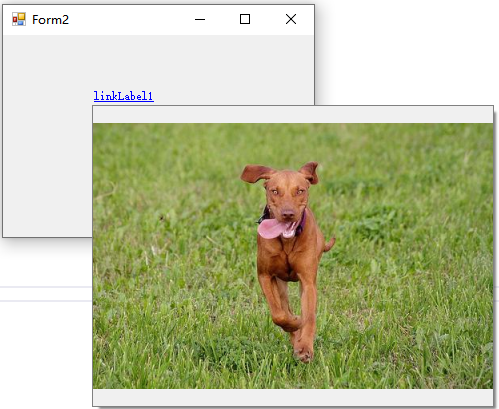
WinForm悬浮框显示图片
1. 工具类
c#
public partial class Popup : ToolStripDropDown
{
    private Control childControl;

    public Popup() : base()
    {
        /*
        * 设置1px的内边距用于显示边框
        */
        Padding = new Padding(1);

    }

    public Popup(Control childControl) : this()
    {
        if (childControl == null)
            return;
        this.childControl = childControl;
        childControl.Dock = DockStyle.Fill;
        /*
         * ToolStripDropDown的Items可以通过ToolStripControlHost放置自定义控件
         */
        ToolStripControlHost toolStripControlHost = new ToolStripControlHost(childControl)
        {
            Padding = Padding.Empty,
            Margin = Padding.Empty
        };
        toolStripControlHost.AutoSize = false;
        this.Items.Add(toolStripControlHost);
    }

    /// <summary>
    /// 相对于父控件以显示
    /// </summary>
    /// <param name="parent">父控件</param>
    public void Show(Control parent)
    {
        // 以父控件的location为原点,参数点p的值是相对于原点的,计算参数点的屏幕坐标
        // 此处就是计算父控件左上角的屏幕坐标
        Point parentScreenLocation = parent.PointToScreen(new Point(0, 0));

        Point pt = parentScreenLocation;
        pt.Offset(0, parent.Height + 3);

        Size dropdownSize = GetPreferredSize(Size.Empty);
        Rectangle dropdownBounds = new Rectangle(pt, dropdownSize);

        if (dropdownBounds.Bottom <= Screen.GetWorkingArea(dropdownBounds).Bottom)
        {
            // 在父控件的下面显示
            base.Show(parent, new Point(0, parent.Height + 3), ToolStripDropDownDirection.BelowRight);
        }
        else
        {
            // 在父控件的上面显示
            base.Show(parent, new Point(0, -3), ToolStripDropDownDirection.AboveRight);
        }

        // 焦点自动移动到popup界面
        Focus();
    }

    /// <summary>
    /// 指定屏幕中的点以显示
    /// </summary>
    /// <param name="point">屏幕点坐标</param>
    public new void Show(Point point)
    {
        // 获取子控件的大小
        Size dropdownSize = GetPreferredSize(Size.Empty);
        Rectangle dropdownBounds = new Rectangle(point, dropdownSize);

        if (dropdownBounds.Bottom <= Screen.GetWorkingArea(dropdownBounds).Bottom)
        {
            // 子控件的左上角与point对齐显示
            base.Show(point, ToolStripDropDownDirection.BelowRight);
        }
        else
        {
            // 子控件的左下角与point对齐显示
            base.Show(point, ToolStripDropDownDirection.AboveRight);
        }

        // 焦点自动移动到popup界面
        Focus();
    }
}2. 效果
测试代码:
c#
// 鼠标在linkLabel上悬浮时显示图片
private void linkLabel1_MouseHover(object sender, EventArgs e)
{
    string url = "https://images.dog.ceo/breeds/vizsla/n02100583_2119.jpg";

    PictureBox pictureBox = new PictureBox();
    pictureBox.Size = new Size(400, 300);
    pictureBox.SizeMode = PictureBoxSizeMode.Zoom;

    pictureBox.LoadAsync(url);

    Popup popup = new Popup(pictureBox);

    popup.Show(sender as LinkLabel);
    //popup.Show(new Point(0,0));
}效果截图: