Appearance
MyBatis SQL获取方法参数详解
1. 前言
在一般的框架中,我们在Mapper接口中定义方法,在对应的XML映射文件中编写SQL语句,并在SQL语句中使用方法参数。
在SQL语句中,我们有两种方式获取参数:
#{}:使用#{}参数语法时,MyBatis 会创建PreparedStatement参数占位符,并通过占位符安全地设置参数(就像使用 ? 一样)${}:使用${}参数语法时,MyBatis 只是简单地进行字符串替换(就像字符串拼接一样)
例子:
使用#{}获取参数:
java
@Select("select * from user where name = #{name} and age > #{age}")
List<UserPO> findUserByNameAndAge(@Param("name") String name, @Param("age") int age);日志输出如下:
txt
==>  Preparing: select * from user where name = ? and age > ?
==> Parameters: 张三(String), 10(Integer)
<==    Columns: id, name, age, address, phone
<==        Row: 1, 张三, 20, 广州, 13500221345
<==      Total: 1
UserPO{id=1, name='张三', age=20, address='广州', phone='13500221345'}使用${}获取参数:
java
@Select("select * from user where name = '${name}' and age > ${age}")
List<UserPO> findUserByNameAndAge(@Param("name") String name, @Param("age") int age);日志输出如下:
txt
==>  Preparing: select * from user where name = '张三' and age > 10
==> Parameters:
<==    Columns: id, name, age, address, phone
<==        Row: 1, 张三, 20, 广州, 13500221345
<== Total: 1可以看到,在使用${}获取参数时,我们需要自行拼接单引号,并且在输出的日志中,SQL语句并没有使用参数占位符。
有时想直接在 SQL 语句中直接插入一个不转义的字符串。 比如 ORDER BY 子句,这时候就可以使用${}获取参数了:
ORDER BY ${columnName}2. 参数类型
2.1 单个参数
方法参数只有一个,并且为基础数据类型(如int、long、String等),如:
java
UserPO findUserById(int id);xml
<select id="findUserById" resultType="com.lee.entity.UserPO">
    select * from user where id = #{id}
</select>这时候,我们可以在#{}的大括号里直接写参数名(如#{id}),SQL语句中能顺利获取到参数。
2.2 多个参数
方法参数有多个,如:
java
List<UserPO> findUserByNameAndAge( String name, int age);xml
<select id="findUserByNameAndAge" resultType="com.lee.entity.UserPO">
    select * from user where name = #{name} and age > #{age}
</select>如果我们执行,会报如下错误:
Cause: org.apache.ibatis.binding.BindingException: Parameter 'name' not found. Available parameters are [arg1, arg0, param1, param2]
报错信息提示我们参数name找不到,可以使用的参数名是arg0/param1(对应第一个参数name)和arg1/param2(对应第二个参数age),所以,参照报错信息,我们修改SQL语句如下:
xml
<select id="findUserByNameAndAge" resultType="com.lee.entity.UserPO">
    select * from user where name = #{arg0} and age > #{param2}
</select>成功执行!但是,使用MyBatis提供的默认参数名( arg0或param1 )去获取参数,会使得SQL语句不能达到见名知意的效果,我们可以在方法参数中添加@Param注解的方式,来自定义参数名:
java
List<UserPO> findUserByNameAndAge(@Param("name") String name, @Param("age") int age);这样,我们在SQL中就能使用#{name}和#{age}的方式来获取参数值了。
2.3 参数为JavaBean或Map
方法参数为一个Java Bean对象或Map对象,例如:
java
UserPO findUserByUserPO(UserPO user);
List<UserPO> findUserByMap(Map<String, Object> map);xml
<select id="findUserByUserPO" resultType="com.lee.entity.UserPO" parameterType="com.lee.entity.UserPO">
    select * from user where id = #{id} and name = #{name}
</select>

<select id="findUserByMap" resultType="com.lee.entity.UserPO">
    select * from user where id = #{id} and name = #{name}
</select>我们可以直接使用JavaBean中的字段名或Map中的键来获取对应的参数值。
如果我们加了@Param注解,那么就需要加上前缀:
java
UserPO findUserByUserPO(@Param("user") UserPO user);

List<UserPO> findUserByMap(@Param("map") Map<String, Object> map);xml
<select id="findUserByUserPO" resultType="com.lee.entity.UserPO" parameterType="com.lee.entity.UserPO">
    select * from user where id = #{user.id} and name = #{user.name}
</select>

<select id="findUserByMap" resultType="com.lee.entity.UserPO">
    select * from user where id = #{map.id} and name = #{map.name}
</select>此时如果直接使用字段名或键去获取参数值,是会报错的。
2.4 参数为数组
方法参数为数组,例如:
java
List<UserPO> findUserByIdsArray(int[] ids);通常在SQL中要使用动态SQL来拼接:
xml
<select id="findUserByIdsArray" resultType="com.lee.entity.UserPO">
    select * from user where id in (
    <foreach collection="ids" separator="," item="id">
        #{id}
    </foreach>
    )
</select>执行查询后报错,错误信息如下:
Error querying database. Cause: org.apache.ibatis.binding.BindingException: Parameter 'ids' not found. Available parameters are [array, arg0]
报错信息提示我们在 <foreach collection="ids">中应该使用array或arg0来获取参数值,而不是ids:
xml
<select id="findUserByIdsArray" resultType="com.lee.entity.UserPO">
    select * from user where id in (
    <foreach collection="array" separator="," item="id">
        #{id}
    </foreach>
    )
</select>同样地,我们也可以使用@Param来自定义参数名:
java
List<UserPO> findUserByIdsArray(@Param("ids") int[] ids);这样,我们就可以使用ids 来获取参数了: <foreach collection="ids">
2.5 参数为集合
参数为集合,以List为例,与参数为数组类似,只不过MyBatis提供的默认参数名为:[arg0, collection, list],我们也可以通过@Param自定义参数值:
java
List<UserPO> findUserByIdsList(@Param("ids") List<Integer> ids);xml
<select id="findUserByIdsList" resultType="com.lee.entity.UserPO">
    select * from user where id in (
    <foreach collection="ids" separator="," item="id">
        #{id}
    </foreach>
    )
</select>2.6 小结
针对不同的参数类型,MyBatis提供了默认的参数名来获取参数值,我们可以通过@Param自定义参数名,以达到见名知意的效果,推荐所有的参数都加上@Param注解。
3. 源码分析
在MyBatis中,获取参数名的源码主要在ParamNameResolver类中,源码如下:
java
public class ParamNameResolver {
    public static final String GENERIC_NAME_PREFIX = "param";
    // <setting name="useActualParamName" value="true"/>
    // 允许使用方法签名中的名称作为语句参数名称。 默认值为true。
    // 为了使用该特性,你的项目必须采用 Java 8 编译,并且加上 -parameters 选项。(新增于 3.4.1)
    private final boolean useActualParamName;

    // 键是方法参数的索引,值是方法参数名
    // 如果方法参数有@Param注解,则方法参数名为@Param指定的值,否则方法参数名为默认值(useActualParamName=true)或索引值(useActualParamName=false)
    // 注意,如果方法有特殊的参数(例如RowBounds或ResultHandler),则作为方法参数名的索引与实际的参数索引是不一样的
    //
    // 例如:
    // 1. aMethod(@Param("M") int a, @Param("N") int b) --names--> {{0,"M"},{1,"N"}}
    // 2. aMethod(int a, int b) --names--> {{0,"1"},{1,"1"}}
    // 3. aMethod(int a, RowBounds rb, int b) --names--> {{0,"0"},{2,"1"}}
    private final SortedMap<Integer, String> names;
    private boolean hasParamAnnotation;

    /**
    * 构造方法
    * config: MyBatis配置文件
    * method: Mapper中要执行的方法
    */
    public ParamNameResolver(Configuration config, Method method) {
        this.useActualParamName = config.isUseActualParamName();
        final Class<?>[] paramTypes = method.getParameterTypes();
        final Annotation[][] paramAnnotations = method.getParameterAnnotations();
        final SortedMap<Integer, String> map = new TreeMap<>();
        int paramCount = paramAnnotations.length;
        // 获取方法参数名
        for (int paramIndex = 0; paramIndex < paramCount; paramIndex++) {
            if (isSpecialParameter(paramTypes[paramIndex])) {
                // 跳过特殊参数类型
                continue;
            }
            // 如果有@Param,获取Param的值作为参数名
            String name = null;
            for (Annotation annotation : paramAnnotations[paramIndex]) {
                if (annotation instanceof Param) {
                    hasParamAnnotation = true;
                    name = ((Param) annotation).value();
                    break;
                }
            }
            // 没有@Param,获取默认的参数名
            if (name == null) {
                if (useActualParamName) {
                    name = getActualParamName(method, paramIndex);  // arg0, arg1
                }
                if (name == null) {
                    name = String.valueOf(map.size());   // 0, 1
                }
            }
            map.put(paramIndex, name);
        }
        names = Collections.unmodifiableSortedMap(map);
    }

    // 通过反射获取参数名
    private String getActualParamName(Method method, int paramIndex) {
        return ParamNameUtil.getParamNames(method).get(paramIndex);
    }

    // 判断是否为特殊类型 RowBounds或ResultHandler
    private static boolean isSpecialParameter(Class<?> clazz) {
        return RowBounds.class.isAssignableFrom(clazz) || ResultHandler.class.isAssignableFrom(clazz);
    }

    // 返回参数名数组
    public String[] getNames() {
        return names.values().toArray(new String[0]);
    }

    /**
     * 获取命名的参数值
     * 三种情况:
     	1. 如果没有参数,则返回null
     	2. 如果有一个参数,并且该参数没有@Param注解,则:
     		2.1 如果该参数为集合类型或数组类型,则返回 {"array", 参数值} / {{"collection",参数值},{"list","参数值"}}
     		2.2 如果该参数为其他类型(如JavaBean,Map,String等),则直接返回参数值
     	3. 其他情况(多个参数/一个参数并且有@Param注解),通过names哈希表返回命名的参数值,除此之外,还会返回默认的param1类型的命名参数,例如:
     	定义:aMathod(@Param("a") int a, @Param("b") int b)
     	调用:aMathod(1,2);
     	getNamedParams返回:{{"a",1},{"b",2},{"param1",1},{"param2",2}}

     	定义:aMathod(String x, int b)
     	调用:aMethod("test", 999);
     	getNamedParams返回:
     		{{"arg0","test"},{"arg1",999},{"param1","test"},{"param2",999}} (useActualParamName=true) 或
     		{{"0","test"},{"1",999},{"param1","test"},{"param2",999}} (useActualParamName=false)
     */
    public Object getNamedParams(Object[] args) {
        final int paramCount = names.size();
        if (args == null || paramCount == 0) {
            return null;
        } else if (!hasParamAnnotation && paramCount == 1) {
            Object value = args[names.firstKey()];
            return wrapToMapIfCollection(value, useActualParamName ? names.get(names.firstKey()) : null);
        } else {
            final Map<String, Object> param = new ParamMap<>();
            int i = 0;
            for (Map.Entry<Integer, String> entry : names.entrySet()) {
                param.put(entry.getValue(), args[entry.getKey()]);
                // add generic param names (param1, param2, ...)
                final String genericParamName = GENERIC_NAME_PREFIX + (i + 1);
                // ensure not to overwrite parameter named with @Param
                if (!names.containsValue(genericParamName)) {
                    param.put(genericParamName, args[entry.getKey()]);
                }
                i++;
            }
            return param;
        }
    }

    /**
      1. 如果参数为集合或数组,则将参数包装为命名参数
      2. 否则,直接返回参数值
     */
    public static Object wrapToMapIfCollection(Object object, String actualParamName) {
        if (object instanceof Collection) {
            ParamMap<Object> map = new ParamMap<>();
            map.put("collection", object);
            if (object instanceof List) {
                map.put("list", object);
            }
            Optional.ofNullable(actualParamName).ifPresent(name -> map.put(name, object));
            return map;
        } else if (object != null && object.getClass().isArray()) {
            ParamMap<Object> map = new ParamMap<>();
            map.put("array", object);
            Optional.ofNullable(actualParamName).ifPresent(name -> map.put(name, object));
            return map;
        }
        return object;
    }
}在MyBatis配置文件中,存在如下配置:
xml
<setting name="useActualParamName" value="true"/>该配置的作用是允许使用方法签名中的名称作为语句参数名称。 默认值为true。为了使用该特性,你的项目必须采用 Java 8 编译,并且加上 -parameters 选项。(新增于 3.4.1)。-parameters选项作用如下:
-parameters
Generates metadata for reflection on method parameters. Stores formal parameter names of constructors and methods in the generated class file so that the method
java.lang.reflect.Executable.getParametersfrom the Reflection API can retrieve them.将方法(包括构造方法)的参数名保存到生成的class文件中,之后可以通过反射获取到参数名。
在IDEA中设置编译器参数如下:
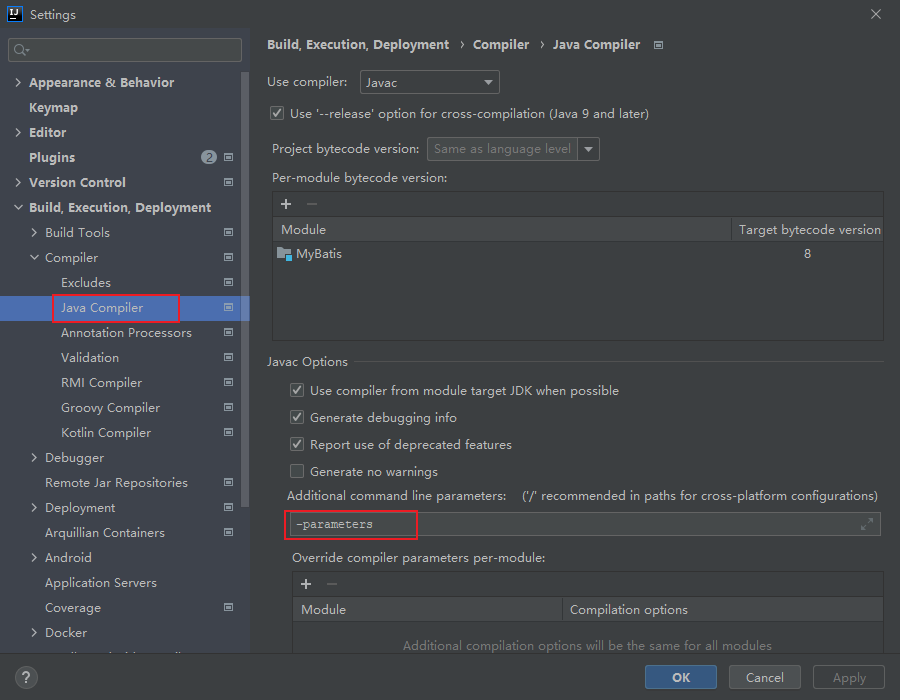
之后,生成的class文件中的参数名就是我们写的实际参数名了,而不是arg0,所以在MyBatis中,可以不加@Param注解直接使用我们写的参数名,并不会报错:
java
List<UserPO> findUserByNameAndAge( String name, int age);xml
<select id="findUserByNameAndAge" resultType="com.lee.entity.UserPO">
    select * from user where name = #{name} and age > #{age}
</select>不过并不建议这样使用!(后面IDEA失效了,加了-parameters选项也没法用了。。。)
参考资料
[1] MyBatis参数:https://mybatis.org/mybatis-3/zh/sqlmap-xml.html#Parameters
[2] javac编译参数:https://download.java.net/java/early_access/panama/docs/specs/man/javac.html#options