Appearance
MyBatis 缓存
本文介绍MyBatis的一级缓存和二级缓存。
1. 环境搭建
先看一下整个项目结构:
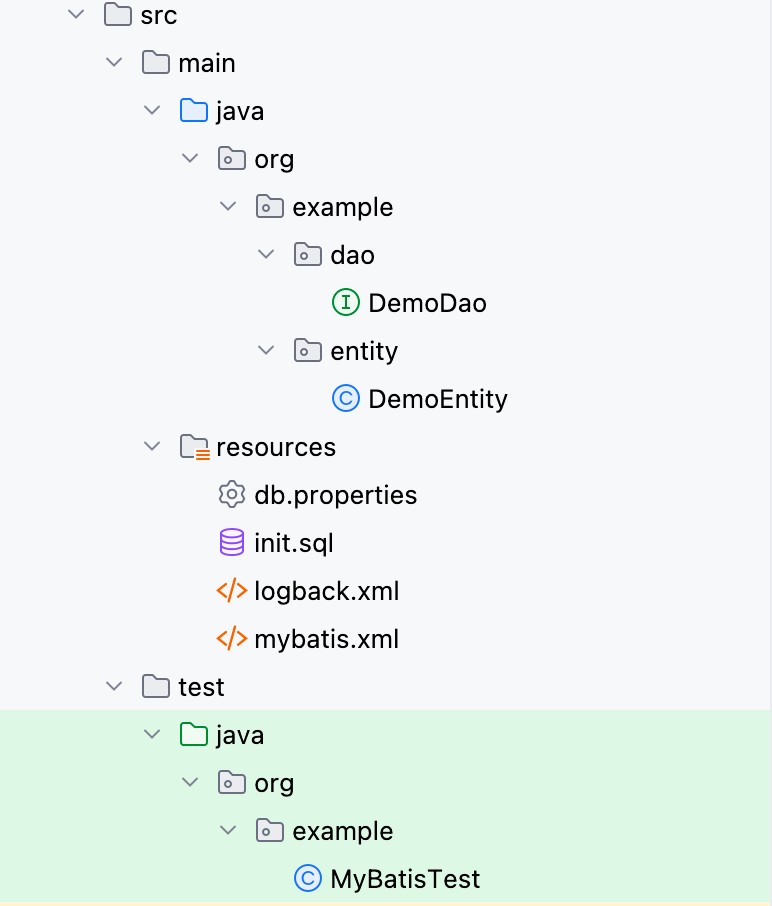
首先创建一个普通的Maven工程,pom.xml依赖内容如下:
xml
<dependencies>
  <dependency>
    <groupId>org.mybatis</groupId>
    <artifactId>mybatis</artifactId>
    <version>3.5.19</version>
  </dependency>
  <dependency>
    <groupId>mysql</groupId>
    <artifactId>mysql-connector-java</artifactId>
    <version>8.0.33</version>
  </dependency>
  <dependency>
    <groupId>org.projectlombok</groupId>
    <artifactId>lombok</artifactId>
    <version>1.18.38</version>
  </dependency>
  <dependency>
    <groupId>ch.qos.logback</groupId>
    <artifactId>logback-classic</artifactId>
    <version>1.5.18</version>
  </dependency>
  <dependency>
    <groupId>junit</groupId>
    <artifactId>junit</artifactId>
    <version>4.8.2</version>
    <scope>test</scope>
  </dependency>
</dependencies>首先创建一个名为test的数据库,然后准备SQL文件初始化数据库:
sql
DROP TABLE IF EXISTS demo;

CREATE TABLE demo(
   id INT AUTO_INCREMENT PRIMARY KEY,
   value1 VARCHAR(255),
   value2 VARCHAR(255)
);

INSERT INTO demo(value1, value2) VALUES('1111','aaaa'),('2222','bbbb'),('3333','cccc');准备实体类和数据访问接口:
java
public interface DemoDao {
    @Select("select * from demo where id = #{id}")
    DemoEntity queryById(Integer id);
}java
@Data
@EqualsAndHashCode
public class DemoEntity {
    private Integer id;
    private String value1;
    private String value2;
}准备数据库连接信息,保存在resources/db.properties文件中:
properties
jdbc.driver=com.mysql.cj.jdbc.Driver
jdbc.url=jdbc:mysql://localhost:3306/test?serverTimezone=Asia/Shanghai&useUnicode=true&characterEncoding=utf-8
jdbc.username=root
jdbc.password=123456然后准备MyBatis配置文件resources/mybatis.xml:
xml
<?xml version="1.0" encoding="UTF-8" ?>
<!DOCTYPE configuration
        PUBLIC "-//mybatis.org//DTD Config 3.0//EN"
        "http://mybatis.org/dtd/mybatis-3-config.dtd">

<configuration>
    <!--加载连接数据库的四要素-->
    <properties resource="db.properties"></properties>

    <settings>
        <!--自动将下划线命名转换为驼峰命名-->
        <setting name="mapUnderscoreToCamelCase" value="true"/>
    </settings>

    <environments default="development">
        <environment id="development">
            <transactionManager type="JDBC"></transactionManager>
            <dataSource type="POOLED">
                <property name="driver" value="${jdbc.driver}"/>
                <property name="url" value="${jdbc.url}"/>
                <property name="username" value="${jdbc.username}"/>
                <property name="password" value="${jdbc.password}"/>
            </dataSource>
        </environment>
    </environments>

    <mappers>
      	<!-- 配置package,让@Select注解生效 -->
        <package name="org.example.dao"/>
    </mappers>

</configuration>最后配置resources/logback.xml文件:
xml
<?xml version="1.0" encoding="UTF-8"?>
<configuration>

    <!-- 控制台输出日志 -->
    <appender name="STDOUT" class="ch.qos.logback.core.ConsoleAppender">
        <encoder>
            <pattern>%-4relative [%thread] %-5level %logger{35} -%kvp- %msg %n</pattern>
        </encoder>
    </appender>

    <!-- 定义根日志记录器日志级别 -->
    <root level="INFO">
        <!-- ref的值需要与appender的name一致 -->
        <appender-ref ref="STDOUT" />
    </root>

    <!-- 定义某个包或某个类的日志级别 -->
    <logger name="org.example.dao" level="DEBUG" additivity="false">
        <appender-ref ref="STDOUT" />
    </logger>

</configuration>准备测试类:
java
@Slf4j
public class MyBatisTest {

    @Test
    public void test1() throws IOException {
        InputStream inputStream = Resources.getResourceAsStream("mybatis.xml");
        SqlSessionFactory sqlSessionFactory = new SqlSessionFactoryBuilder().build(inputStream);

        SqlSession sqlSession = sqlSessionFactory.openSession();
        DemoEntity demoEntity1 = sqlSession.selectOne("org.example.dao.DemoDao.queryById", 1);

        log.info("demoEntity1: {}", demoEntity1);

        DemoEntity demoEntity2 = sqlSession.selectOne("org.example.dao.DemoDao.queryById", 1);
        log.info("demoEntity2: {}", demoEntity2);

        log.info("demoEntity1 == demoEntity2: {}", demoEntity1 == demoEntity2);

    }
}结果如下:
txt
303  [main] DEBUG org.example.dao.DemoDao.queryById -- ==>  Preparing: select * from demo where id = ?
315  [main] DEBUG org.example.dao.DemoDao.queryById -- ==> Parameters: 1(Integer)
329  [main] DEBUG org.example.dao.DemoDao.queryById -- <==      Total: 1
329  [main] INFO  org.example.MyBatisTest -- demoEntity1: DemoEntity(id=1, value1=1111, value2=aaaa)
330  [main] INFO  org.example.MyBatisTest -- demoEntity2: DemoEntity(id=1, value1=1111, value2=aaaa)
330 [main] INFO org.example.MyBatisTest -- demoEntity1 == demoEntity2: true可以发现,第二次查询没有打印出SQL语句,说明是查询的缓存数据,并且两次查询返回的数据是同一个数据。
经过以上的例子,证实了MyBatis中存在缓存(实际是一级缓存的存在)。
2. 一级缓存
2.1 什么是一级缓存
在MyBatis中,一级缓存(也叫本地缓存)是存在SqlSession中的,也就是说,在同一个SqlSession中执行查询语句,如果在缓存中查询到同样SQL的查询语句,那么就会从缓存中获取数据,而不是从数据库中。
MyBatis的一级缓存是默认开启的。
2.2 什么时候存入一级缓存
先说结论,查询结果是否会放入 MyBatis 一级缓存,取决于调用的方法以及是否启用了缓存。
如果调用的是
selectList()、selectOne()或selectMap()方法,并且对应的<select>语句中没有设置useCache=false,则查询结果会放入 MyBatis 的一级缓存(本地缓存)。如果使用了
ResultHandler(如调用select()的重载方法),则不会将结果放入一级缓存。使用 Cursor(如
selectCursor()方法)进行查询时,不会将结果缓存到一级缓存中。
所以,如果该方法是通过普通 selectList/selectOne/selectMap 系列方法执行的,并且未禁用缓存,则结果会被放入一级缓存,否则不会。
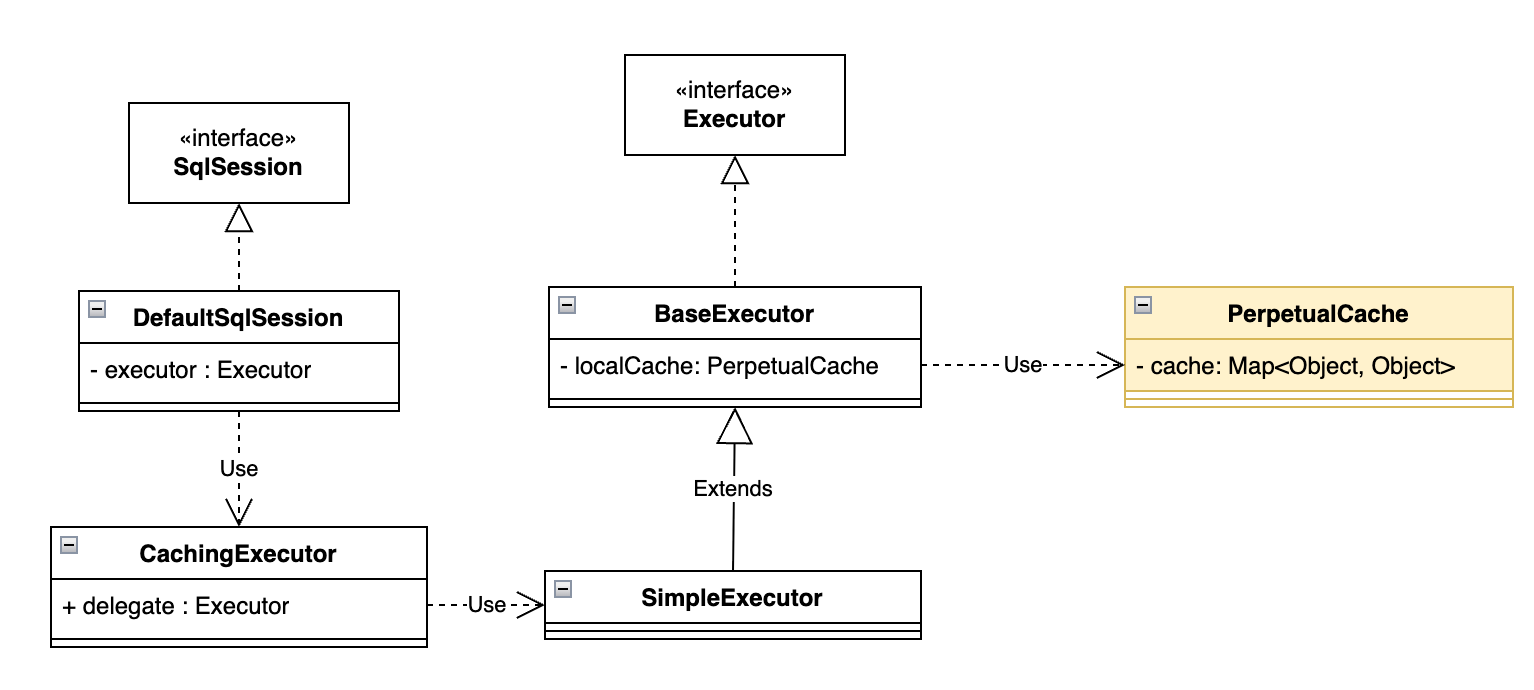
先看看MyBatis中SqlSession的类图:
TIP
在SqlSession中使用Executor执行SQL语句,在Executor的基础实现类BaseExecutor中有属性 loalCache,其类型为PerpetualCache,就是对java.util.Map的简单包装
然后,跟踪DefaultSqlSession中的查询方法,最终找到如下方法,从数据库中查询数据:
txt
org.apache.ibatis.executor.BaseExecutor#queryFromDatabasejava
private <E> List<E> queryFromDatabase(MappedStatement ms, Object parameter, RowBounds rowBounds,
    ResultHandler resultHandler, CacheKey key, BoundSql boundSql) throws SQLException {
  List<E> list;
  localCache.putObject(key, EXECUTION_PLACEHOLDER);
  try {
    list = doQuery(ms, parameter, rowBounds, resultHandler, boundSql);
  } finally {
    localCache.removeObject(key);
  }
  localCache.putObject(key, list);
  if (ms.getStatementType() == StatementType.CALLABLE) {
    localOutputParameterCache.putObject(key, parameter);
  }
  return list;
}重点在第10行,就是往本地缓存中加入数据。
问题来了,localCache.putObject(key, list);中的list是刚从数据库中查询出来的数据,那key是什么呢,方法参数中显示key的类型为CacheKey,这又是什么?
2.3 CacheKey是什么
在PerpetualCache中,putObject()就是往Map中添加数据:
java
public class PerpetualCache implements Cache {

  private final String id;

  private final Map<Object, Object> cache = new HashMap<>();

  @Override
  public void putObject(Object key, Object value) {
    cache.put(key, value);
  }
}我们主要关注这里的key,即CacheKey是什么,源码如下:
Details
java
public class CacheKey implements Cloneable, Serializable {

  private final int multiplier;
  private int hashcode;
  private long checksum;
  private int count;
  private List<Object> updateList;

  // update 方法
  public void update(Object object) {
    int baseHashCode = object == null ? 1 : ArrayUtil.hashCode(object);

    count++;
    checksum += baseHashCode;
    baseHashCode *= count;

    hashcode = multiplier * hashcode + baseHashCode;

    updateList.add(object);
  }

  // equals方法
  @Override
  public boolean equals(Object object) {
    if (this == object) {
      return true;
    }
    if (!(object instanceof CacheKey)) {
      return false;
    }

    final CacheKey cacheKey = (CacheKey) object;

    if ((hashcode != cacheKey.hashcode) || (checksum != cacheKey.checksum) || (count != cacheKey.count)) 		 {
      return false;
    }

    for (int i = 0; i < updateList.size(); i++) {
      Object thisObject = updateList.get(i);
      Object thatObject = cacheKey.updateList.get(i);
      if (!ArrayUtil.equals(thisObject, thatObject)) {
        return false;
      }
    }
    return true;
  }

  // hashCode方法
  @Override
  public int hashCode() {
    return hashcode;
  }
}总结一下,CacheKey就是由多个对象组成的一个唯一标识。
在如下方法中,创建CacheKey:
txt
org.apache.ibatis.executor.BaseExecutor#query(org.apache.ibatis.mapping.MappedStatement, java.lang.Object, org.apache.ibatis.session.RowBounds, org.apache.ibatis.session.ResultHandler)java
@Override
public <E> List<E> query(MappedStatement ms, Object parameter, RowBounds rowBounds, ResultHandler resultHandler)
    throws SQLException {
  BoundSql boundSql = ms.getBoundSql(parameter);
  CacheKey key = createCacheKey(ms, parameter, rowBounds, boundSql);
  return query(ms, parameter, rowBounds, resultHandler, key, boundSql);
}进入createCacheKey()方法:
java
@Override
public CacheKey createCacheKey(MappedStatement ms, Object parameterObject, RowBounds rowBounds, BoundSql boundSql) {
  if (closed) {
    throw new ExecutorException("Executor was closed.");
  }
  // 创建cacheKey对象
  CacheKey cacheKey = new CacheKey();
  // 向cacheKey中添加对象
  cacheKey.update(ms.getId());     // StatementId
  cacheKey.update(rowBounds.getOffset());  // 分页参数offset
  cacheKey.update(rowBounds.getLimit());   // 分页参数limit
  cacheKey.update(boundSql.getSql());      // SQL

  // 获取SQL参数
  List<ParameterMapping> parameterMappings = boundSql.getParameterMappings();
  TypeHandlerRegistry typeHandlerRegistry = ms.getConfiguration().getTypeHandlerRegistry();
  // 将SQL参数依次加入到cacheKey中
  MetaObject metaObject = null;
  for (ParameterMapping parameterMapping : parameterMappings) {
    if (parameterMapping.getMode() != ParameterMode.OUT) {
      Object value;
      String propertyName = parameterMapping.getProperty();
      if (boundSql.hasAdditionalParameter(propertyName)) {
        value = boundSql.getAdditionalParameter(propertyName);
      } else if (parameterObject == null) {
        value = null;
      } else if (typeHandlerRegistry.hasTypeHandler(parameterObject.getClass())) {
        value = parameterObject;
      } else {
        if (metaObject == null) {
          metaObject = configuration.newMetaObject(parameterObject);
        }
        value = metaObject.getValue(propertyName);
      }
      cacheKey.update(value);
    }
  }
  // 从配置中获取环境,将EnvironmentID加入到cacheKey中
  if (configuration.getEnvironment() != null) {
    cacheKey.update(configuration.getEnvironment().getId());
  }
  return cacheKey;
}通过以上的分析,缓存中的Key就是由要执行的查询SQL语句各部分组成的,包括StatementId,分页参数、SQL语句、查询条件和环境。
所以,我们也能总结出缓存命中原则。
2.4 缓存命中原则
首先总结缓存命中原则,只有同时满足以下情况,才能从缓存中查询数据:
MyBatis 的一级缓存能否命中,只有同时满足以下情况,才能从缓存中查询数据(必须全部满足才能命中):
- 同一个 SqlSession(物理上是同一个
Executor对象)。 - 同一个 statementId(Mapper 接口的方法全限定名,例如
org.example.dao.DemoDao.queryById)。 - 同一个 SQL(由 MyBatis 最终生成的带
?占位符的 SQL 字符串,例如select id, value1, value2 from demo where id = ?)。 - 同一个 参数集合(
parameterObject的equals结果相同,也就是最终传递给SQL的参数要相同)。 - 同一个 RowBounds(分页范围相同;无分页时就是
RowBounds.DEFAULT)。 - 同一个 Environment
只要上述项完全一致,MyBatis 就直接把上一次查询放在 PerpetualCache 里的结果对象原样返回;任何一项不同,都会视为新的查询,重新发送 SQL 到数据库查询数据。
下面就以多个例子演示缓存未命中的情况。
情况一:不是同一个SqlSession
java
@Test
public void testSqlSession() throws IOException {
    InputStream inputStream = Resources.getResourceAsStream("mybatis.xml");
    SqlSessionFactory sqlSessionFactory = new SqlSessionFactoryBuilder().build(inputStream);

    // 第一个SqlSession
    SqlSession sqlSession1 = sqlSessionFactory.openSession();
    DemoEntity demoEntity = sqlSession1.selectOne("org.example.dao.DemoDao.queryById", 1);
    log.info("demoEntity: {}", demoEntity);

    // 第二个SqlSession
    SqlSession sqlSession2 = sqlSessionFactory.openSession();
    DemoEntity demoEntity2 = sqlSession2.selectOne("org.example.dao.DemoDao.queryById", 1);
    log.info("demoEntity2: {}", demoEntity2);

    log.info("demoEntity == demoEntity2: {}", demoEntity == demoEntity2);
}通过之前的分析,我们可以找到,缓存是在BaseExecutor中的,而Executor是在SqlSession中的,有两个不同的SqlSession,也就意味着有两个缓存,那么肯定是无法命中缓存的。
情况二:不同的StatementId
首先在DemoDao中添加一个方法:
java
public interface DemoDao {
    DemoEntity queryById(Integer id);
    DemoEntity queryById2(Integer id);
}xml
<?xml version="1.0" encoding="UTF-8" ?>
<!DOCTYPE mapper PUBLIC "-//mybatis.org//DTD Mapper 3.0//EN" "http://mybatis.org/dtd/mybatis-3-mapper.dtd" >
<mapper namespace="org.example.dao.DemoDao">

    <select id="queryById" resultType="org.example.entity.DemoEntity">
        select id, value1, value2 from demo
        where id = #{id}
    </select>
    <select id="queryById2" resultType="org.example.entity.DemoEntity">
        select id, value1, value2 from demo
        where id = #{id}
    </select>
</mapper>除了方法名不同,其余完全相同。
java
@Test
public void testStatementId() throws IOException {
    InputStream inputStream = Resources.getResourceAsStream("mybatis.xml");
    SqlSessionFactory sqlSessionFactory = new SqlSessionFactoryBuilder().build(inputStream);

    SqlSession sqlSession = sqlSessionFactory.openSession();
    // queryById 方法
    DemoEntity demoEntity1 = sqlSession.selectOne("org.example.dao.DemoDao.queryById", 1);
    log.info("demoEntity1: {}", demoEntity1);

    // queryById2 方法
    DemoEntity demoEntity2 = sqlSession.selectOne("org.example.dao.DemoDao.queryById2", 1);
    log.info("demoEntity2: {}", demoEntity2);

    log.info("demoEntity1 == demoEntity2: {}", demoEntity1 == demoEntity2);
}情况三:不同的SQL
再在接口中添加如下方法:
java
public interface DemoDao {
	DemoEntity queryByIdByType(Map<String, Object> map);
}xml
<select id="queryByIdByType" resultType="org.example.entity.DemoEntity">
    <if test="type==1">
        select id, value1, value2 from demo
        where id = #{id}
    </if>
    <if test="type==2">
        select id, value1, value2 from demo
        where                id = #{id}
    </if>
</select>可以看到,当type=2时,SQL语句会有一长串的空格。
java
@Test
public void testSql() throws IOException {
    InputStream inputStream = Resources.getResourceAsStream("mybatis.xml");
    SqlSessionFactory sqlSessionFactory = new SqlSessionFactoryBuilder().build(inputStream);

    SqlSession sqlSession = sqlSessionFactory.openSession();
    Map<String, Object> map1 = new HashMap<>(){{
        put("id", 1);
        put("type",1);
    }};
    DemoEntity demoEntity1 = sqlSession.selectOne(
            "org.example.dao.DemoDao.queryByIdByType", map1);
    log.info("demoEntity1: {}", demoEntity1);

    map1.put("type",2);
    DemoEntity demoEntity2 = sqlSession.selectOne(
            "org.example.dao.DemoDao.queryByIdByType", map1);
    log.info("demoEntity2: {}", demoEntity2);

    log.info("demoEntity1 == demoEntity2: {}", demoEntity1 == demoEntity2);
}结果:
txt
304  [main] DEBUG o.e.dao.DemoDao.queryByIdByType -- ==>  Preparing: select id, value1, value2 from demo where id = ?
316  [main] DEBUG o.e.dao.DemoDao.queryByIdByType -- ==> Parameters: 1(Integer)
333  [main] DEBUG o.e.dao.DemoDao.queryByIdByType -- <==      Total: 1
334  [main] INFO  org.example.MyBatisTest -- demoEntity1: DemoEntity(id=1, value1=1111, value2=aaaa)
335  [main] DEBUG o.e.dao.DemoDao.queryByIdByType -- ==>  Preparing: select id, value1, value2 from demo where id = ?
335  [main] DEBUG o.e.dao.DemoDao.queryByIdByType -- ==> Parameters: 1(Integer)
335  [main] DEBUG o.e.dao.DemoDao.queryByIdByType -- <==      Total: 1
335  [main] INFO  org.example.MyBatisTest -- demoEntity2: DemoEntity(id=1, value1=1111, value2=aaaa)
335 [main] INFO org.example.MyBatisTest -- demoEntity1 == demoEntity2: false从日志来看,两条SQL完全一样,其实不一样的是其中一条SQL多了很多空格。
情况四:参数不同
java
@Test
public void testParam() throws IOException {
    InputStream inputStream = Resources.getResourceAsStream("mybatis.xml");
    SqlSessionFactory sqlSessionFactory = new SqlSessionFactoryBuilder().build(inputStream);

    SqlSession sqlSession = sqlSessionFactory.openSession();
    DemoEntity demoEntity1 = sqlSession.selectOne(
            "org.example.dao.DemoDao.queryById",
            1);
    log.info("demoEntity1: {}", demoEntity1);

    DemoEntity demoEntity2 = sqlSession.selectOne(
            "org.example.dao.DemoDao.queryById",
            2);
    log.info("demoEntity2: {}", demoEntity2);

    log.info("demoEntity1 == demoEntity2: {}", demoEntity1 == demoEntity2);
}结果显而易见,结果集都不一样了,肯定不能从缓存中查询数据。
情况四:分页参数不同
java
@Test
public void testPage() throws IOException {
    InputStream inputStream = Resources.getResourceAsStream("mybatis.xml");
    SqlSessionFactory sqlSessionFactory = new SqlSessionFactoryBuilder().build(inputStream);

    SqlSession sqlSession = sqlSessionFactory.openSession();
    List<DemoEntity> demoEntity1 = sqlSession.selectList(
            "org.example.dao.DemoDao.queryById",
            1,
            new RowBounds(0,1));

    log.info("demoEntity1: {}", demoEntity1);

    List<DemoEntity> demoEntity2 = sqlSession.selectList(
            "org.example.dao.DemoDao.queryById",
            1,
            new RowBounds(0,2));
    log.info("demoEntity2: {}", demoEntity2);

    log.info("demoEntity1 == demoEntity2: {}", demoEntity1 == demoEntity2);
}2.5 缓存失效
缓存失效,更确切地说,应该是指缓存什么时候被清除了。
在以下情况下,缓存会被清除:
- 调用了
SqlSession.close(); - 调用了
SqlSession.commit(); - 调用了
SqlSession.rollback(); - 调用了
update()/insert()/delete()等修改方法; - 调用了
SqlSession.clearCache()方法;
下面演示或讲解以上导致缓存清除的情况。
情况一:调用close()方法
由于调用了close()方法,就不能再使用SqlSession对象了,所以我们以跟踪源码的方式查看close()的实现:
txt
org.apache.ibatis.executor.BaseExecutor#closejava
public void close(boolean forceRollback) {
  try {
    try {
      rollback(forceRollback);
    } finally {
      if (transaction != null) {
        transaction.close();
      }
    }
  } catch (SQLException e) {
    log.warn("Unexpected exception on closing transaction.  Cause: " + e);
  } finally {
    transaction = null;
    deferredLoads = null;
    localCache = null;
    localOutputParameterCache = null;
    closed = true;
  }
}在第15行,直接把本地缓存置为null了,所以可见调用close()会清空缓存。
情况二和情况三:调用了commit()方法或调用了rollback()方法
java
@Test
public void testCommit() throws IOException {
    InputStream inputStream = Resources.getResourceAsStream("mybatis.xml");
    SqlSessionFactory sqlSessionFactory = new SqlSessionFactoryBuilder().build(inputStream);

    SqlSession sqlSession = sqlSessionFactory.openSession();

    DemoEntity demoEntity1 = sqlSession.selectOne("org.example.dao.DemoDao.queryById", 1);
    log.info("demoEntity1: {}", demoEntity1);
  	// 情况二
    sqlSession.commit();
	  // 情况三
  	sqlSession.rollback();

    DemoEntity demoEntity2 = sqlSession.selectOne("org.example.dao.DemoDao.queryById", 1);
    log.info("demoEntity2: {}", demoEntity2);

    log.info("demoEntity1 == demoEntity2: {}", demoEntity1 == demoEntity2);  // false
}结果显示两次查询都是查的数据库。
情况四:调用了update()/insert()/delete()方法
首先在接口中增加一个insert()方法:
java
public interface DemoDao {
    void insert(DemoEntity demoEntity);
}xml
<insert id="insert" parameterType="org.example.entity.DemoEntity">
    insert into demo (value1, value2)
    values (#{value1}, #{value2})
</insert>然后测试情况如下:
java
@Test
public void testInsert() throws IOException {
    InputStream inputStream = Resources.getResourceAsStream("mybatis.xml");
    SqlSessionFactory sqlSessionFactory = new SqlSessionFactoryBuilder().build(inputStream);

    SqlSession sqlSession = sqlSessionFactory.openSession();

    DemoEntity demoEntity1 = sqlSession.selectOne("org.example.dao.DemoDao.queryById", 1);
    log.info("demoEntity1: {}", demoEntity1);

    DemoEntity newDemoEntity = new DemoEntity();
    newDemoEntity.setValue1("4444");
    newDemoEntity.setValue1("dddd");
    sqlSession.insert("org.example.dao.DemoDao.insert", newDemoEntity);

    DemoEntity demoEntity2 = sqlSession.selectOne("org.example.dao.DemoDao.queryById", 1);
    log.info("demoEntity2: {}", demoEntity2);

    log.info("demoEntity1 == demoEntity2: {}", demoEntity1 == demoEntity2);
}结果如下:
Details
txt
301  [main] DEBUG org.example.dao.DemoDao.queryById -- ==>  Preparing: select id, value1, value2 from demo where id = ?
313  [main] DEBUG org.example.dao.DemoDao.queryById -- ==> Parameters: 1(Integer)
327  [main] DEBUG org.example.dao.DemoDao.queryById -- <==      Total: 1
328  [main] INFO  o.example.MyBatisCacheInvalidTest -- demoEntity1: DemoEntity(id=1, value1=1111, value2=aaaa)
329  [main] DEBUG org.example.dao.DemoDao.insert -- ==>  Preparing: insert into demo (value1, value2) values (?, ?)
329  [main] DEBUG org.example.dao.DemoDao.insert -- ==> Parameters: dddd(String), null
339  [main] DEBUG org.example.dao.DemoDao.insert -- <==    Updates: 1
339  [main] DEBUG org.example.dao.DemoDao.queryById -- ==>  Preparing: select id, value1, value2 from demo where id = ?
339  [main] DEBUG org.example.dao.DemoDao.queryById -- ==> Parameters: 1(Integer)
340  [main] DEBUG org.example.dao.DemoDao.queryById -- <==      Total: 1
340  [main] INFO  o.example.MyBatisCacheInvalidTest -- demoEntity2: DemoEntity(id=1, value1=1111, value2=aaaa)
340 [main] INFO o.example.MyBatisCacheInvalidTest -- demoEntity1 == demoEntity2: false可以看到缓存在执行了插入语句后失效了。
情况五:调用了clearCache()方法
java
@Test
public void testClearCache() throws IOException {
    InputStream inputStream = Resources.getResourceAsStream("mybatis.xml");
    SqlSessionFactory sqlSessionFactory = new SqlSessionFactoryBuilder().build(inputStream);

    SqlSession sqlSession = sqlSessionFactory.openSession();

    DemoEntity demoEntity1 = sqlSession.selectOne("org.example.dao.DemoDao.queryById", 1);
    log.info("demoEntity1: {}", demoEntity1);

    sqlSession.clearCache();

    DemoEntity demoEntity2 = sqlSession.selectOne("org.example.dao.DemoDao.queryById", 1);
    log.info("demoEntity2: {}", demoEntity2);

    log.info("demoEntity1 == demoEntity2: {}", demoEntity1 == demoEntity2);
}跟踪源码,最后找到BaseExecutor的方法:
java
public void clearLocalCache() {
  if (!closed) {
    localCache.clear();
    localOutputParameterCache.clear();
  }
}txt
org.apache.ibatis.cache.impl.PerpetualCache#clearjava
@Override
public void clear() {
  cache.clear();
}2.6 Spring中的SqlSession管理
在Spring环境下,我们不用手动进行SqlSession管理,即不用自己获取、关闭SqlSession:
在事务方法中,Spring 会从
SqlSessionFactory获取一个SqlSession实例,并将其绑定到当前线程的事务上下文中。这意味着在这个事务的整个生命周期内,当前线程会使用这同一个SqlSession。在非事务方法中,如果没有活动的 Spring 事务,每次通过数据访问层调用数据库操作时,会:
- 获取新的
SqlSession: 从SqlSessionFactory获取一个新的SqlSession。 - 执行操作并提交: 执行 DAO 方法(例如
queryById)。 - 立即关闭
SqlSession: 操作完成后,立即关闭这个SqlSession。
也就是说每次独立的 DAO 调用都会获取并关闭一个新的
SqlSession。- 获取新的
因此,在事务方法中,一级缓存是有效的,在非事务方法中,一级缓存无效(因为不是同一个SqlSession)。
下面演示在Spring环境下事务和非事务方法中,一级缓存情况。
首先引入依赖:
Details
xml
<dependencies>
  <dependency>
    <groupId>org.mybatis</groupId>
    <artifactId>mybatis</artifactId>
    <version>3.5.19</version>
  </dependency>
  <dependency>
    <groupId>mysql</groupId>
    <artifactId>mysql-connector-java</artifactId>
    <version>8.0.33</version>
  </dependency>
  <dependency>
    <groupId>org.projectlombok</groupId>
    <artifactId>lombok</artifactId>
    <version>1.18.38</version>
  </dependency>
  <dependency>
    <groupId>ch.qos.logback</groupId>
    <artifactId>logback-classic</artifactId>
    <version>1.5.18</version>
  </dependency>

  <dependency>
    <groupId>org.springframework</groupId>
    <artifactId>spring-core</artifactId>
    <version>6.2.8</version>
  </dependency>
  <dependency>
    <groupId>org.springframework</groupId>
    <artifactId>spring-beans</artifactId>
    <version>6.2.8</version>
  </dependency>
  <dependency>
    <groupId>org.springframework</groupId>
    <artifactId>spring-context</artifactId>
    <version>6.2.8</version>
  </dependency>
  <dependency>
    <groupId>org.springframework</groupId>
    <artifactId>spring-aop</artifactId>
    <version>6.2.8</version>
  </dependency>
  <dependency>
    <groupId>org.springframework</groupId>
    <artifactId>spring-jdbc</artifactId>
    <version>6.2.8</version>
  </dependency>
  <dependency>
    <groupId>org.springframework</groupId>
    <artifactId>spring-tx</artifactId>
    <version>6.2.8</version>
  </dependency>
  <dependency>
    <groupId>org.mybatis</groupId>
    <artifactId>mybatis-spring</artifactId>
    <version>3.0.4</version>
  </dependency>

  <dependency>
    <groupId>org.springframework</groupId>
    <artifactId>spring-test</artifactId>
    <version>6.2.8</version>
    <scope>test</scope>
  </dependency>
  <dependency>
    <groupId>junit</groupId>
    <artifactId>junit</artifactId>
    <version>4.13.2</version>
    <scope>test</scope>
  </dependency>
</dependencies>然后编写服务方法:
java
@Service
@Slf4j
public class DemoService {

    @Autowired
    private DemoDao demoDao;

    @Transactional
    public void testWithTransaction() {

        DemoEntity demoEntity1 = demoDao.queryById(1);
        log.info("demoEntity1: {}", demoEntity1);

        DemoEntity demoEntity2 = demoDao.queryById(1);
        log.info("demoEntity2: {}", demoEntity2);

        log.info("demoEntity1 == demoEntity2: {}", demoEntity1 == demoEntity2);
    }

    public void testWithoutTransaction() {
        DemoEntity demoEntity1 = demoDao.queryById(1);
        log.info("demoEntity1: {}", demoEntity1);

        DemoEntity demoEntity2 = demoDao.queryById(1);
        log.info("demoEntity2: {}", demoEntity2);

        log.info("demoEntity1 == demoEntity2: {}", demoEntity1 == demoEntity2);
    }

}配置类:
java
@Configuration
@ComponentScan("org.example")
@EnableTransactionManagement
public class MyBatisConfig {

    /**
     * 配置并返回一个数据源Bean
     *
     * @return 配置好的数据源对象
     */
    @Bean
    public DataSource dataSource() {
        DriverManagerDataSource dataSource = new DriverManagerDataSource();
        dataSource.setUrl("jdbc:mysql://localhost:3306/test?serverTimezone=Asia/Shanghai&useUnicode=true&characterEncoding=utf-8");
        dataSource.setDriverClassName("com.mysql.cj.jdbc.Driver");
        dataSource.setUsername("root");
        dataSource.setPassword("123456");
        return dataSource;
    }

    /**
     * 配置并返回一个SqlSessionFactoryBean,用于获取SqlSession对象
     *
     * @param dataSource 数据源实例
     * @return 配置好的SqlSessionFactoryBean对象
     * @throws IOException 如果加载映射文件时发生IO异常
     */
    @Bean
    public SqlSessionFactoryBean sqlSessionFactoryBean(DataSource dataSource) throws IOException {
        SqlSessionFactoryBean sqlSessionFactoryBean = new SqlSessionFactoryBean();
        sqlSessionFactoryBean.setDataSource(dataSource);
        sqlSessionFactoryBean.setMapperLocations(
                new PathMatchingResourcePatternResolver().getResources("classpath:mapper/**/*.xml")
        );

        return sqlSessionFactoryBean;
    }

    /**
     * 配置并返回一个MapperScannerConfigurer,用于扫描Mapper接口并注册为Bean
     *
     * @return 配置好的MapperScannerConfigurer对象
     */
    @Bean
    public MapperScannerConfigurer mapperScannerConfigurer(){
        MapperScannerConfigurer mapperScannerConfigurer = new MapperScannerConfigurer();
        mapperScannerConfigurer.setBasePackage("org.example.dao");
        mapperScannerConfigurer.setSqlSessionFactoryBeanName("sqlSessionFactoryBean");
        return mapperScannerConfigurer;
    }

    /**
     * 配置并返回一个事务管理器
     *
     * @param dataSource 数据源实例
     * @return 配置好的DataSourceTransactionManager对象
     */
    @Bean
    DataSourceTransactionManager dataSourceTransactionManager(DataSource dataSource){
        return new DataSourceTransactionManager(dataSource);
    }
}然后编写测试代码:
java
@RunWith(SpringRunner.class)
@ContextConfiguration(classes = MyBatisConfig.class)
@Slf4j
public class MyBatisSpringTest {

    @Autowired
    private DemoService demoService;

    @Test
    public void test() {
        demoService.testWithoutTransaction();
        log.info("-------------------分隔线------------------------");
        demoService.testWithTransaction();
    }
}结果如下:
txt
482  [main] DEBUG org.example.dao.DemoDao.queryById -- ==>  Preparing: select id, value1, value2 from demo where id = ?
493  [main] DEBUG org.example.dao.DemoDao.queryById -- ==> Parameters: 1(Integer)
508  [main] DEBUG org.example.dao.DemoDao.queryById -- <==      Total: 1
509  [main] INFO  org.example.service.DemoService -- demoEntity1: DemoEntity(id=1, value1=1111, value2=aaaa)
525  [main] DEBUG org.example.dao.DemoDao.queryById -- ==>  Preparing: select id, value1, value2 from demo where id = ?
525  [main] DEBUG org.example.dao.DemoDao.queryById -- ==> Parameters: 1(Integer)
526  [main] DEBUG org.example.dao.DemoDao.queryById -- <==      Total: 1
527  [main] INFO  org.example.service.DemoService -- demoEntity2: DemoEntity(id=1, value1=1111, value2=aaaa)
527  [main] INFO  org.example.service.DemoService -- demoEntity1 == demoEntity2: false
527  [main] INFO  org.example.MyBatisSpringTest -- -------------------分隔线------------------------
544  [main] DEBUG org.example.dao.DemoDao.queryById -- ==>  Preparing: select id, value1, value2 from demo where id = ?
545  [main] DEBUG org.example.dao.DemoDao.queryById -- ==> Parameters: 1(Integer)
545  [main] DEBUG org.example.dao.DemoDao.queryById -- <==      Total: 1
545  [main] INFO  org.example.service.DemoService -- demoEntity1: DemoEntity(id=1, value1=1111, value2=aaaa)
545  [main] INFO  org.example.service.DemoService -- demoEntity2: DemoEntity(id=1, value1=1111, value2=aaaa)
545 [main] INFO org.example.service.DemoService -- demoEntity1 == demoEntity2: true可以看到在事务方法中,一级缓存生效了。
3. 二级缓存
3.1 什么是二级缓存
二级缓存,属于Mapper层级的缓存,意思是一个Mapper文件就有一个缓存,当这个Mapper文件中的查询语句执行后,会将结果保存在对应Mapper缓存中(如果开启了的话),这样,不同的SqlSession操作同一个Mapper文件执行查询操作时,会先去Mapper缓存中查询。所以说二级缓存是跨SqlSession的。
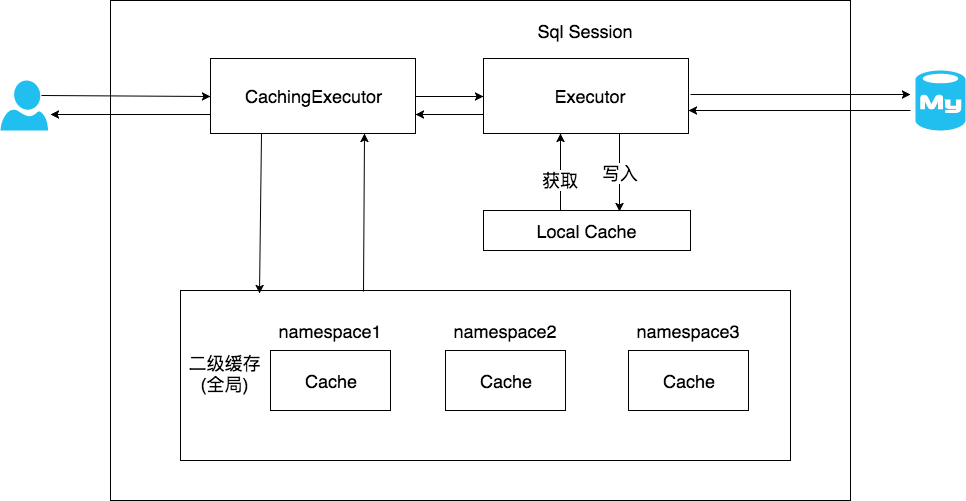
3.2 开启二级缓存
首先在mybatis.xml配置文件中开启缓存:
xml
<settings>
  <setting name="cacheEnabled" value="true"/>
</settings>然后在需要开启缓存的Mapper XML 文件中添加以下标签,开启缓存:
xml
<mapper namespace="xxx">
    <cache/>
</mapper>最后,对需要缓存的数据添加序列化能力,也就是继承Serializable接口:
java
@Data
@EqualsAndHashCode
public class DemoEntity implements Serializable {
    private Integer id;
    private String value1;
    private String value2;
}之后,我们就可以使用二级缓存了:
java
@Test
public void test() throws IOException {
    InputStream inputStream = Resources.getResourceAsStream("mybatis.xml");
    SqlSessionFactory sqlSessionFactory = new SqlSessionFactoryBuilder().build(inputStream);

    SqlSession sqlSession1 = sqlSessionFactory.openSession();
    DemoEntity demoEntity1 = sqlSession1.selectOne("org.example.dao.DemoDao.queryById",1);
    log.info("demoEntity1: {}", demoEntity1);

  	// 一定要关闭,二级缓存才生效
    sqlSession1.close();

    SqlSession sqlSession2 = sqlSessionFactory.openSession();
    DemoEntity demoEntity2 = sqlSession2.selectOne("org.example.dao.DemoDao.queryById",1);
    log.info("demoEntity2: {}", demoEntity2);

    log.info("demoEntity1 == demoEntity2: {}", demoEntity1 == demoEntity2);
}从结果可以看到,sqlSession2没有查询数据库,而是走的缓存。
3.3 MappedStatement
在 MyBatis 中,MappedStatement 是一个非常核心且重要的内部对象。简单来说,它代表了 MyBatis Mapper XML 文件中定义的一个完整的 SQL 操作(比如 <select>、<insert>、<update>、<delete> 标签)。
MyBatis 在启动时会解析所有的 Mapper XML 文件,并将每个 <select>、<insert>、<update>、<delete> 标签以及它们的属性和子元素封装成一个 MappedStatement 对象。这些 MappedStatement 对象会被存储在 Configuration 对象中,供后续的 SQL 执行查找和使用。
最重要的是,在 MappedStatement 对象,有一个缓存属性cache,这就是二级缓存。
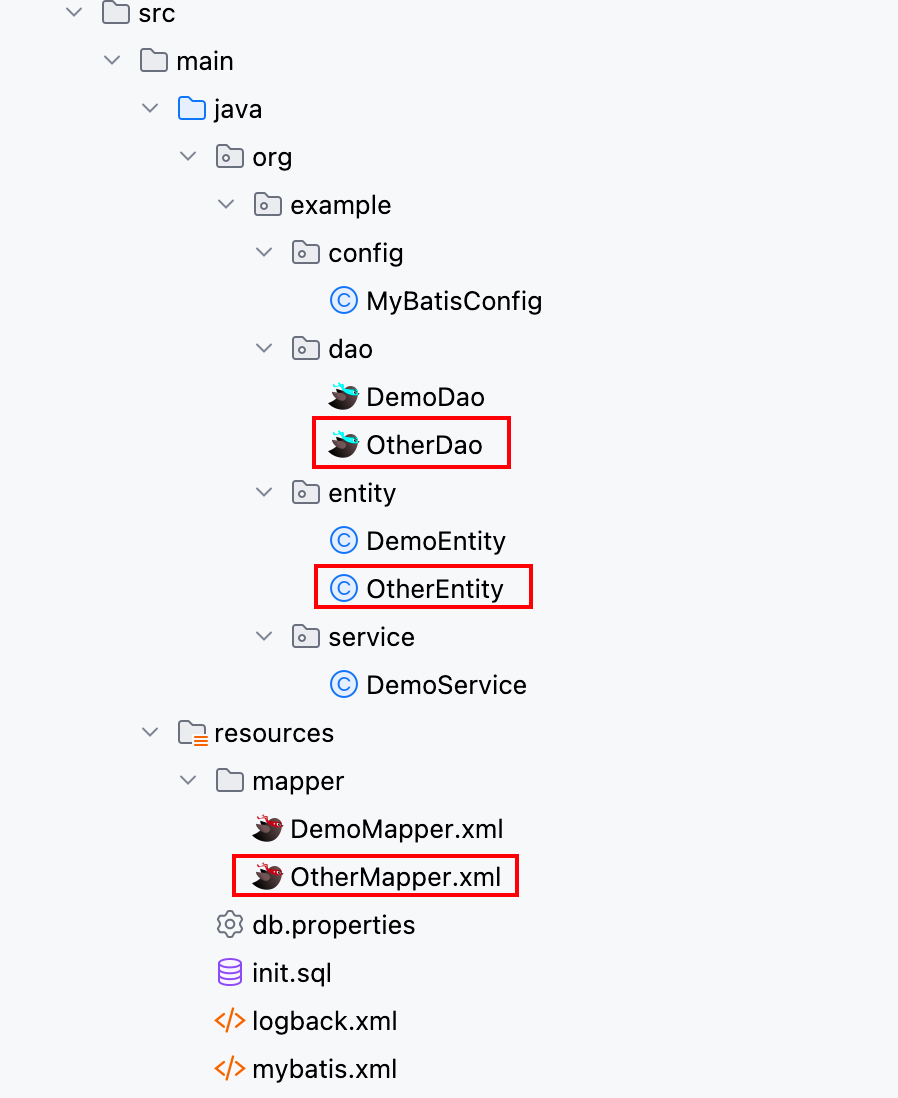
首先,在项目中多加一个DAO 接口,整体项目结构如下:
然后用反射的方式,从Configuration中获取MappedStatement:
java
public void test1() throws IOException, NoSuchFieldException, IllegalAccessException {
    InputStream inputStream = Resources.getResourceAsStream("mybatis.xml");
    SqlSessionFactory sqlSessionFactory = new SqlSessionFactoryBuilder().build(inputStream);

    Configuration configuration = sqlSessionFactory.getConfiguration();

    // 用反射的方式获取mappedStatementMap
    Field mappedStatementsField = Configuration.class.getDeclaredField("mappedStatements");
    mappedStatementsField.setAccessible(true);
    Map<String, MappedStatement> mappedStatementMap =
            (Map<String, MappedStatement>) mappedStatementsField.get(configuration);

    Set<Object> cacheSet = new HashSet<>();
    mappedStatementMap.forEach((key, value) -> {
        System.out.println(key + " ---> " + value);
        cacheSet.add(value.getCache());
    });

    System.out.println(cacheSet);
}可以看到,每条SQL语句(每个方法),都有一个全限定名的key,和一个以方法名的key。
最主要的是关注cache:
txt
[org.apache.ibatis.cache.decorators.SynchronizedCache@70ed52de, org.apache.ibatis.cache.decorators.SynchronizedCache@6be968ce]可以发现,只有两个缓存,也就是说一个Mapper XML文件只对应一个缓存,这个缓存的实现是SynchronizedCache(其实就是PerpetualCache的装饰)。
txt
SynchronizedCache -> LoggingCache -> SerializedCache -> LruCache -> PerpetualCache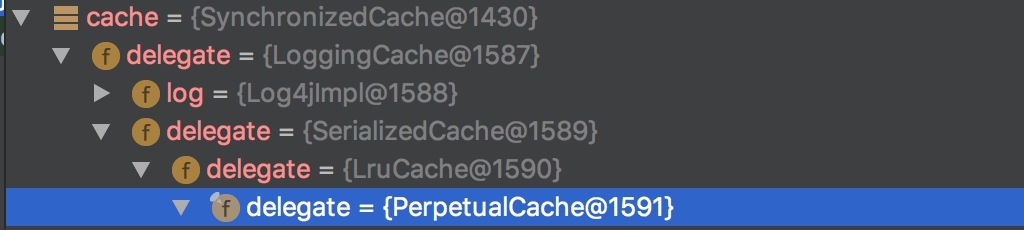
一个Mapper XML文件只对应一个缓存,也就说明了为什么SqlSession可以共享二级缓存。
在以下方法中,可以查看二级缓存的作用:
txt
org.apache.ibatis.executor.CachingExecutor#query(org.apache.ibatis.mapping.MappedStatement, java.lang.Object, org.apache.ibatis.session.RowBounds, org.apache.ibatis.session.ResultHandler, org.apache.ibatis.cache.CacheKey, org.apache.ibatis.mapping.BoundSql)java
@Override
public <E> List<E> query(MappedStatement ms, Object parameterObject, RowBounds rowBounds, ResultHandler resultHandler,
    CacheKey key, BoundSql boundSql) throws SQLException {
  // 从MappedStatement中获取二级缓存
  Cache cache = ms.getCache();
  if (cache != null) {
    // 二级缓存不为空
    flushCacheIfRequired(ms);
    if (ms.isUseCache() && resultHandler == null) {
      ensureNoOutParams(ms, boundSql);
      // 从二级缓存中查询数据
      List<E> list = (List<E>) tcm.getObject(cache, key);
      if (list == null) {
        // 二级缓存中没有数据,则委托其他Executor查询数据,就是之前的一级缓存-->数据库的逻辑
        list = delegate.query(ms, parameterObject, rowBounds, resultHandler, key, boundSql);
        // 将数据放入二级缓存
        tcm.putObject(cache, key, list);
      }
      return list;
    }
  }
  return delegate.query(ms, parameterObject, rowBounds, resultHandler, key, boundSql);
}3.4 TCM是什么
TCM是TransactionalCacheManager类,在CachingExecutor中作为属性存在:
java
public class CachingExecutor implements Executor {

  private final Executor delegate;
  private final TransactionalCacheManager tcm = new TransactionalCacheManager();
}TCM的存在是管理事务中的查询语句:
- 当事务提交时(
commit()),TCM才会将查询结果刷新到二级缓存中,其他SqlSession才能查询到二级缓存中的数据; - 当事务回滚时(
rollback()),TCM会将事务中的查询结果丢弃,不保存到二级缓存中;
TransactionalCacheManager结构如下:
java
public class TransactionalCacheManager {

  private final Map<Cache, TransactionalCache> transactionalCaches = new HashMap<>();

  // 事务提交
  public void commit() {
    for (TransactionalCache txCache : transactionalCaches.values()) {
      txCache.commit();
    }
  }

  // 事务回滚
  public void rollback() {
    for (TransactionalCache txCache : transactionalCaches.values()) {
      txCache.rollback();
    }
  }
}TransactionalCache的结构如下:
java
public class TransactionalCache implements Cache {

  // 实际的二级缓存
  private final Cache delegate;
  private boolean clearOnCommit;
  // 待保存或丢弃的缓存数据
  private final Map<Object, Object> entriesToAddOnCommit;
  // 未命中缓存的键
  private final Set<Object> entriesMissedInCache;

  // 事务提交
  public void commit() {
    if (clearOnCommit) {
      delegate.clear();
    }
    flushPendingEntries();
    reset();
  }

  // 事务回滚
  public void rollback() {
    unlockMissedEntries();
    reset();
  }

  // 将事务中的查询结果清空,也就是不保存到二级缓存中
  private void reset() {
    clearOnCommit = false;
    entriesToAddOnCommit.clear();
    entriesMissedInCache.clear();
  }

  // 将事务中的查询结果保存到二级缓存中
  private void flushPendingEntries() {
    for (Map.Entry<Object, Object> entry : entriesToAddOnCommit.entrySet()) {
      delegate.putObject(entry.getKey(), entry.getValue());
    }
    for (Object entry : entriesMissedInCache) {
      if (!entriesToAddOnCommit.containsKey(entry)) {
        delegate.putObject(entry, null);
      }
    }
  }
}当关闭SqlSession时,会根据配置判断是否回滚或提交:
txt
org.apache.ibatis.executor.CachingExecutor#closejava
@Override
public void close(boolean forceRollback) {
  try {
    if (forceRollback) {
      tcm.rollback();
    } else {
      tcm.commit();
    }
  } finally {
    delegate.close(forceRollback);
  }
}3.5 二级缓存小结
有关二级缓存的类图关系如下:
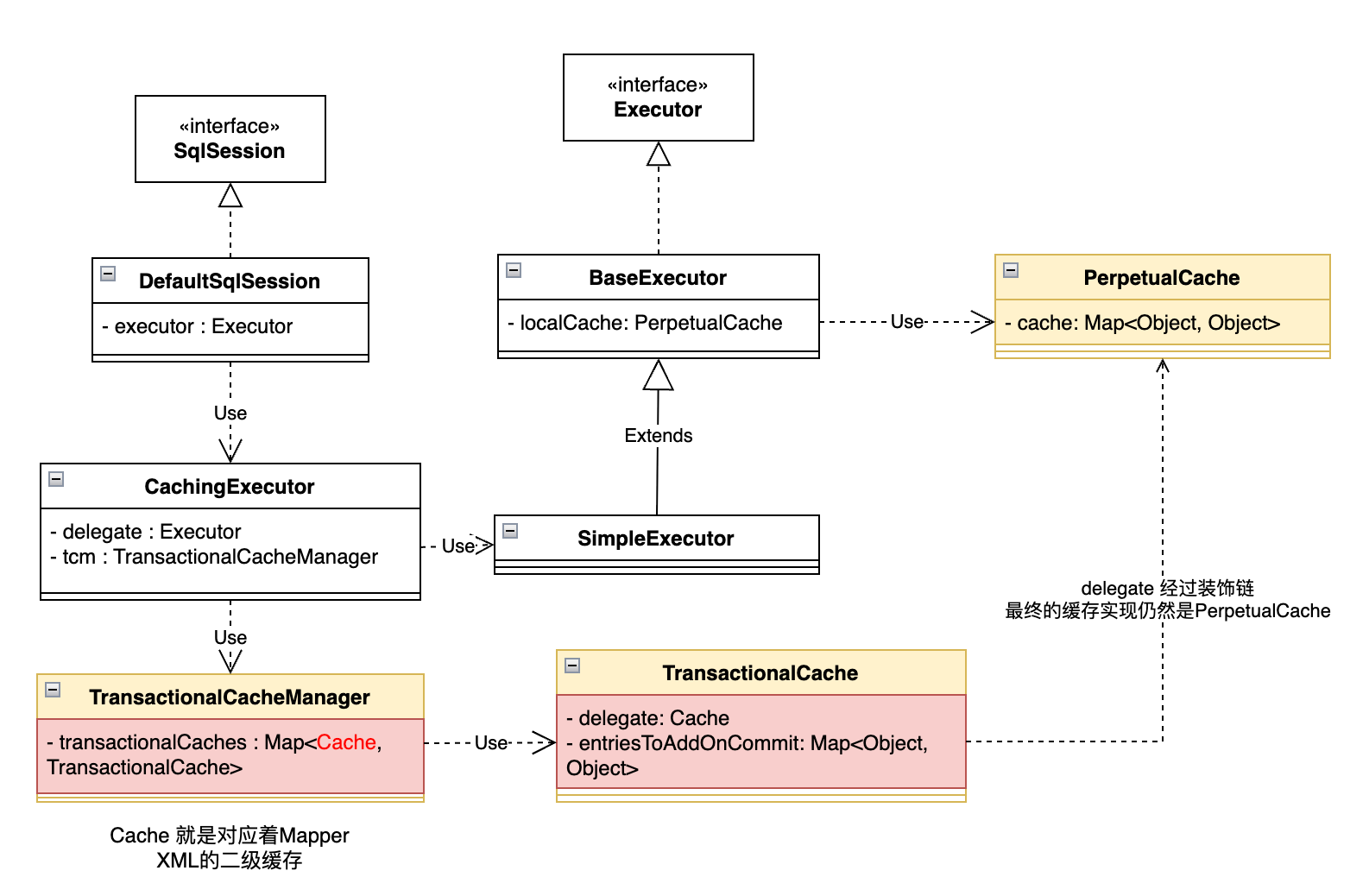
- 首先,使用
SqlSession查询数据时,会调用CachingExecutor的查询方法; - 在
CachingExecutor的查询方法中,会先从MappedStatement中获取二级缓存Cache(可以把二级缓存理解为两部分:一部分是放生效的缓存数据,一部分是放未生效的缓存数据);- 从二级缓存(已生效的部分)中查询数据,如果二级缓存中没有数据,那么就委托
BaseExecutor查询数据,从一级缓存或数据库中查询;- 查询到数据后,将查询结果放入未生效的缓存数据中
- 如果二级缓存(已生效的部分)中查询到数据,直接返回;
- 从二级缓存(已生效的部分)中查询数据,如果二级缓存中没有数据,那么就委托
- 调用方法结束,根据情况调用以下三种方法:
commit():将二级缓存中未生效的缓存数据,放入已生效的数据中;rollback():丢弃二级缓存中未生效的缓存数据;close():根据配置调用commit()或rollback();
3.6 二级缓存使用案例
commit() / rollback() / close() 对二级缓存的影响
java
@Test
public void test() throws IOException {
    InputStream inputStream = Resources.getResourceAsStream("mybatis.xml");
    SqlSessionFactory sqlSessionFactory = new SqlSessionFactoryBuilder().build(inputStream);

    SqlSession sqlSession1 = sqlSessionFactory.openSession();
    DemoEntity demoEntity1 = sqlSession1.selectOne("org.example.dao.DemoDao.queryById",1);
    log.info("demoEntity1: {}", demoEntity1);

    //sqlSession1.rollback();  // 二级缓存不生效
    sqlSession1.commit();  // 二级缓存生效
    //sqlSession1.close();  // 二级缓存生效

    SqlSession sqlSession2 = sqlSessionFactory.openSession();
    DemoEntity demoEntity2 = sqlSession2.selectOne("org.example.dao.DemoDao.queryById",1);
    log.info("demoEntity2: {}", demoEntity2);

    log.info("demoEntity1 == demoEntity2: {}", demoEntity1 == demoEntity2);
}TIP
有一个奇怪的问题,最后demoEntity1 == demoEntity2的比较结果是false,为什么?
因为在前面缓存的装饰链上,存在SerializedCache,这个缓存器用于序列化与反序列缓存数据,所以反序列化产生的对象是不一样的。
update / insert / delete 对二级缓存的影响
增删改操作对二级缓存的影响,需要分两步来看:
- 第一步,执行增删改操作,在这一步中,会将二级缓存中未生效的部分清空,然后将
TransactionalCache.clearOnCommit置为true; - 第二步,执行
commit()或rollback()操作:- 执行
commit()操作:由于将TransactionalCache.clearOnCommit置为true,所以会将二级缓存中已生效的部分清空,然后再把未生效的数据放入已生效的部分中(有可能在同一个事务中,执行了增删改操作后,又执行了查询操作,所以未生效的部分也是有数据的),最后将TransactionalCache.clearOnCommit置为false; - 执行
rolback()操作:将未生效的部分清空,将TransactionalCache.clearOnCommit置为false;
- 执行
以下代码是第一步的体现(org.apache.ibatis.executor.CachingExecutor中的方法):
java
public int update(MappedStatement ms, Object parameterObject) throws SQLException {
  flushCacheIfRequired(ms);
  return delegate.update(ms, parameterObject);
}

private void flushCacheIfRequired(MappedStatement ms) {
  Cache cache = ms.getCache();
  if (cache != null && ms.isFlushCacheRequired()) {
    tcm.clear(cache);
  }
}3.7 其他配置
在Mapper XML 中的<cache>`标签用于声明这个namespace使用二级缓存:
xml
<cache/><cache>还有以下属性可以配置:
type:cache使用的类型,默认是PerpetualCache,我们可以实现自己的缓存,例如将缓存数据保存到Redis中;eviction: 定义回收的策略,常见的有:- FIFO:先进先出,最先保存的缓存数据被回收;
- LRU:最近最少使用的缓存数据被回收;
flushInterval: 配置一定时间自动刷新缓存,单位是毫秒。size: 最多缓存对象的个数。readOnly: 是否只读,若配置可读写,则需要对应的实体类能够序列化。blocking: 若缓存中找不到对应的key,是否会一直blocking,直到有对应的数据进入缓存。
cache-ref代表引用别的命名空间的Cache配置,这样两个命名空间的操作使用的就是同一个Cache。
xml
<cache-ref namespace="mapper.StudentMapper"/>在增删改查标签中,有以下属性与缓存有关:
xml
<select ... flushCache="false" useCache="true"/>
<insert ... flushCache="true"/>
<update ... flushCache="true"/>
<delete ... flushCache="true"/>flushCache:是否刷新缓存,这里的刷新是指清空未生效的部分,并且在提交时先清空已生效的部分;javaprivate void flushCacheIfRequired(MappedStatement ms) { Cache cache = ms.getCache(); if (cache != null && ms.isFlushCacheRequired()) { //ms.isFlushCacheRequired() tcm.clear(cache); } }useCache:是否使用缓存,只对select有效;
4. 总结
本文了解了MyBatis的缓存机制,包括一级缓存和二级缓存,总的建议是:
- 可以使用一级缓存;
- 不使用二级缓存,原因如下:
- 数据一致性问题:如果数据在外部被修改(例如,通过其他应用程序直接修改数据库,或者在不同的
Mapper中修改),二级缓存可能无法感知,导致缓存中的数据与数据库不一致。 - 引入二级缓存会增加内存消耗,并且缓存的序列化/反序列化、更新和淘汰等操作都会带来一定的性能开销。对于更新频繁的数据,过度使用二级缓存反而可能降低性能,因为缓存的维护成本会超过查询带来的收益。
- 数据一致性问题:如果数据在外部被修改(例如,通过其他应用程序直接修改数据库,或者在不同的
TIP
MyBatis缓存会带来脏读问题吗?
在一级缓存中,假如一个SqlSession1查询并缓存了数据A,另一个SqlSession2修改了数据A为A1,但是SqlSession1无法感知,仍然会查询缓存,查到旧数据。这算脏读吗?
应该不算,一级缓存的作用域可以理解为事务,那么这和事务隔离级别的要求相符。
在二级缓存中,一个Mapper XML中的缓存有了数据,并且该SqlSession已结束,之后数据在另一个Mapper或其他应用程序被修改了,那么之后再次查询该数据,仍然会走缓存。
所以,我认为二级缓存是会带来脏读问题的。