Appearance
Resilience4j
本文介绍Resilience4j的相关组件,以及如何与Spring技术栈集成使用。
1. 概述
Resilience4j 是一个为函数式编程设计的轻量级容错库。Resilience4j 提供了高阶装饰器,通过熔断器(Circuit Breaker)、限流器(Rate Limiter)、重试(Retry)或并发隔离(Bulkhead)来增强普通函数式接口、lambda 表达式或方法引用即可得到高阶函数。可以在任何函数式接口、lambda 表达式或方法引用上叠加多个装饰器,可以根据需要选择装饰器,而无需引入其他不必要的内容。
在Resilience4j 中,主要有以下模块:
- 熔断器(Circuit Breaker):检测下游调用的失败或慢调用情况,达到阈值后暂时阻止后续请求,防止持续调用故障服务,避免故障扩散;
- 限流器(Rate Limiter):限制单位时间内允许通过的请求数量,防止请求量过大,超过系统处理能力;
- 重试(Retry):调用失败后,按照配置重新执行调用,应对网络抖动、临时异常等瞬时故障;
- 并发隔离(Bulkhead):限制同时执行的调用数量,或通过独立线程池隔离资源,防止慢调用占用过多并发资源,影响其他业务;
以上机制可以组合使用。
在微服务架构中,以订单服务调用库存服务为例:
- 熔断器: 库存服务连续出现大量失败,暂时停止调用,等待恢复后再尝试。
- 限流器: 每秒最多允许 100 个库存请求通过。
- 并发隔离: 最多允许 20 个库存请求同时执行。
- 重试: 库存请求因临时网络异常失败后,再尝试调用 2 次。
注意,Resilience4j一般配置在调用方,即订单服务中。
如果要在项目中引入Resilience4j,可以使用以下坐标(具体版本号可以查看【参考资料2】):
xml
<dependency>
    <groupId>io.github.resilience4j</groupId>
    <artifactId>resilience4j-all</artifactId>
    <version>${resilience4jVersion}</version>
</dependency>如果要单独使用某一个模块,可以使用以下独立模块:
xml
<dependency>
    <groupId>io.github.resilience4j</groupId>
    <artifactId>resilience4j-circuitbreaker</artifactId>
    <version>${resilience4jVersion}</version>
</dependency>
<dependency>
    <groupId>io.github.resilience4j</groupId>
    <artifactId>resilience4j-ratelimiter</artifactId>
    <version>${resilience4jVersion}</version>
</dependency>
<dependency>
    <groupId>io.github.resilience4j</groupId>
    <artifactId>resilience4j-retry</artifactId>
    <version>${resilience4jVersion}</version>
</dependency>
<dependency>
    <groupId>io.github.resilience4j</groupId>
    <artifactId>resilience4j-bulkhead</artifactId>
    <version>${resilience4jVersion}</version>
</dependency>
<dependency>
    <groupId>io.github.resilience4j</groupId>
    <artifactId>resilience4j-cache</artifactId>
    <version>${resilience4jVersion}</version>
</dependency>
<dependency>
    <groupId>io.github.resilience4j</groupId>
    <artifactId>resilience4j-timelimiter</artifactId>
    <version>${resilience4jVersion}</version>
</dependency>2. 模块介绍
2.1 熔断器(CircuitBreaker)
2.1.1 介绍
Resilience4j CircuitBreaker熔断器是通过有限状态机来实现的,熔断器的三种正常状态如下:
- CLOSED:初始状态,当熔断器处于CLOSED状态时,不起作用;
- OPEN:当处于OPEN状态时,熔断器起作用,此时针对所有下游服务的调用调用,会直接抛出异常;
- HALF_OPEN:当处于HALF_OPEN状态时,熔断器会放行部分下游服务调用请求,并根据这部分调用结果,切换为CLOSED或OPEN状态;
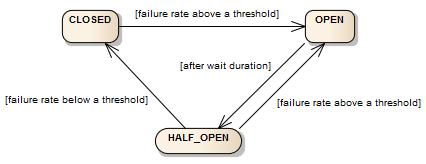
Resilience4j 熔断器的工作流程可以分为以下几个步骤:
- 初始状态(CLOSED):熔断器处于关闭状态,允许请求正常通过,熔断器会记录调用结果,包括成功、失败以及调用耗时;
- 统计调用结果:熔断器根据配置的滑动窗口,统计一定范围内的调用数据,并计算失败率和慢调用率。只有达到
minimumNumberOfCalls配置的最小调用次数后,才会判断是否满足熔断条件; - 触发熔断(OPEN):当失败率或慢调用率达到配置的阈值时,熔断器从
CLOSED切换到OPEN。此时,后续请求会被快速拒绝,不再正常调用下游服务,从而避免故障进一步扩散。被拒绝的调用通常会抛出CallNotPermittedException; - 等待熔断时间结束:熔断器在
OPEN状态下持续一段时间,该时间由waitDurationInOpenState配置。等待期间,请求仍会被直接拒绝; - 进入半开状态(HALF_OPEN):等待时间结束后,熔断器切换为HALF_OPEN状态,允许有限数量的探测请求通过,具体数量由
permittedNumberOfCallsInHalfOpenState配置。通过这些请求的实际执行结果,判断下游服务是否已经恢复; - 判断是否恢复:如果半开状态下的调用结果满足恢复条件(失败率和慢调用率都没有达到阈值),熔断器切换回
CLOSED,恢复正常调用;如果失败率或慢调用率仍达到熔断阈值,则重新进入OPEN,继续拒绝请求;
2.1.2 滑动窗口
Resilience4j 熔断器提供了两种滑动窗口:基于计数的滑动窗口、基于时间的滑动窗口:
基于计数的滑动窗口:记录最近N个请求的结果,基于长度为N的循环数组实现,在Resilience4j中实现类为
FixedSizeSlidingWindowMetrics,如下:javapublic class FixedSizeSlidingWindowMetrics implements Metrics { // 窗口大小,即最近的N个请求中的N private final int windowSize; // 最近请求的总聚合数据 private final TotalAggregation totalAggregation; // 每个请求的数据 private final Measurement[] measurements; // 当前数组位置 int headIndex; // 锁,记录时禁止并发操作 private final ReentrantLock lock = new ReentrantLock(); }滑动窗口递增更新总聚合数据
totalAggregation,每当有最旧的请求过期时,会把该请求移除总聚合数据,并记录新的请求数据到总聚合数据中。每当熔断器判断是否需要开启时,只需要从总聚合数据中获取慢请求和失败请求比例即可。基于时间的滑动窗口:记录最近N秒内的请求结果,同样是基于长度为N的循环数组实现,在Resilience4j中,实现类为
SlidingTimeWindowMetrics,如下:javapublic class SlidingTimeWindowMetrics implements Metrics { // partialAggregations,长度为N,每个元素代表每一秒的聚合结果 final PartialAggregation[] partialAggregations; // 窗口大小,即N private final int timeWindowSizeInSeconds; // 总的聚合数据 private final TotalAggregation totalAggregation; // 时钟,要判断当前时间 private final Clock clock; // 当前数组位置 int headIndex; // 锁 private final ReentrantLock lock = new ReentrantLock(); }同样地,滑动窗口会递增更新总聚合数据
totalAggregation,每当有新请求被记录时,会把时间窗口范围外的记录数据都移除。每当熔断器判断是否需要开启时,也只需要从总聚合数据中获取慢请求和失败请求比例即可。
注意,只有达到 minimumNumberOfCalls 配置的最小调用次数后,熔断器才会发挥作用,这是为了防止第一次请求就失败,此时失败率为100%,触发熔断。
在totalAggregation中,关键指标如下:
java
abstract class AbstractAggregation implements CumulativeMeasurement {
  	// 所有已统计调用的总耗时,单位毫秒
    long totalDurationInMillis = 0;
  	// 慢调用总数,不论成功还是失败
    int numberOfSlowCalls = 0;
  	// 既是慢调用、又调用失败的次数
    int numberOfSlowFailedCalls = 0;
  	// 失败调用总数,不论是否慢调用
    int numberOfFailedCalls = 0;
  	// 总调用次数
    int numberOfCalls = 0;
}以上数据用于计算熔断指标:
- 失败率 =
numberOfFailedCalls / numberOfCalls × 100% - 慢调用率 =
numberOfSlowCalls / numberOfCalls × 100%
2.1.3 三种特殊状态
除了上述的CLOSED、OPEN和HALF_OPEN三种正常状态,熔断器还有三种特殊状态:
METRICS_ONLY:在该状态下,熔断器和
CLOSED状态相似,会记录请求结果、发布事件,但是当达到失败请求和慢请求阈值时,不回切换为OPEN状态;适用于上线前观察调用质量、验证熔断阈值是否合理的场景。
DISABLED:在
DISABLED状态下,熔断器不会工作,也不会统计请求结果、发布事件;适用于暂时关闭熔断保护、观察业务原始调用行为等场景。
FORCED_OPEN:在
FORCED_OPEN状态下,会强制熔断,不会统计请求结果、发布事件;适用于需要紧急停止访问某个下游服务的场景,例如库存服务正在维护时,临时阻断相关调用。
要退出以上特殊状态,需要手动进行熔断器状态变更或重置。
2.1.4 关键类与案例
CircuitBreakerConfig用来配置熔断器参数,主要参数如下:
| 参数 | 默认值 | 说明 |
|---|---|---|
| failureRateThreshold | 50 | Configures the failure rate threshold in percentage. When the failure rate is equal or greater than the threshold the CircuitBreaker transitions to open and starts short-circuiting calls. |
| slowCallRateThreshold | 100 | Configures a threshold in percentage. The CircuitBreaker considers a call as slow when the call duration is greater than slowCallDurationThreshold When the percentage of slow calls is equal or greater the threshold, the CircuitBreaker transitions to open and starts short-circuiting calls. |
| slowCallDurationThreshold | 60000 [ms] | Configures the duration threshold above which calls are considered as slow and increase the rate of slow calls. |
| permittedNumberOfCalls InHalfOpenState | 10 | Configures the number of permitted calls when the CircuitBreaker is half open. |
| maxWaitDurationInHalfOpenState | 0 [ms] | Configures a maximum wait duration which controls the longest amount of time a CircuitBreaker could stay in Half Open state, before it switches to open. Value 0 means Circuit Breaker would wait infinitely in HalfOpen State until all permitted calls have been completed. |
| slidingWindowType | COUNT_BASED | Configures the type of the sliding window which is used to record the outcome of calls when the CircuitBreaker is closed. Sliding window can either be count-based or time-based. If the sliding window is COUNT_BASED, the last slidingWindowSize calls are recorded and aggregated. If the sliding window is TIME_BASED, the calls of the last slidingWindowSize seconds recorded and aggregated. |
| slidingWindowSize | 100 | Configures the size of the sliding window which is used to record the outcome of calls when the CircuitBreaker is closed. |
| minimumNumberOfCalls | 100 | Configures the minimum number of calls which are required (per sliding window period) before the CircuitBreaker can calculate the error rate or slow call rate. For example, if minimumNumberOfCalls is 10, then at least 10 calls must be recorded, before the failure rate can be calculated. If only 9 calls have been recorded the CircuitBreaker will not transition to open even if all 9 calls have failed. |
| waitDurationInOpenState | 60000 [ms] | The time that the CircuitBreaker should wait before transitioning from open to half-open. |
| automaticTransition FromOpenToHalfOpenEnabled | false | If set to true it means that the CircuitBreaker will automatically transition from open to half-open state and no call is needed to trigger the transition. A thread is created to monitor all the instances of CircuitBreakers to transition them to HALF_OPEN once waitDurationInOpenState passes. Whereas, if set to false the transition to HALF_OPEN only happens if a call is made, even after waitDurationInOpenState is passed. The advantage here is no thread monitors the state of all CircuitBreakers. |
| recordExceptions | empty | A list of exceptions that are recorded as a failure and thus increase the failure rate. Any exception matching or inheriting from one of the list counts as a failure, unless explicitly ignored via ignoreExceptions. If you specify a list of exceptions, all other exceptions count as a success, unless they are explicitly ignored by ignoreExceptions. |
| ignoreExceptions | empty | A list of exceptions that are ignored and neither count as a failure nor success. Any exception matching or inheriting from one of the list will not count as a failure nor success, even if the exceptions is part of recordExceptions. |
| recordFailurePredicate | throwable -> true By default all exceptions are recorded as failures. | A custom Predicate which evaluates if an exception should be recorded as a failure. The Predicate must return true if the exception should count as a failure. The Predicate must return false, if the exception should count as a success, unless the exception is explicitly ignored by ignoreExceptions. |
| ignoreExceptionPredicate | throwable -> false By default no exception is ignored. | A custom Predicate which evaluates if an exception should be ignored and neither count as a failure nor success. The Predicate must return true if the exception should be ignored. The Predicate must return false, if the exception should count as a failure. |
创建CircuitBreakerConfig如下:
java
CircuitBreakerConfig circuitBreakerConfig = CircuitBreakerConfig.custom()
  .failureRateThreshold(50)
  .slowCallRateThreshold(50)
  .waitDurationInOpenState(Duration.ofMillis(1000))
  .slowCallDurationThreshold(Duration.ofSeconds(2))
  .permittedNumberOfCallsInHalfOpenState(3)
  .minimumNumberOfCalls(10)
  .slidingWindowType(SlidingWindowType.TIME_BASED)
  .slidingWindowSize(5)
  .recordException(e -> INTERNAL_SERVER_ERROR
                 .equals(getResponse().getStatus()))
  .recordExceptions(IOException.class, TimeoutException.class)
  .ignoreExceptions(BusinessException.class, OtherBusinessException.class)
.build();CircuitBreakerRegistry是用来管理熔断器的,创建如下:
java
// 使用默认配置创建CircuitBreakerRegistry
CircuitBreakerRegistry circuitBreakerRegistry = CircuitBreakerRegistry.ofDefaults();

// 使用自定义配置创建CircuitBreakerRegistry
CircuitBreakerRegistry circuitBreakerRegistry = CircuitBreakerRegistry.of(circuitBreakerConfig);CircuitBreaker即熔断器,可以通过CircuitBreakerRegistry创建:
java
// 使用CircuitBreakerRegistry的默认参数创建熔断器
CircuitBreaker circuitBreakerWithDefaultConfig = circuitBreakerRegistry.circuitBreaker("name1");

// 使用自定义配置创建熔断器
CircuitBreaker circuitBreakerWithCustomConfig = circuitBreakerRegistry.circuitBreaker("name2", circuitBreakerConfig);也可以不使用CircuitBreakerRegistry,直接创建熔断器:
java
// Create a custom configuration for a CircuitBreaker
CircuitBreakerConfig circuitBreakerConfig = CircuitBreakerConfig.custom()
  .recordExceptions(IOException.class, TimeoutException.class)
  .ignoreExceptions(BusinessException.class, OtherBusinessException.class)
  .build();

CircuitBreaker customCircuitBreaker = CircuitBreaker
.of("testName", circuitBreakerConfig);当有了熔断器后,我们就可以使用熔断器保护我们的业务代码,首先需要使用熔断器包装业务代码:
java
Supplier<String> decoratedSupplier =
    CircuitBreaker.decorateSupplier(
        circuitBreaker,
        () -> inventoryService.getStock()
);之后,可以执行包装后的业务代码:
java
String result = decoratedSupplier.get();当然,也可以直接使用熔断器执行业务代码:
java
String result = circuitBreaker.executeSupplier(
    () -> inventoryService.getStock()
);完整例子如下:
java
public static void main(String[] args) throws Throwable {
    // 创建熔断器
    CircuitBreakerConfig config = CircuitBreakerConfig.custom()
            .minimumNumberOfCalls(10)
            .failureRateThreshold(50)
            .slidingWindowType(CircuitBreakerConfig.SlidingWindowType.COUNT_BASED)
            .slidingWindowSize(10)
            .waitDurationInOpenState(Duration.ofMillis(900))
            .build();
    CircuitBreaker circuitBreaker = CircuitBreaker.of("testName", config);

    // 包装业务代码
    CheckedSupplier<String> stringCheckedSupplier = CircuitBreaker.decorateCheckedSupplier(
            circuitBreaker,
            () -> {
                if (new Random().nextInt() % 2 == 0) {
                    throw new RuntimeException("异常");
                }
                return "成功";
            }
    );

    // 模拟调用20次
    for (int i = 1; i <= 20; i++) {
        System.out.print(i + ": ");

        String exceptionMsg = "";
        try {
            stringCheckedSupplier.get();
        }catch (Exception e){
            exceptionMsg = e.getMessage();
            if(e instanceof CallNotPermittedException){
                Thread.sleep(200);
            }
        }finally {
            System.out.print(" 熔断器状态:" + circuitBreaker.getState() + " ");
            if (StringUtils.isNotEmpty(exceptionMsg)){
                System.out.print(exceptionMsg);
            }
            System.out.println();
        }
    }
}结果如下:
txt
1:  熔断器状态:CLOSED 异常
2:  熔断器状态:CLOSED
3:  熔断器状态:CLOSED 异常
4:  熔断器状态:CLOSED
5:  熔断器状态:CLOSED
6:  熔断器状态:CLOSED
7:  熔断器状态:CLOSED 异常
8:  熔断器状态:CLOSED
9:  熔断器状态:CLOSED 异常
10:  熔断器状态:OPEN 异常
11:  熔断器状态:OPEN CircuitBreaker 'testName' is OPEN and does not permit further calls
12:  熔断器状态:OPEN CircuitBreaker 'testName' is OPEN and does not permit further calls
13:  熔断器状态:OPEN CircuitBreaker 'testName' is OPEN and does not permit further calls
14:  熔断器状态:OPEN CircuitBreaker 'testName' is OPEN and does not permit further calls
15:  熔断器状态:OPEN CircuitBreaker 'testName' is OPEN and does not permit further calls
16:  熔断器状态:HALF_OPEN 异常
17:  熔断器状态:HALF_OPEN
18:  熔断器状态:HALF_OPEN 异常
19:  熔断器状态:HALF_OPEN
20: 熔断器状态:HALF_OPEN2.2 限流器(RateLimiter)
2.2.1 介绍
Resilience4j的限流器(RateLimiter)用来限制单位时间内允许通过的请求数量,防止请求量过大,超过系统处理能力。
在Resilience4j中,限流器有3个参数:
| 参数 | 默认值 | 说明 |
|---|---|---|
| timeoutDuration | 5 [s] | 线程获取许可的最大等待时间 |
| limitRefreshPeriod | 500 [ns] | 周期时间,在每个周期开始,会重置许可数 |
| limitForPeriod | 50 | 周期内的最大许可数 |
RateLimiter会从JVM启动开始,按照limitRefreshPeriod,将时间轴划分为一个一个的周期,每个周期内提供limitForPeriod个许可。当线程执行RateLimiter保护的代码时,会先获取许可,获取成功可以继续执行,如果获取失败,则会尝试最多等待timeoutDuration时间,等待后还没有获取成功,会抛出RequestNotPermitted异常。
最简单的实现,就是启动一个守护线程,每个周期开始时,重新设置许可数量。当线程执行受保护代码时,先获取许可,视情况等待。
这就是Resilience4j提供的SemaphoreBasedRateLimiter实现。
Resilience4j提供的RateLimiter默认实现是AtomicRateLimiter,对许可刷新和线程等待做了优化。
在AtomicRateLimiter中,维护了当前限流器状态:
java
private static class State {

    private final RateLimiterConfig config;

    private final long activeCycle;
    private final int activePermissions;
    private final long nanosToWait;
}activeCycle:当前活动周期的编号;activePermissions:当前剩余许可数;nanosToWait:记录许可不足时的等待时间,用于计算请求何时能够获得许可;
最难理解的是nanosToWait,举个具体的例子,假如限流器配置如下:
txt
limitForPeriod: 2
limitRefreshPeriod: 1s
timeoutDuration: 500ms即每秒刷新2个许可,当许可不足时,请求线程最多等待500毫秒。
假设在某个周期内,第100ms时,执行第一个请求,消耗1个许可;第700ms时,执行第二个请求,此时许可剩余0个;
第900ms时,来了第三个请求,此时没有许可,第三个请求线程需要等待,此时只需要等待100ms即可(因为只有100ms就到下一个周期了,许可数会重新刷新),不用等待500ms。这里的nanosToWait就是100ms。
AtomicRateLimiter还对许可刷新做了优化,不需要启动一个定时任务去重置许可。它采用按需计算的方式:当有线程申请许可时,根据当前时间计算现在属于哪个周期,再判断是否已经进入了新周期。
例如:
- 10:00:00:某个请求使用限流器,消耗了许可。
- 10:00:01:没有任何请求。
- 10:00:02:仍然没有请求。
- 10:00:10:又有请求到达。
这时,AtomicRateLimiter 不需要在 10:00:01、10:00:02……10:00:09 逐秒刷新许可。它只需要在 10:00:10 这次申请许可时,计算当前周期与上一次记录的周期之间相差多少,再更新内部状态。
2.2.2 关键类与案例
与熔断器类似,限流器同样有配置类、注册器类、限流器类。
限流器配置类RateLimiterConfig:
java
RateLimiterConfig config = RateLimiterConfig.custom()
  .limitRefreshPeriod(Duration.ofMillis(1))
  .limitForPeriod(10)
  .timeoutDuration(Duration.ofMillis(25))
.build();限流器注册器类RateLimiterRegistry:
java
// 使用默认配置的注册器类
RateLimiterRegistry rateLimiterRegistry = RateLimiterRegistry.ofDefaults();

// 自定义配置的注册器类
RateLimiterRegistry rateLimiterRegistry = RateLimiterRegistry.of(config);限流器类RateLimiter:
java
RateLimiter rateLimiterWithDefaultConfig = rateLimiterRegistry
  .rateLimiter("name1");

RateLimiter rateLimiterWithCustomConfig = rateLimiterRegistry
.rateLimiter("name2", config);使用限流器包装业务代码:
java
CheckedRunnable restrictedCall = RateLimiter
.decorateCheckedRunnable(rateLimiter, backendService::doSomething);完整案例:
java
public static void main(String[] args) throws InterruptedException {
    // 创建限流器
    RateLimiterConfig rateLimiterConfig = RateLimiterConfig.custom()
            .limitForPeriod(2)
            .limitRefreshPeriod(Duration.ofSeconds(1))
            .timeoutDuration(Duration.ofMillis(500))
            .build();
    RateLimiter rateLimiter = RateLimiter.of("rateLimiter", rateLimiterConfig);

    // 包装lambda表达式
    Runnable runnable = RateLimiter.decorateRunnable(
            rateLimiter, () -> System.out.println(LocalTime.now() + ": " + Thread.currentThread().getName()));

    // 创建线程池
    AtomicInteger atomicInteger = new AtomicInteger(0);
    ThreadPoolExecutor threadPoolExecutor = new ThreadPoolExecutor(
            2, 10,
            1, TimeUnit.MINUTES,
            new ArrayBlockingQueue<>(100),
            r -> {
                Thread thread = new Thread(r);
                thread.setName("myThreadPool-" + atomicInteger.incrementAndGet());
                return thread;
            }
    );

    // 主线程每300毫秒向线程池提交一次runnable
    for (int i = 1; i <= 5 ; i++) {
        threadPoolExecutor.execute(runnable);
        Thread.sleep(300);
    }

    // 关闭线程池
    threadPoolExecutor.shutdown();
}结果如下:
txt
19:07:08.196296: myThreadPool-1
19:07:08.495209: myThreadPool-2
19:07:09.191339: myThreadPool-2
19:07:09.191581: myThreadPool-1
Exception in thread "myThreadPool-2" io.github.resilience4j.ratelimiter.RequestNotPermitted: RateLimiter 'rateLimiter' does not permit further calls19:07:08.196296:主线程提交任务,线程池正常执行任务,这时限流器许可还剩下1个;
19:07:08.495209:主线程提交任务,线程池正常执行任务,这时限流器许可还剩下0个;
19:07:08.795209:主线程继续提交任务,线程池也正常执行,但是由于限流器没有许可了,所以线程卡住;
19:07:09.095209:主线程继续提交任务,线程池也正常执行,但是由于限流器没有许可了,所以线程卡住;
19:07:09.191339:限流器到了新的周期,刷新许可,此时卡住的两个线程顺利执行,此时限流器没有许可了;
19:07:09.391339:主线程继续提交任务,线程池也正常执行,但是由于限流器没有许可了,所以线程卡住,最多等待500毫秒;
19:07:09.891339:等待500毫秒后,还是没有许可,抛出异常RequestNotPermitted;
2.3 并发隔离(BulkHead)
2.3.1 介绍
Resilience4j中的并发隔离(BulkHead)限制同时执行的调用数量,或通过独立线程池隔离资源,防止慢调用占用过多并发资源,影响其他业务。如果已达到最大并发数,则新调用会抛出异常或等待。
在Resilience4j中,并发隔离有两种实现:
SemaphoreBulkhead:使用信号量,默认实现;FixedThreadPoolBulkhead:使用线程池;
当使用SemaphoreBulkhead,配置参数如下:
| 参数 | 默认值 | 说明 |
|---|---|---|
| maxConcurrentCalls | 25 | 最大的并发执行数 |
| maxWaitDuration | 0 | 当已达到最大并发数后,新线程等待时间,默认不等待直接抛出异常 |
| writableStackTraceEnabled | true | 当达到最大并发数抛出异常时,是否打印堆栈信息,如果为false,则只打印一行错误信息 |
| fairCallHandlingEnabled | true | 是否按照先来先执行的公平策略获取许可,当maxWaitDuration不为0时有效 |
当使用FixedThreadPoolBulkhead,配置参数如下:
| 参数 | 默认值 | 说明 |
|---|---|---|
| maxThreadPoolSize | Runtime.getRuntime() .availableProcessors() | 线程池最大线程数 |
| coreThreadPoolSize | Runtime.getRuntime() .availableProcessors() - 1 | 核心线程数 |
| queueCapacity | 100 | 队列容量 |
| keepAliveDuration | 20 [ms] | 非核心线程最大存活时间 |
| writableStackTraceEnabled | true | 当达到最大并发数抛出异常时,是否打印堆栈信息,如果为false,则只打印一行错误信息 |
注,FixedThreadPoolBulkhead和JDK中的ThreadPoolExecutor类似,重点使用SemaphoreBulkhead。
2.3.2 案例
java
public static void main(String[] args) throws InterruptedException {
    // 创建BulkHead
    BulkheadConfig bulkheadConfig = BulkheadConfig.custom()
            .maxConcurrentCalls(2)
            .maxWaitDuration(Duration.ZERO)
            .writableStackTraceEnabled(false)
            .fairCallHandlingStrategyEnabled(true)
            .build();

    Bulkhead bulkHead = Bulkhead.of("bulkHead", bulkheadConfig);

    // 包装Runnable
    Runnable runnable = Bulkhead.decorateRunnable(bulkHead,
            () -> {
                try {
                    Thread.sleep(10000);
                    System.out.println(LocalTime.now() + ": " + Thread.currentThread().getName());
                } catch (InterruptedException e) {
                    throw new RuntimeException(e);
                }
            });


    // 创建线程池
    AtomicInteger atomicInteger = new AtomicInteger(0);
    ThreadPoolExecutor threadPoolExecutor = new ThreadPoolExecutor(
            5, 5,
            1, TimeUnit.MINUTES,
            new ArrayBlockingQueue<>(100),
            r -> {
                Thread thread = new Thread(r);
                thread.setName("myThreadPool-" + atomicInteger.incrementAndGet());
                return thread;
            }
    );
    // 预先创建所有的核心线程
    threadPoolExecutor.prestartAllCoreThreads();

    // 主线程每200毫秒向线程池提交一次runnable
    for (int i = 1; i <= 5 ; i++) {
        System.out.println(LocalTime.now() + ": " + "提交任务:" + i);

        threadPoolExecutor.execute(runnable);
        Thread.sleep(200);
    }

    // 关闭线程池
    threadPoolExecutor.shutdown();
}结果如下:
txt
20:33:40.017331: 提交任务:1
20:33:40.218398: 提交任务:2
20:33:40.423596: 提交任务:3
Exception in thread "myThreadPool-3" io.github.resilience4j.bulkhead.BulkheadFullException: Bulkhead 'bulkHead' is full and does not permit further calls
20:33:40.628922: 提交任务:4
Exception in thread "myThreadPool-4" io.github.resilience4j.bulkhead.BulkheadFullException: Bulkhead 'bulkHead' is full and does not permit further calls
20:33:40.834093: 提交任务:5
Exception in thread "myThreadPool-5" io.github.resilience4j.bulkhead.BulkheadFullException: Bulkhead 'bulkHead' is full and does not permit further calls
20:33:50.023553: myThreadPool-2
20:33:50.223439: myThreadPool-12.4 重试(Retry)
2.4.1 介绍
Resilience4j中的重试模块(Retry)作用是调用失败后,按照配置重新执行调用,应对网络抖动、临时异常等瞬时故障。
主要配置如下:
| 参数 | 默认值 | 说明 |
|---|---|---|
| maxAttempts | 3 | 最大重试次数(包括第一次调用) |
| waitDuration | 500 [ms] | 在重试之间的固定等待时间,即隔waitDuration时间后才发起下一次重试 |
| intervalFunction | numOfAttempts -> waitDuration | 动态改变重试间等待时间函数 |
| intervalBiFunction | (numOfAttempts, Either<throwable, result>) -> waitDuration | 基于重试次数和异常,动态改变重试间等待时间函数。不可以和intervalFunction一起使用。 |
| retryOnResultPredicate | result -> false | 基于结果判断是否需要重试,如果要重试,返回true,否则返回false。 |
| retryExceptionPredicate | throwable -> true | 基于异常判断是否需要重试,如果要重试,返回true,否则返回false。 |
| retryExceptions | empty | 定义需要重试的异常 |
| ignoreExceptions | empty | 定义不需要重试的异常 |
| failAfterMaxAttempts | false | 当重试次数耗尽,但最后一次调用返回的结果仍然不满足 retryOnResultPredicate 时,是否抛出 MaxRetriesExceededException。它主要针对根据返回结果触发重试的场景,而不是普通的异常重试。 |
也就是说,重试既可以根据异常配置,也可以根据返回结果配置。
2.4.2 案例
java
public static void main(String[] args) throws Throwable {
    RetryConfig retryConfig = RetryConfig.custom()
        .maxAttempts(3)
        .waitDuration(Duration.ofSeconds(1))
        .retryExceptions(TimeoutException.class)
        .build();

    Retry retry = Retry.of("retry", retryConfig);

    CheckedRunnable checkedRunnable = retry.decorateCheckedRunnable(RetryDemo::throwTimeoutException);

    checkedRunnable.run();

}

static void throwTimeoutException() throws TimeoutException {
    System.out.println(LocalTime.now());
    throw new TimeoutException();
}结果如下:
txt
16:14:59.875418
16:15:00.891356100
16:15:01.902722600
Exception in thread "main" java.util.concurrent.TimeoutException
	at org.example.RetryDemo.throwTimeoutException(RetryDemo.java:30)
	at io.github.resilience4j.retry.Retry.lambda$decorateCheckedRunnable$2(Retry.java:188)
at org.example.RetryDemo.main(RetryDemo.java:23)3. 在Spring Boot中使用Resilience4j
3.1 项目搭建
如果要在Spring Boot中使用Resilience4j,可以引入以下依赖:
xml
<!-- Source: https://mvnrepository.com/artifact/io.github.resilience4j/resilience4j-spring-boot3 -->
<dependency>
    <groupId>io.github.resilience4j</groupId>
    <artifactId>resilience4j-spring-boot3</artifactId>
    <version>2.4.0</version>
    <scope>compile</scope>
</dependency>注意,需要同时引入以下依赖:
xml
<dependency>
    <groupId>org.springframework.boot</groupId>
    <artifactId>spring-boot-starter-actuator</artifactId>
</dependency>
<dependency>
    <groupId>org.springframework.boot</groupId>
    <artifactId>spring-boot-starter-aop</artifactId>
</dependency>3.2 配置
可以在application.yml文件中配置熔断器、限流器、并发隔离、重试:
yaml
resilience4j.circuitbreaker:
    instances:
        backendA:
            registerHealthIndicator: true
            slidingWindowSize: 100
        backendB:
            registerHealthIndicator: true
            slidingWindowSize: 10
            permittedNumberOfCallsInHalfOpenState: 3
            slidingWindowType: TIME_BASED
            minimumNumberOfCalls: 20
            waitDurationInOpenState: 50s
            failureRateThreshold: 50
            eventConsumerBufferSize: 10
            recordFailurePredicate: io.github.robwin.exception.RecordFailurePredicate

resilience4j.retry:
    instances:
        backendA:
            maxAttempts: 3
            waitDuration: 10s
            enableExponentialBackoff: true
            exponentialBackoffMultiplier: 2
            retryExceptions:
                - org.springframework.web.client.HttpServerErrorException
                - java.io.IOException
            ignoreExceptions:
                - io.github.robwin.exception.BusinessException
        backendB:
            maxAttempts: 3
            waitDuration: 10s
            retryExceptions:
                - org.springframework.web.client.HttpServerErrorException
                - java.io.IOException
            ignoreExceptions:
                - io.github.robwin.exception.BusinessException

resilience4j.bulkhead:
    instances:
        backendA:
            maxConcurrentCalls: 10
        backendB:
            maxWaitDuration: 10ms
            maxConcurrentCalls: 20

resilience4j.thread-pool-bulkhead:
  instances:
    backendC:
      maxThreadPoolSize: 1
      coreThreadPoolSize: 1
      queueCapacity: 1
      writableStackTraceEnabled: true

resilience4j.ratelimiter:
    instances:
        backendA:
            limitForPeriod: 10
            limitRefreshPeriod: 1s
            timeoutDuration: 0
            registerHealthIndicator: true
            eventConsumerBufferSize: 100
        backendB:
            limitForPeriod: 6
            limitRefreshPeriod: 500ms
timeoutDuration: 3s同样可以在application.yaml中设置Resilience4j各模块的配置、模块实例使用的配置,以及可以在实例中覆盖部分配置:
yaml
resilience4j.circuitbreaker:
    configs:
        default:
            slidingWindowSize: 100
            permittedNumberOfCallsInHalfOpenState: 10
            waitDurationInOpenState: 10000
            failureRateThreshold: 60
            eventConsumerBufferSize: 10
            registerHealthIndicator: true
        someShared:
            slidingWindowSize: 50
            permittedNumberOfCallsInHalfOpenState: 10
    instances:
        backendA:
            baseConfig: default
            waitDurationInOpenState: 5000
        backendB:
baseConfig: someShared3.3 注解
Resilience4j提供了多个注解,用于应用各个模块组件:
@CircuitBreaker:用于在某个类或某个方法上,表示熔断保护;如果加在类上,则表示该类中的所有public方法都加上了熔断保护,属性如下:name:用于指定熔断器名称,可以是SpEL表达式,例如:#a0:第 1 个方法参数#p0:同样表示第 1 个参数#root.args[0]:同样表示第 1 个参数#a1/#p1:第 2 个参数#root.methodName:方法名#root.className:类名SpEL 里可以调用 Spring 容器中的某个 Bean,让这个 Bean 计算 CircuitBreaker 的名字。语法为
@yourBean.yourMethod(#a0),其中#a0表示调用当前方法的第一个参数,不是必须的。configuration:用于指定熔断器使用的参数配置名称,可以是SpEL表达式;注意,如果已经在
instances中给某个具体 name 的实例配置了参数,那么具体实例配置通常会优先于配置模板中的同名配置项。fallbackMethod:指定fallback方法,如果业务方法抛出异常,或者当断路器已经 OPEN 而直接拒绝调用时,转去执行指定的 fallback 方法。关键规则:fallback 方法的返回值必须兼容原方法返回值;
fallback 方法参数通常需要包含原方法参数;
例如原方法:
javapublic String queryOrder(Long orderId, String userId)那么 fallback 可以写:
javapublic String queryOrderFallback( Long orderId, String userId, Throwable throwable) { return "fallback"; }最后一个异常参数不是必须写成
Throwable,也可以写得更具体:javapublic String queryOrderFallback( Long orderId, CallNotPermittedException ex) { return "熔断器已打开"; }可以针对不同异常写多个同名 fallback:
javapublic String queryOrderFallback( Long orderId, CallNotPermittedException ex) { return "熔断中"; } public String queryOrderFallback( Long orderId, TimeoutException ex) { return "调用超时"; } public String queryOrderFallback( Long orderId, Throwable ex) { return "系统异常"; }Resilience4j 会根据异常类型选择最匹配的 fallback 方法。
CircuitBreaker 处于
CLOSED状态时,如果这次业务调用抛出了异常,如果该异常继续从 CircuitBreaker 切面向外抛出,那么 fallback 就可能被执行,会找到最匹配的fallback方法执行。fallback 支持SpEL表达式,根据表达式的值,在当前目标对象上寻找fallback方法;
@RateLimiter:用于在某个类或某个方法上,表示限流保护;如果加在类上,则表示该类中的所有public方法都加上了限流保护,属性如下:name:指定限流器名称,同上;configuration:指定限流器配置,同上;fallbackMethod:指定fallback方法名称,同上;permits:表示当前这一次方法调用,需要一次性申请多少个 permit(许可),默认值为1;
在Spring Boot中使用
@RateLimiter,不能指定限流器实现类型。@BulkHead:用于在某个类或某个方法上,表示并发保护;如果加在类上,则表示该类中的所有public方法都加上了并发保护,属性如下:name:指定限流器名称,同上;configuration:指定限流器配置,同上;fallbackMethod:指定fallback方法名称,同上;type:指定BulkHead的实现,可选值为SEMAPHORE和THREADPOOL,默认值为SEMAPHORE;
@Retry:用于在某个类或某个方法上,表示重试保护;如果加在类上,则表示该类中的所有public方法都加上了重试保护,属性如下:name:指定限流器名称,同上;configuration:指定限流器配置,同上;fallbackMethod:指定fallback方法名称,同上;
3.4 顺序
我们可以在一个方法上设置多个注解:
java
@CircuitBreaker(name = BACKEND, fallbackMethod = "fallback")
@RateLimiter(name = BACKEND)
@Bulkhead(name = BACKEND, fallbackMethod = "fallback")
@Retry(name = BACKEND)
public Mono<String> method(String param1) {
    return Mono.error(new NumberFormatException());
}

private Mono<String> fallback(String param1, CallNotPermittedException e) {
    return Mono.just("Handled the exception when the CircuitBreaker is open");
}

private Mono<String> fallback(String param1, BulkheadFullException e) {
    return Mono.just("Handled the exception when the Bulkhead is full");
}

private Mono<String> fallback(String param1, NumberFormatException e) {
    return Mono.just("Handled the NumberFormatException");
}

private Mono<String> fallback(String param1, Exception e) {
    return Mono.just("Handled any other exception");
}Resilience4j会按照以下顺序执行:
txt
Retry ( CircuitBreaker ( RateLimiter ( Bulkhead ( Function ) ) ) )也就是说,Retry是最后应用的。
如果要指定其他顺序,可以设置如下配置:
txt
- resilience4j.retry.retryAspectOrder
- resilience4j.circuitbreaker.circuitBreakerAspectOrder
- resilience4j.ratelimiter.rateLimiterAspectOrder
- resilience4j.timelimiter.timeLimiterAspectOrder
- resilience4j.bulkhead.bulkheadAspectOrder例如:
yaml
resilience4j:
  circuitbreaker:
    circuitBreakerAspectOrder: 1
  retry:
retryAspectOrder: 23.5 小结
本文介绍了Resilience4j在Spring Boot中的用法,主要是通过配置文件配置实例,通过注解使用。
各模块组件的使用位置:
| 组件 | 主要作用 | 常见位置 |
|---|---|---|
| 限流器 RateLimiter | 限制单位时间内的调用次数 | Controller 或下游客户端 |
| 并发隔离 Bulkhead | 限制同时执行的调用数量 | Controller 或下游客户端 |
| 熔断器 CircuitBreaker | 下游持续失败时快速拒绝调用 | 下游客户端方法 |
| 重试 Retry | 下游出现临时故障时重新调用 | 下游客户端方法 |
如果注解写在Controller中,保护的是本服务接口,例如限制上游调用本服务接口的速率和次数。
4. Spring Cloud OpenFeign整合
Spring Cloud OpenFeign可以自动与Spring Cloud CircuitBreaker整合,提供熔断功能,但此处介绍Spring Cloud OpenFeign与resilience4j-spring-boot3的整合方式。
首先引入依赖:
xml
<properties>
    <java.version>17</java.version>
    <resilience4j.version>2.4.0</resilience4j.version>
    <spring-cloud.version>2025.0.3</spring-cloud.version>
</properties>

<dependencyManagement>
    <dependencies>
        <dependency>
            <groupId>io.github.resilience4j</groupId>
            <artifactId>resilience4j-bom</artifactId>
            <version>${resilience4j.version}</version>
            <type>pom</type>
            <scope>import</scope>
        </dependency>
        <dependency>
            <groupId>org.springframework.cloud</groupId>
            <artifactId>spring-cloud-dependencies</artifactId>
            <version>${spring-cloud.version}</version>
            <type>pom</type>
            <scope>import</scope>
        </dependency>
    </dependencies>
</dependencyManagement>

<dependencies>
    <dependency>
        <groupId>org.springframework.boot</groupId>
        <artifactId>spring-boot-starter-web</artifactId>
    </dependency>
    <dependency>
        <groupId>org.springframework.boot</groupId>
        <artifactId>spring-boot-starter-actuator</artifactId>
    </dependency>
    <dependency>
        <groupId>org.springframework.boot</groupId>
        <artifactId>spring-boot-starter-aop</artifactId>
    </dependency>
    <dependency>
        <groupId>io.github.resilience4j</groupId>
        <artifactId>resilience4j-spring-boot3</artifactId>
    </dependency>
    <dependency>
        <groupId>org.springframework.cloud</groupId>
        <artifactId>spring-cloud-starter-openfeign</artifactId>
    </dependency>

</dependencies>然后编写客户端:
java
@FeignClient(name = "jsonPlaceholder")
public interface ExternalTodoClient {

    @GetMapping("/todos/{id}")
    Todo getTodo(@PathVariable("id") Long id);
}

public record Todo(Long userId, Long id, String title, boolean completed) {
}在配置文件application.yml中增加配置:
yaml
spring:
  cloud:
    openfeign:
      client:
        config:
          jsonPlaceholder:
            url: https://jsonplaceholder.typicode.com
            connect-timeout: 3000
read-timeout: 3000TIP
之后,重点是在Feign客户端之上,再包装一层,用于Resilience4j控制:
java
@Component
public class ExternalTodoGateway {

    private final ExternalTodoClient externalTodoClient;

    public ExternalTodoGateway(ExternalTodoClient externalTodoClient) {
        this.externalTodoClient = externalTodoClient;
    }

    @CircuitBreaker(name = "jsonPlaceholder")
    public Todo getTodo(Long id) {
        return externalTodoClient.getTodo(id);
    }
}yaml
resilience4j:
  circuitbreaker:
    instances:
      jsonPlaceholder:
        sliding-window-size: 5
        minimum-number-of-calls: 2
        failure-rate-threshold: 50
wait-duration-in-open-state: 10s之后,如果要调用Feign接口,需要通过ExternalTodoGateway进行调用,才能进行熔断保护、重试等等。
java
@RestController
@RequestMapping("/api/external/todos")
public class ExternalTodoController {

    private final ExternalTodoGateway externalTodoGateway;

    public ExternalTodoController(ExternalTodoGateway externalTodoGateway) {
        this.externalTodoGateway = externalTodoGateway;
    }

    @GetMapping("/{id}")
    public ApiResponse<Todo> getTodo(@PathVariable Long id) {
        return ApiResponse.success(externalTodoGateway.getTodo(id));
    }
}5. 按租户隔离
在多租户系统中,不同租户通常共享同一套应用实例和线程池,但各租户调用下游服务时的稳定性可能不同。如果所有租户共用一个熔断器,某个租户的大量失败请求可能触发熔断,导致其他正常租户也无法调用下游服务,形成租户之间的相互影响。
因此,可以按照租户维度隔离熔断器:
- 请求进入系统时,拦截器从请求头获取租户 ID。
- 将租户 ID 保存到当前线程的上下文中。
- 调用下游服务时,根据线程上下文动态生成熔断器名称,例如
jsonPlaceholder-tenant-a。 - 每个租户分别统计调用次数、失败率和熔断状态。
- 请求结束后清理线程上下文,避免线程复用导致租户信息泄漏。
这样,当 tenant-a 的下游调用持续失败时,只会打开 tenant-a 对应的熔断器,不会影响 tenant-b。
需要注意,按租户创建熔断器会增加熔断器实例数量。如果租户数量非常大,应限制租户 ID 的来源和格式,并考虑实例清理、指标数量及内存占用问题。
TenantContext用于保存租户上下文:
java
public final class TenantContext {

    private static final ThreadLocal<String> TENANT_ID = new ThreadLocal<>();

    private TenantContext() {
    }

    public static void setTenantId(String tenantId) {
        TENANT_ID.set(tenantId);
    }

    public static String getTenantId() {
        String tenantId = TENANT_ID.get();
        return tenantId == null ? "default" : tenantId;
    }

    public static void clear() {
        TENANT_ID.remove();
    }
}TenantCircuitBreakerNameResolver用于按租户获取熔断器名称:
java
@Component
public class TenantCircuitBreakerNameResolver {

    public String resolve() {
        return "jsonPlaceholder-" + TenantContext.getTenantId();
    }
}动态获取熔断器名称:
java
@Component
public class ExternalTodoGateway {

    private final ExternalTodoClient externalTodoClient;

    public ExternalTodoGateway(ExternalTodoClient externalTodoClient) {
        this.externalTodoClient = externalTodoClient;
    }

    @CircuitBreaker(name = "@tenantCircuitBreakerNameResolver.resolve()")
    public Todo getTodo(Long id) {
        return externalTodoClient.getTodo(id);
    }
}参考资料
[1] Resilience4j:https://resilience4j.readme.io/docs/getting-started
[2] Resilience4j 版本: https://mvnrepository.com/artifact/io.github.resilience4j/resilience4j-all