Appearance
Spring Security 5 使用JWT登录
本文主要介绍如何使用JWT登录,是Spring Security系列第五篇文章,前四篇文章如下:
- Spring Security - 1 初认识
- Spring Security - 2 身份验证(Authentication)
- Spring Security - 3 身份验证之数据库
- Spring Security - 4 JWT
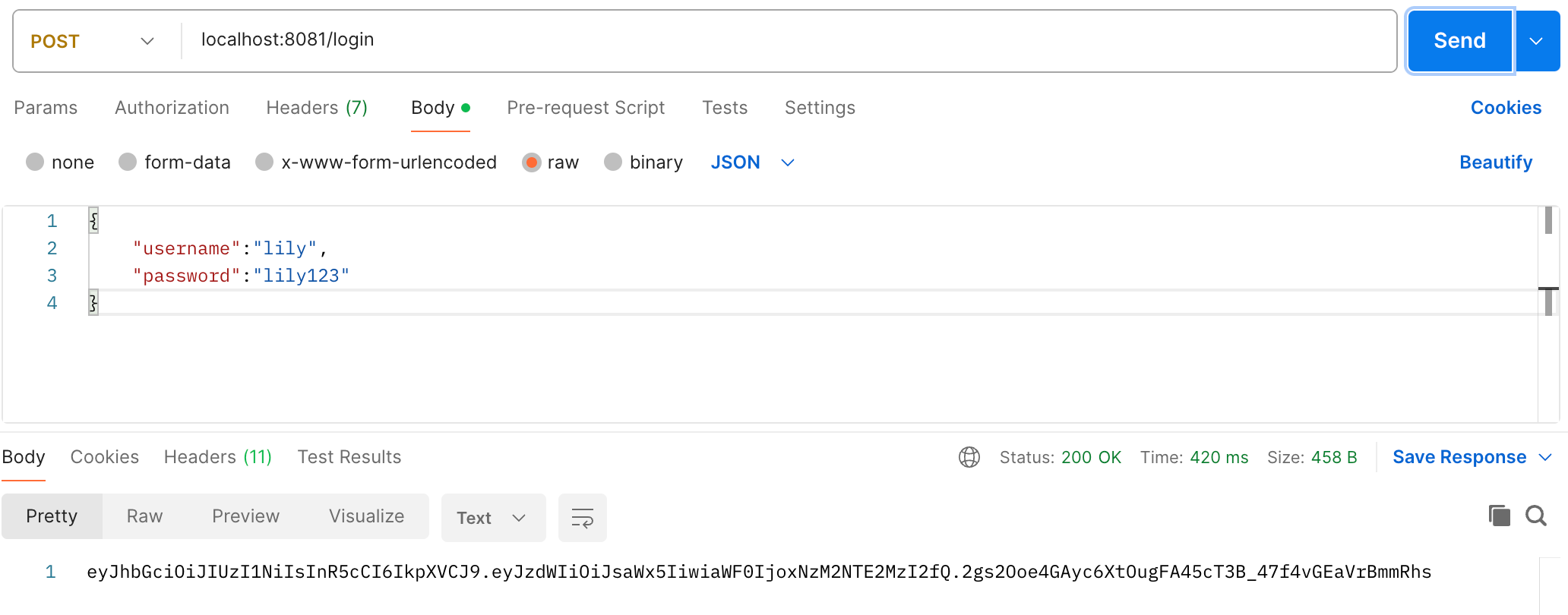
使用JWT进行登录分为两步:
- 用户访问
/login接口,传入用户名和密码,验证成功后,返回JWT; - 用户再次访问时,请求携带JWT,服务接收JWT并校验,并将用户信息保存起来供后续使用;
1. 登录接口返回JWT
本小节介绍用户访问登录接口并返回JWT,首先定义登录接口:
java
@RestController
public class AuthController {

    @Resource
    private AuthService authService;

    @PostMapping("/login")
    public String login(@RequestBody User user) throws LoginException {
        return authService.login(user);
    }
}AuthService实现如下:
java
@Service
public class AuthService {

    @Resource
    private AuthenticationManager authenticationManager;

    public String login(User user) throws LoginException {
        UsernamePasswordAuthenticationToken usernamePasswordAuthenticationToken =
                new UsernamePasswordAuthenticationToken(user.getUsername(), user.getPassword());
        Authentication authenticate = authenticationManager.authenticate(usernamePasswordAuthenticationToken);
        if(!authenticate.isAuthenticated()){
            // 登录失败
            throw new LoginException("登录失败,账号或密码错误");
        }

        // 登录成功,生成JWT返回
        return generateJwt(user.getUsername());
    }

    /**
     * 生成JWT,其中保存有用户名
     * @param username 用户名
     * @return JWT
     * @throws LoginException 生成JWT失败,抛出异常
     */
    public String generateJwt(String username) throws LoginException {
        // 密钥在生产环境中需生成
        Algorithm algorithm = Algorithm.HMAC256("secret-key-for-jwt");

        try {
            String token = JWT.create()
                    .withSubject(username)  // 用户名
                    .withIssuedAt(Instant.now())  // 签发时间
                    .sign(algorithm);

            return token;
        }catch (Exception e){
            // 生成失败,抛出异常
            throw new LoginException("生成JWT失败");
        }
    }
}由于在AuthService中需要使用AuthenticationManager,所以我们需要将该组件注入到容器中:
java
@Configuration
@EnableWebSecurity
public class SecurityConfig {
    @Bean
    public SecurityFilterChain securityFilterChain(HttpSecurity httpSecurity) throws Exception {
        return httpSecurity.csrf(csrfConfigurer -> csrfConfigurer.disable())
                .formLogin(config -> config.disable())
                .authorizeHttpRequests(authorizeHttpRequestsConfigurer ->
                        authorizeHttpRequestsConfigurer
                                .requestMatchers("/login", "/register", "/error").permitAll()
                                .anyRequest().authenticated())
                .sessionManagement(session->session.sessionCreationPolicy(SessionCreationPolicy.STATELESS))
                .build();
    }

    @Bean
    public AuthenticationManager authenticationManager(AuthenticationConfiguration configuration) throws Exception {
        return configuration.getAuthenticationManager();
    }
}并且,由于我们定义的/login(POST)接口,这与UsernamePasswordAuthenticationFilter的拦截规则相冲突了,而且登录接口我们自定义了,所以我们禁用掉表单登录,如第7行,然后放行/login接口,如第10行。
2. 其他接口校验JWT
本小节介绍如何校验其他接口请求携带的JWT,以判断用户是否登录,首先定义一个JWT校验的过滤器:
java
public class JwtAuthFilter extends OncePerRequestFilter {

    private DBUserDetailsService dbUserDetailsService;
    private RequestMatcher requestMatcher;

    public JwtAuthFilter(DBUserDetailsService dbUserDetailsService, RequestMatcher requestMatcher){
        this.dbUserDetailsService = dbUserDetailsService;
        this.requestMatcher = requestMatcher;
    }

    @Override
    protected boolean shouldNotFilter(HttpServletRequest request) throws ServletException {
        // 跳过某些请求不校验
        return requestMatcher.matches(request);
    }

    @Override
    protected void doFilterInternal(HttpServletRequest request,
                                    HttpServletResponse response,
                                    FilterChain filterChain) throws ServletException, IOException {

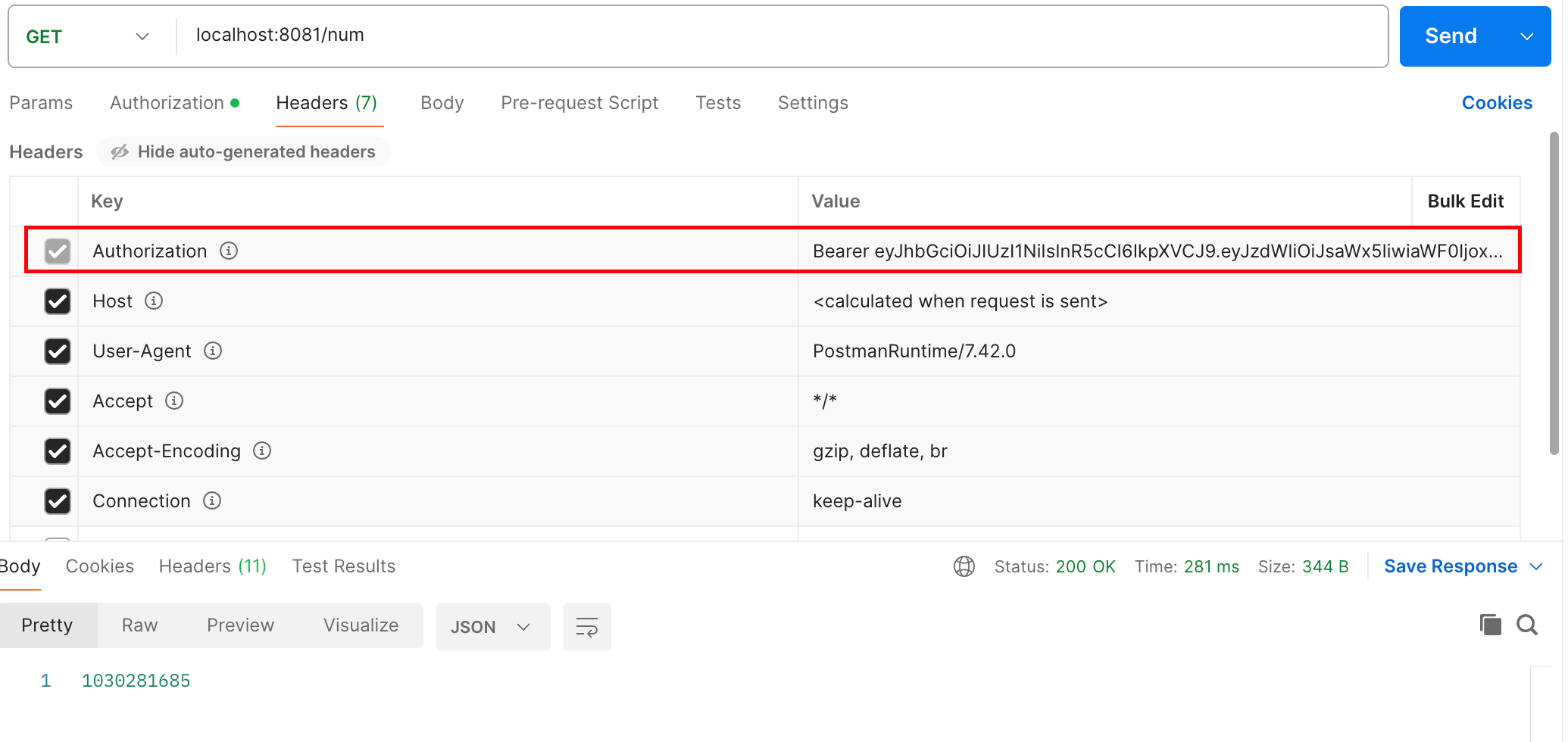
        String authentication = request.getHeader("Authorization");
        if(StringUtils.isEmpty(authentication) || !authentication.startsWith("Bearer ")){
            throw new RuntimeException("未登录");
        }
        // 获取JWT
        String jwt = authentication.substring(7);

        // 校验
        try {
            // 校验并获取用户名
            String username = validJwtAndExtractUsername(jwt);

            // 获取用户信息
            UserDetails userDetails = dbUserDetailsService.loadUserByUsername(username);

            // 将用户信息存入SecurityContextHolder供后续使用
            UsernamePasswordAuthenticationToken authAuthenticatoin =
                    new UsernamePasswordAuthenticationToken(userDetails, null, userDetails.getAuthorities());
            SecurityContextHolder.getContext().setAuthentication(authAuthenticatoin);

            // 放行
            filterChain.doFilter(request,response);

        }catch (Exception e){
            throw new RuntimeException("JWT错误");
        }
    }

    /**
     * 校验JWT并提取用户名
     * @param jwt JWT字符串
     * @return 用户名
     */
    private String validJwtAndExtractUsername(String jwt){
        try {
            Algorithm algorithm = Algorithm.HMAC256("secret-key-for-jwt");
            JWTVerifier verifier = JWT.require(algorithm).build();
            DecodedJWT decodedJWT = verifier.verify(jwt);

            String username = decodedJWT.getSubject();

            return username;
        }catch (Exception e){
            throw e;
        }
    }
}- 继承
OncePerRequestFilter以实现自己的过滤器; - 重写
shouldNotFilter()方法用来跳过某些请求,比如/login、/register等请求不应该拦截; - 实现
doFilterInternal()方法用来校验JWT并获取用户信息保存到SecurityContextHolder;
然后在配置类中将自定义的JwtAuthFilter加到Security过滤器链中(完整的配置类):
java
@Configuration
@EnableWebSecurity
public class SecurityConfig {

    @Resource
    private DBUserDetailsService userDetailsService;

    @Bean
    public SecurityFilterChain securityFilterChain(HttpSecurity httpSecurity) throws Exception {
        return httpSecurity.csrf(csrfConfigurer -> csrfConfigurer.disable())
                .formLogin(config -> config.disable())
                .addFilterAt(new JwtAuthFilter(userDetailsService, requestMatcher()), UsernamePasswordAuthenticationFilter.class)
                .sessionManagement(session->session.sessionCreationPolicy(SessionCreationPolicy.STATELESS))
                .authorizeHttpRequests(authorizeHttpRequestsConfigurer ->
                        authorizeHttpRequestsConfigurer
                                .requestMatchers(requestMatcher()).permitAll()
                                .anyRequest().authenticated())
                .build();
    }

    @Bean
    public RequestMatcher requestMatcher(){
        RequestMatcher requestMatcher = new OrRequestMatcher(
                new AntPathRequestMatcher("/login"),
                new AntPathRequestMatcher("/register"),
                new AntPathRequestMatcher("/error")
        );
        return requestMatcher;
    }

    @Bean
    public AuthenticationProvider authenticationProvider(){
        DaoAuthenticationProvider daoAuthenticationProvider = new DaoAuthenticationProvider();
        daoAuthenticationProvider.setUserDetailsService(userDetailsService);
        daoAuthenticationProvider.setPasswordEncoder(passwordEncoder());
        return daoAuthenticationProvider;
    }

    @Bean
    public PasswordEncoder passwordEncoder(){
        return new BCryptPasswordEncoder();
    }

    @Bean
    public AuthenticationManager authenticationManager(AuthenticationConfiguration configuration) throws Exception {
        return configuration.getAuthenticationManager();
    }

}之后,在我们发起请求时,就可以携带JWT成功通过校验了:
3. JWT登录的特点
此处不说好处与坏处,因为好处的另一面就是坏处,此处说说自己对于JWT登录的特点:
- JWT登录不用服务器端保存用户信息,之前需要用session来保存用户信息,使用jwt就不用了,此处是因为每次请求用户信息都是从数据库中查询的,我们也可以在JWT载荷中保存自定义的用户信息(但是要注意不要泄漏私密信息),这样每次请求时JWT中就有足够的信息不用查询数据库了,但是,如果保存的用户信息过多,就会造成每次请求需要携带的数据过多,对宽带造成压力。
- JWT登录后,只要持有令牌,就可以访问受保护资源,如果令牌泄漏了,服务器端并没有很好的方法拦截某个用户的访问。当然,我们可以设置令牌过期时间,但是令牌过期时间太短,会造成用户频繁登录;过期时间太长,令牌泄漏风险大。如果要管理令牌,需要额外的支持,例如维护令牌黑名单、短时间令牌与刷新机制。