Appearance
Spring Security - 8 解决跨域问题
本文主要介绍如何在Spring Boot中解决跨域问题,是Spring Security系列第八篇文章,前七篇文章如下:
- Spring Security - 1 初认识
- Spring Security - 2 身份验证(Authentication)
- Spring Security - 3 身份验证之数据库
- Spring Security - 4 JWT
- Spring Security - 5 使用JWT登录
- Spring Security - 6 权限校验介绍
- Spring Security - 7 RBAC模型
关于跨域问题,详情请见文章:跨域问题解析
1. CrossOrigin注解
我们可以在类或接口方法上使用注解@CrossOrigin来解决跨域问题,例如:
java
@RestController
public class MapController {

    @GetMapping("/map1")
    @CrossOrigin(origins = {"http://127.0.0.1:5500"}, methods = {RequestMethod.GET})
    public Map<String, String> map1(){
        System.out.println("map1");
        Map<String, String> map = Map.of("a", "1", "b", "2","c","3");
        return map;
    }

    @GetMapping("/map2")
    public Map<String, String> map2(){
        System.out.println("map2");
        Map<String, String> map = Map.of("x", "-1", "y", "-2","z","-3");
        return map;
    }

}注意:@CrossOrigin注解是Spring MVC提供的,所以不需要Spring Security支持。
然后编写网页:
html
<body>
    <button onclick="getMap1()">获取map1</button>
    <div id="map1"></div>

    <button onclick="getMap2()">获取map2</button>
    <div id="map2"></div>

    <script>
        async function getMap1() {
            const result = await fetch('http://127.0.0.1:8081/map1')
            const data = await result.json()

            document.getElementById('map1').innerHTML = JSON.stringify(data)
        }

        async function getMap2() {
            const result = await fetch('http://127.0.0.1:8081/map2')
            const data = await result.json()

            document.getElementById('map2').innerHTML = JSON.stringify(data)
        }
    </script>
</body>然后启动该网页在http://127.0.0.1:5500地址上(通过Visual Studio插件Live Server实现),并点击两个按钮。结果如下:
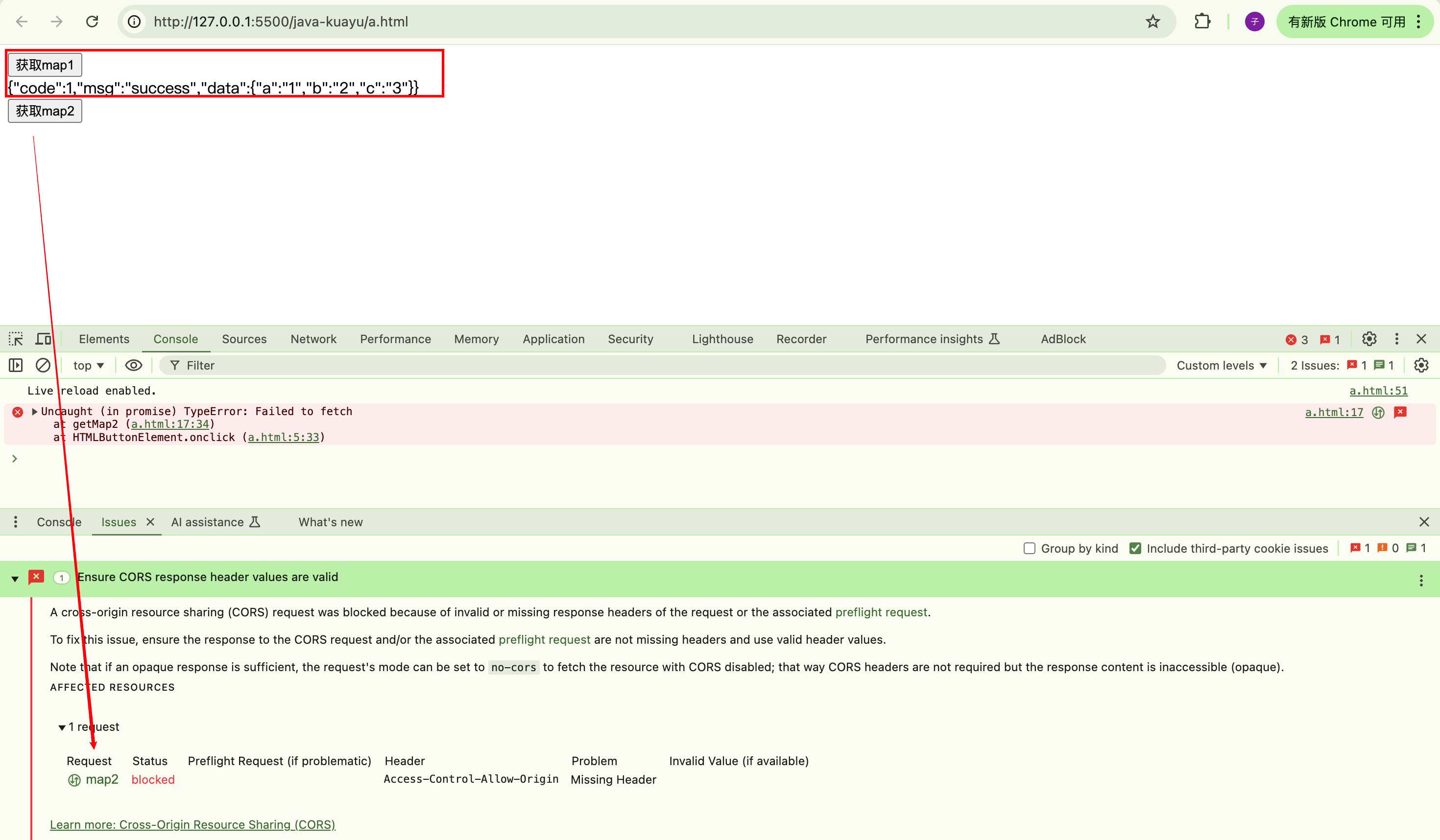
可以看到/map1由于配置了@CrossOrigin可以成功访问,/map2由于同源策略不能成功访问。
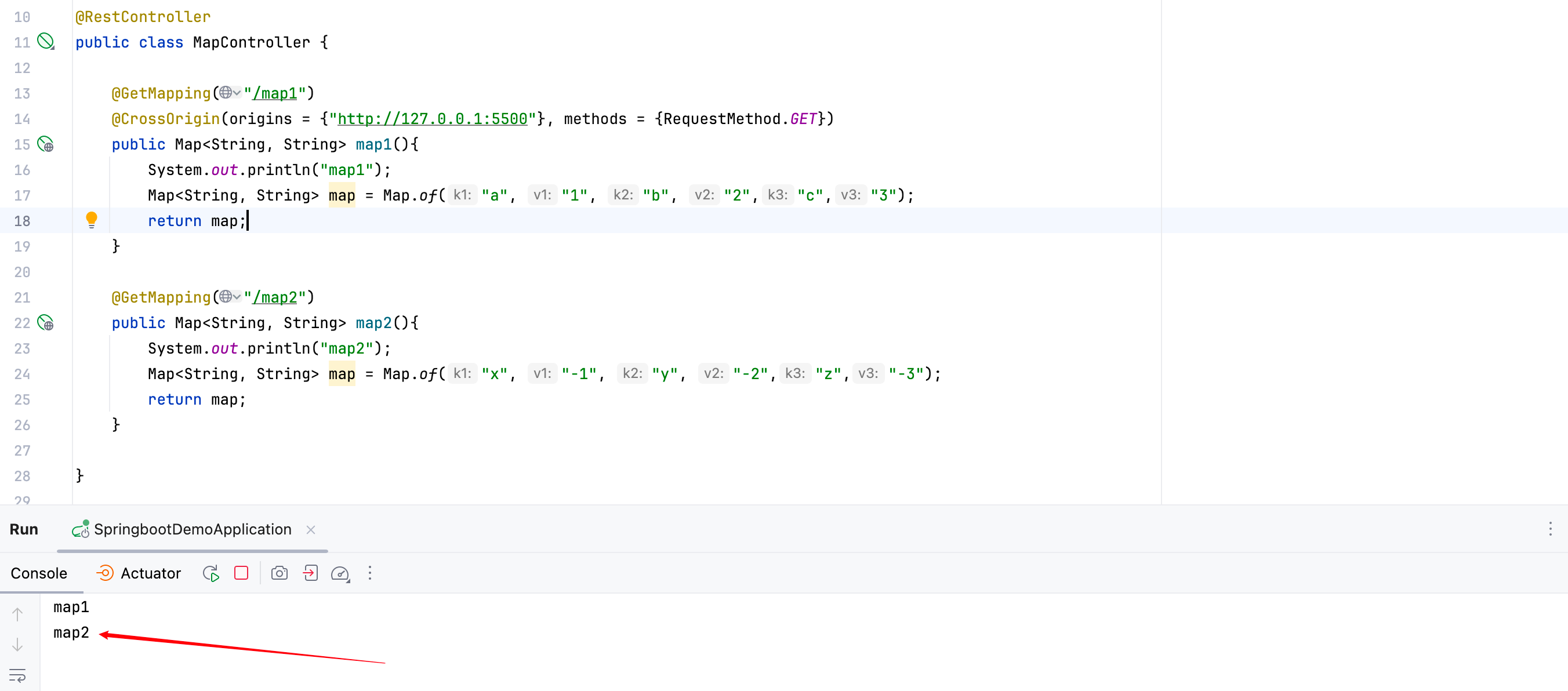
注意:这里严格来说不是说/map2没有被访问,而是返回值被浏览器拦截了。通过后台服务控制台的打印内容,我们可以看到map2被打印出来了:
2.CorsConfigurationSource配置
结合Spring Security,我们可以通过CorsConfigurationSource来配置跨域策略:
java
@Configuration
@EnableWebSecurity
@EnableMethodSecurity
public class SecurityConfig {

    @Resource
    private DBUserDetailsService userDetailsService;

    @Bean
    public SecurityFilterChain securityFilterChain(HttpSecurity httpSecurity) throws Exception {
        return httpSecurity.csrf(csrfConfigurer -> csrfConfigurer.disable())
                .cors(Customizer.withDefaults())
                .authorizeHttpRequests(authorizeHttpRequestsConfigurer ->
                        authorizeHttpRequestsConfigurer
                                .requestMatchers(requestMatcher()).permitAll()
                                .anyRequest().authenticated())
                .build();
    }

    @Bean
    public RequestMatcher requestMatcher(){
        RequestMatcher requestMatcher = new OrRequestMatcher(
                new AntPathRequestMatcher("/login"),
                new AntPathRequestMatcher("/register"),
                new AntPathRequestMatcher("/error"),
                new AntPathRequestMatcher("/map1"),
                new AntPathRequestMatcher("/map2")
        );
        return requestMatcher;
    }

    @Bean
    CorsConfigurationSource corsConfigurationSource() {
        CorsConfiguration configuration = new CorsConfiguration();
        configuration.setAllowedOrigins(Arrays.asList("http://127.0.0.1:5500")); // 允许的来源
        configuration.setAllowedMethods(Arrays.asList("GET","POST", "PUT", "DELETE")); // 允许的 HTTP 方法
        configuration.setAllowedHeaders(Arrays.asList("Content-Type", "Authorization")); // 允许的请求头
        configuration.setAllowCredentials(true); // 允许发送 Cookie
        UrlBasedCorsConfigurationSource source = new UrlBasedCorsConfigurationSource();
        source.registerCorsConfiguration("/**", configuration); // 所有路径都应用此配置
        return source;
    }
}这里详细说说configuration.setAllowCredentials(true)的含义。首先从客户端发起请求说起,需要设置是否包含凭证,这里设置为要包含:
javascript
fetch(url, {
  credentials: "include",
});对于简单请求,浏览器发送请求时会携带凭证,如果响应头不包括
Access-Control-Allow-Credentials或该项值为false,那么浏览器会报错。对于跨域复杂请求,在发起正式请求之前会发送预检请求,预检请求不包含凭据。如果服务器对预检请求的响应将
Access-Control-Allow-Credentials标头设置为 true,则真正的请求将包含凭据;否则浏览器会报网络错误。
而响应头:
properties
Access-Control-Allow-Credentials: true就是通过configuration.setAllowCredentials(true)设置的。
另外,凭证是什么?
凭据包括 cookie、传输层安全 (TLS) 客户端证书或包含用户名和密码的身份验证标头。默认情况下,这些凭据不会在跨源请求中发送。
参考链接:https://developer.mozilla.org/en-US/docs/Web/HTTP/Headers/Access-Control-Allow-Credentials
问题:什么情况下可以发送跨域的Cookie?
有关的链接,还没有答案,先挖个坑:https://developer.mozilla.org/en-US/docs/Web/API/Request/credentials
3. 总结
其实还有另一种方法,配置CorsFilter,但好像和第二种没有多大差别。
第一种和第二种的区别在于控制粒度的粗细,第一种控制到每个接口方法,第二种全局控制(当然也可以细粒度地控制)。一般情况下使用第二种方法就好。
跨域请求控制策略并不是Spring Security的内容,所以没有引入Spring Security框架也可以实现跨域请求控制:
https://docs.spring.io/spring-framework/reference/web/webmvc-cors.html
在Spring Security中的有关跨域请求的文档: https://docs.spring.io/spring-security/reference/servlet/integrations/cors.html